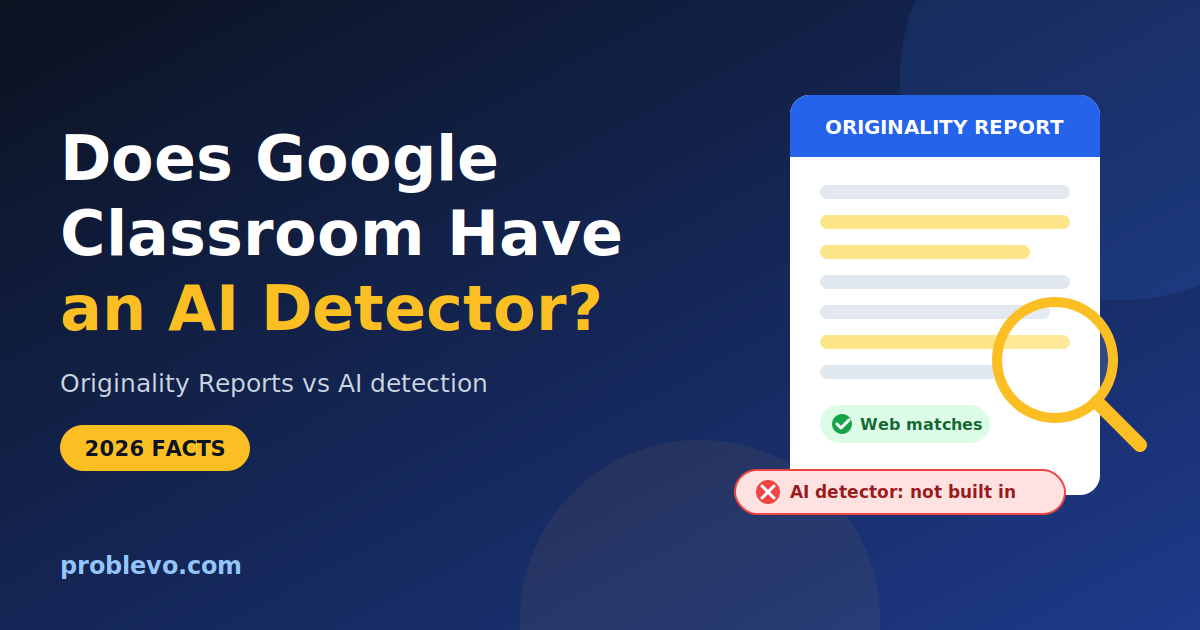
Does Google Classroom Have an AI Detector? Truth is here
No. Originality reports use Google Search to compare a student’s Google Docs, Google Slides, and Microsoft Word files against webpages and books on the internet, and that is a different job from deciding whether a person or a chatbot wrote the words. As of September 30, 2026, Google’s Classroom documentation describes no feature that scores writing as AI generated.
⚡ Quick Answer: Does Google Classroom Have an AI Detector?
No, Google Classroom does not have a built-in AI detector.
Instead, its Originality Reports compare submitted Google Docs, Slides, and Microsoft Word files against webpages and books. When enabled by an administrator, they can also check earlier student submissions from the same school.
Key Takeaways:
- What it flags: Uncited matching text from external sources, not AI-generated writing.
- AI detection: Google Classroom cannot detect whether a human or a chatbot wrote the assignment.
- Third-party tools: Schools must separately integrate external tools (like Turnitin or GPTZero) if they want AI detection.
In This Guide
What Google Classroom actually does
Google Classroom is where assignments are posted, submitted, returned, and graded. Two areas are often confused with AI detection. The first is Originality Reports, which check submitted work against existing text. The second is Gemini in Classroom, which helps teachers draft material. Neither one classifies student writing as AI generated.
Windows laptops
Many students use Windows laptops for Google Classroom, and a slow device makes Docs, quizzes, and multiple tabs frustrating to manage. If your own Windows 11 computer feels cluttered with apps you never use, this Windows 11 debloater guide explains how to clean it up.
Does Google Classroom have an AI detector?
No built in detector is described in Google’s documentation. Independent vendors that sell AI detection say the same, including Originality.ai, which states that Classroom has no built in AI detector and that its own Chrome extension fills the gap. Those vendors have a commercial interest, so the stronger evidence is what Google itself documents: web, book, and school comparisons only
What Originality Reports check
The sources are all pages accessible by Google Search and Google Books. A few details that most competing pages skip:
- Google Scholar is not searched directly. Scholarly journals that are available on Google Search are still included. One competitor says reports check “academic databases”, which overstates what Google documents.
- There is no external domain matching. Google states that it does not store student work to check against other domains, so a teacher at another school cannot find your students’ work.
- Formatting tricks are noticed. Classroom notifies the teacher if multiple scripts are present when 6 or more non text characters are found.
- The tool does not grade citations. It does not evaluate MLA or APA formatting, and it does not tier matches by severity, so the teacher decides what a flag means.
How Originality Reports work
When students turn in work, Classroom automatically runs a report for each submitted Docs or Slides file, visible only to the teacher. Other conditions matter:
- Plan limits. Fundamentals accounts can turn reports on for 5 assignments per class. Unlimited reports need the Teaching and Learning upgrade or Education Plus.
- Student self checks. Students can run 3 reports before turning in, and the teacher cannot see those reports.
- File and time limits. Documents must not exceed 2MB, and reports can be found for 45 days before you run another one in the grading tool.
- Language limits. Reports work only for Workspace for Education accounts set to a supported language list of about 25 languages.
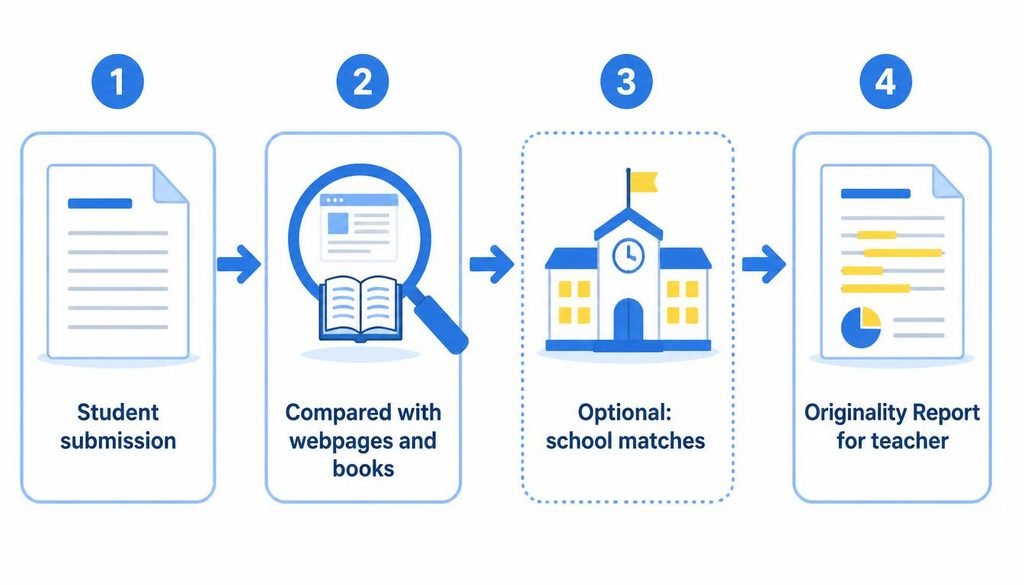
School matches are the most misunderstood part. They are available only in Education Plus and the Teaching and Learning upgrade, and administrators must turn them on because they are off by default.
Important technical distinctions
- AI detector: software that estimates whether text resembles output from a language model. Example: a percentage score on an essay.
- Plagiarism checker: software that finds text matching existing sources. Example: a paragraph copied from a website.
- Originality Report: Google’s plagiarism style feature in Classroom. It finds matches and uncited text.
- Web match: a passage similar to a public webpage or book.
- School match: a passage similar to earlier work from your own school or district.
- Browser monitoring: software that records or restricts what a student does in a browser. Google Classroom does not do this in a normal assignment.
- Cheating detection: a conclusion a person reaches after weighing evidence. No single Classroom feature produces it.
- Learning management system: the place where work is assigned and collected. Classroom is one.
- Third party AI detector: a separate company’s tool, added by a school or teacher.
What Google Classroom can and cannot detect
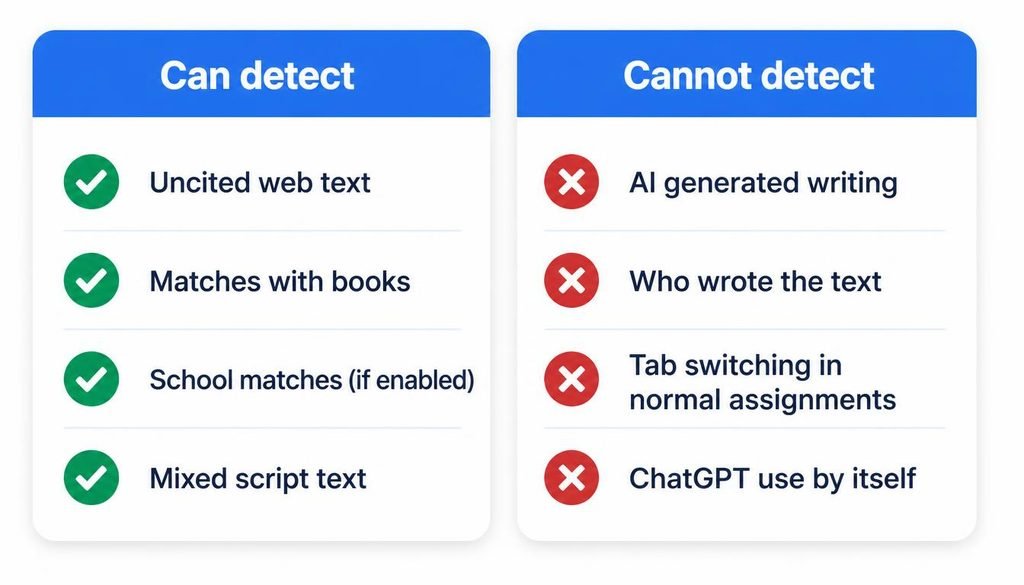
It can detect matching or uncited text from the web and books, matching text from earlier school submissions when enabled, and mixed script formatting. It cannot detect who wrote the words, whether a chatbot produced them, or whether a student had permission to use AI.
Does Google Classroom Have an AI Detector?
Does Google Classroom detect ChatGPT?
Not by itself.
A chatbot usually writes new sentences rather than copying a webpage, so a web match report often shows nothing. A clean report does not mean the work is human written, and a flagged report does not mean it is AI written.
Does Google Classroom detect Gemini?
No, and Gemini in Classroom is not a detector.
It is a teacher assistant. Google describes Gemini helping teachers draft assignments and summarize student progress. In February 2026 Google also added AI suggested feedback that lets teachers draft private comments, with the teacher approving edits before sharing. Administrators can turn Gemini in Classroom on or off in the Admin console.
Google does have SynthID, a watermark added to text from its own models. When it was released, only Google and developers using the tool could check the watermark, and the text version works only on content generated by Google’s models. That reporting dates from 2024, and I found no Classroom feature that exposes it to teachers.
Can Google Classroom detect cheating?
Partly, through separate tools that a teacher combines.
Originality Reports cover copied text. Locked mode covers navigation during quizzes. Version history covers how a document changed. A teacher still has to interpret all of it.
Can Google Classroom detect tab switching?
Only in one documented situation.
In locked mode, students cannot open other apps, and the teacher is notified by email if a student exits the quiz or opens another tab. That requires a Google Workspace for Education account and a school managed Chromebook, and it applies to Google Forms quizzes. In a normal Docs or Slides assignment, the documentation I reviewed describes no tab tracking.
Can teachers detect AI generated assignments?
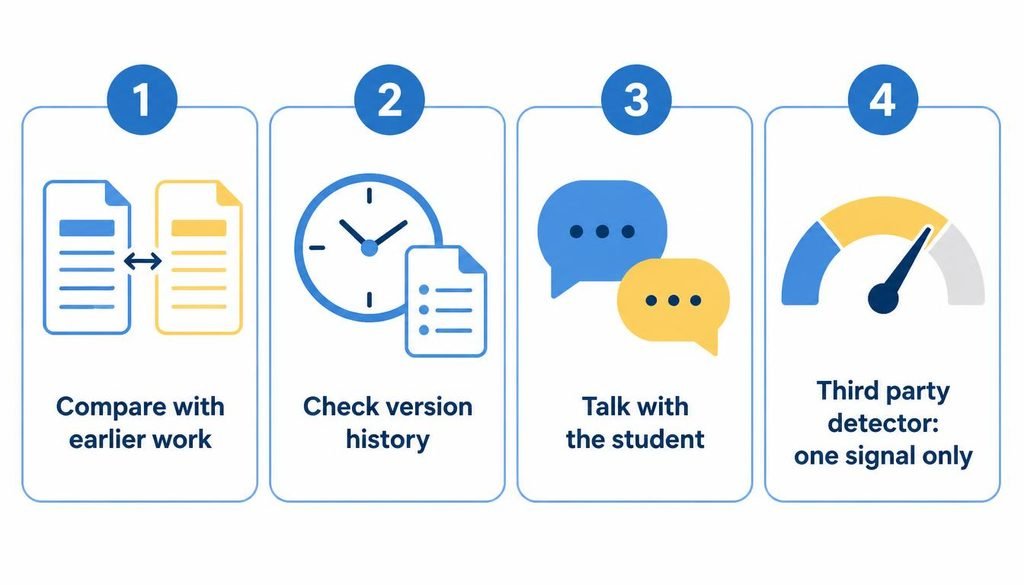
Sometimes, but not with certainty from Google tools alone. Useful signals:
- Version history. A person needs edit permission to browse earlier versions. A document that appeared in one large paste looks different from one built over several days. Limits apply: revisions may occasionally be merged to save storage space, so history is evidence, not proof.
- Comparison with earlier work. A sudden change in voice, vocabulary, or accuracy is worth a conversation.
- Asking the student to explain the work. A short conversation about choices, sources, and examples often shows more than a score.
- A separate AI detector. It can add a signal. Its vendors describe results as probabilities. GPTZero states that no AI detector is 100% accurate and that results should not be used to punish or as the final verdict. Originality.ai says a score should be treated as a signal, not as proof.
Google Classroom vs third party AI detectors
Third party detectors connect to Classroom in different ways, so the label “integration” hides real differences.
- Turnitin. Turnitin announced a Google Classroom add on on May 12, 2026, bringing Feedback Studio into Classroom. Institutions must hold a Google Workspace for Education Plus license to use Classroom add ons, and AI writing indication requires a Turnitin Originality license. Older articles that describe a manual workflow may be out of date.
- GPTZero. GPTZero markets a Classroom integration and says a one click installation for an organization adds AI detection and writing feedback. It is a separate product with its own accuracy claims, which I did not independently verify.
- Originality.ai. It works through a Chrome extension that appears in Classroom’s grading view. That is a browser extension the teacher installs, not a Google feature.
None of these tools is part of Google’s Originality Report, and Google Classroom does not use any of them by default.
Practical examples
Scenario 1: A student submits a Google Doc containing AI generated text.
Classroom can run an Originality Report if the teacher turned it on. It will likely show few or no flags, because the wording is new. The teacher can open version history, compare the writing with earlier work, and talk with the student. A separate detector, if the school has one, adds a probability score. None of this proves authorship.
Scenario 2: A student copies material from a website.
This is what Originality Reports are built for. The report flags the passage, shows the source text, and links to the page. If the student quoted and cited it, the passage appears as cited or quoted instead. The teacher judges whether the citation is adequate.
Scenario 3: A student switches browser tabs while writing an essay.
Nothing in the documentation I reviewed shows Classroom recording that. It is different for a locked Forms quiz on a managed Chromebook, where the teacher gets an email.
Classroom displays
Teachers often show student work or Classroom pages on a projector or smart display during lessons. If the school WiFi is unreliable, you can learn how to screen mirror without WiFi as a backup option.
Common myths
Myth: My teacher can see everything I do on my computer through Classroom.
Fact: Classroom does not document screen or tab monitoring for standard assignments. Network or device management is a separate school decision. For the home version of that question, see who can see search history on a WiFi bill.
Home network control
If you manage your own home network and want to check which devices are connected, you need to know how to access router settings. That is a network level question and does not involve Classroom directly.
Myth: Google Classroom automatically detects ChatGPT.
Fact: it has no documented feature for that.
Myth: Originality Reports are AI detectors.
Fact: they compare text against existing sources.
Myth: Google Classroom uses GPTZero.
Fact: no evidence supports this. GPTZero offers its own integration.
Myth: Google Classroom can see every browser tab.
Fact: only locked mode on managed Chromebooks notifies teachers about tabs, and only for quizzes.
Myth: Google Classroom can prove a student used AI.
Fact: no Classroom feature proves authorship, and AI detector vendors themselves call scores signals.
FAQ (Does Google Classroom Have an AI Detector)
1. Can teachers detect cheating in Google Classroom?
Partly. Teachers can use Originality Reports to find uncited text that matches webpages, books, and, if enabled, earlier school submissions. They can also review Google Docs version history and use locked mode for quizzes on managed Chromebooks. Classroom does not automatically prove cheating, so a teacher still has to judge the evidence.
2. How do I detect if my students are using AI?
Use several signals together, not one score. Compare the work with the student’s earlier writing, review version history, ask the student to explain the content, and follow school policy. A third party AI detector can add a signal, but its vendors state that results are not proof.
3. Does Google have an AI detector?
Google has no AI writing detector in Classroom. It does use SynthID, a watermark added to text from its own Gemini models. When announced in 2024, only Google and developers could check that watermark, and it works only on Google model output. It is not a tool for checking student essays.
4. Can Google Classroom detect if you switch tabs?
Only in locked mode. For a Google Forms quiz on a school managed Chromebook, the teacher receives an email if a student exits the quiz or opens another tab. In a normal Docs or Slides assignment, the documentation reviewed describes no tab tracking. Other monitoring software would be a separate school decision.
5. Does Google Classroom detect ChatGPT?
No, not by itself. Originality Reports look for text that matches webpages and books, and ChatGPT usually produces new wording rather than copied passages. A separate AI detector may flag such text, but that score is a probability estimate, not proof of who wrote it.
6. Does Google Classroom use GPTZero?
No evidence shows that it does. GPTZero offers its own Classroom integration that an organization can add, and it is separate from Originality Reports. Whether a particular school uses GPTZero depends on that school’s own decision and setup.
7. What AI detector does Google Classroom use?
Google Classroom does not use a built in AI detector. Some schools add third party tools such as Turnitin, GPTZero, or Originality.ai. Which tool applies depends on the school license and setup, so the best way to know is to ask the school administrator or teacher.
8. What is an Originality Report in Google Classroom?
A Classroom feature that compares a submitted file with webpages and books. It works with Google Docs, Slides, and Word files, highlights uncited passages, and links to sources. It does not judge citation format, rank how serious a match is, or decide who wrote the text.
9. Can students see Originality Reports?
Yes, in a limited way. When reports are on, students can run up to 3 reports on their work before turning it in, and the teacher cannot see those reports. After submission, the report Classroom runs for the teacher is visible only to the teacher.
10. Does Google Classroom detect plagiarism?
Yes, in the sense of matching text. Originality Reports flag passages similar to webpages and books, and, with school matches enabled, earlier submissions from the same school or district. Fundamentals accounts can turn reports on for 5 assignments per class. Unlimited use needs a paid edition.
Conclusion
Google Classroom does not have an AI detector. Its Originality Reports find text that matches webpages, books, and, when enabled, earlier school submissions, but they cannot tell whether a person or a chatbot wrote a passage. A clean report does not prove human writing, and a flagged report does not prove AI use.
For teachers, the practical approach is to combine several signals: the Originality Report, Docs version history, comparison with the student’s earlier work, a short conversation with the student, and a third party detector only if the school licenses one. For students, the safest habit is to write inside the assigned document and follow the school’s AI policy.
Questions about who can see what online often go beyond Classroom. If you want to understand the network side, read whether you can see search history on a WiFi bill and learn how to access router settings. Problevo publishes plain explanations of everyday technology questions like these. Some families play recorded lessons or class videos on a television at home. If the TV is not online yet, this guide on how to connect a TV to WiFi covers the setup.