How Much Hotspot Do I Have Left (100% Trusted Guide 2026)
When people ask how much hotspot do I have, they uHow Much Hotspot Do I Have Left (100% Trusted Guide 2026)ually mean two things at once: how much hotspot data their plan includes, and how much of it is still available this month.
Quick Answer (How much hotspot do I have left)
Your exact hotspot allowance depends on your carrier plan. Your phone can show how much data it has used, but only your carrier account or app shows the allowance and what remains. Check the carrier app first, then compare it with the usage counter on your phone.
In This Guide
What you see and what to do about it
| What You See | What It Usually Means | What To Do |
|---|---|---|
| Phone shows total mobile data usage | This is a device counter, not your plan allowance | Open your carrier app to see the plan allowance |
| Carrier app shows a hotspot usage figure | The carrier tracks hotspot separately from phone data | Treat this as the authoritative number |
| Hotspot option is missing | Your plan, carrier settings, or device settings may block it | Check plan terms, then the troubleshooting section below |
| Unlimited plan still has a hotspot limit | Unlimited phone data does not always mean unlimited hotspot | Read your plan hotspot terms in your account |
| Hotspot usage differs from phone data | Different reset dates and tracking methods | Compare billing cycle dates, then trust the carrier figure |
| Usage counter has not been reset | The device counter may cover months, not one billing cycle | Reset statistics at the start of a billing cycle |
What hotspot data actually means
A mobile hotspot, also called tethering, shares your phone cellular connection with other devices such as a laptop, tablet, or TV. Hotspot is not a separate kind of internet with its own universal data pool. It is a feature of your mobile plan, and your carrier decides the rules.
Three numbers matter:
- Total allowance: the hotspot amount your plan includes.
- Used: the hotspot data consumed so far in the current billing cycle.
- Remaining: allowance minus used.
Your phone can usually tell you something about “used.” Only your carrier can reliably tell you the allowance and the remaining amount.
How much hotspot do I have? Where the real number lives
Your phone data counter is not necessarily your carrier hotspot allowance. This is the point most people miss.
A phone may show total cellular data used, or a hotspot figure since the last time statistics were reset. A carrier may track hotspot usage separately, on its own billing cycle, with its own rules about what counts. The carrier billing system is the authoritative source for what remains on your plan.
Think of the phone counter as a car trip meter and the carrier account as the fuel gauge that the fuel company reads. The trip meter is helpful, but it only counts what you told it to count, from when you last reset it.
How to check how much hotspot data you have left
Use this order:
- Check your carrier app or online account. This gives the allowance and, on most plans, the usage.
- Check your phone usage screen. This shows how much your device has used and helps you cross check.
- Do the subtraction. Allowance minus used equals remaining.
Menu names change between operating system versions and manufacturers, so treat the paths below as current examples and not universal rules.
iPhone
- Open Settings > Cellular (some regions label it Mobile Data).
- Look at the Cellular Data section. Current Period shows usage since statistics were last reset.
- Scroll the app list and look for Personal Hotspot. If it is listed, that is the hotspot usage measured by the iPhone.
- Scroll to the bottom to see Reset Statistics and the last reset date.
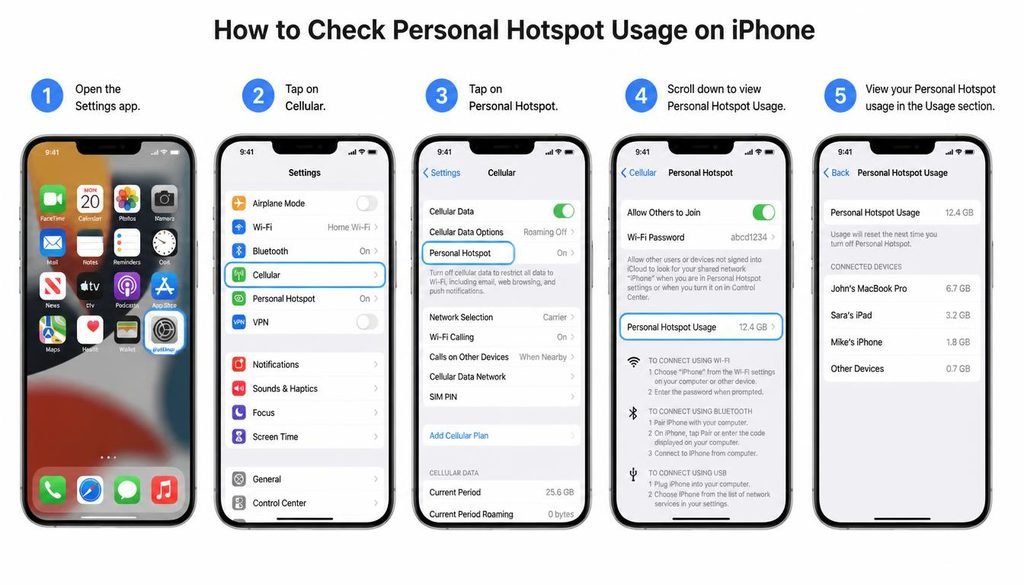
The Current Period figure does not automatically match your billing cycle, so it may include several months. Also, Settings > Cellular shows what the phone measured. It does not show your plan hotspot allowance. Apple documents how to turn on and use the feature under Personal Hotspot in its support pages. For the allowance, use your carrier app or account.
Android (Google Pixel and similar stock versions)
- Open Settings > Network & internet > SIMs.
- Select your SIM, then open App data usage to see mobile data used over a date range.
- Open Data warning & limit to set a billing cycle date and optional warning.
- To manage sharing, open Settings > Network & internet > Hotspot & tethering.
Depending on the Android version, tethering usage may or may not appear as a separate item in the data usage list. Do not assume one Android path fits every phone. Your phone counter here shows device level usage, while your carrier account shows what the plan allows.
Samsung Galaxy
- Open Settings > Connections > Data usage.
- Tap Mobile data usage to see usage by date range, with a billing cycle option.
- Open Billing cycle and data warning to align the counter with your billing cycle start date.
- Hotspot settings are under Settings > Connections > Mobile Hotspot and Tethering.
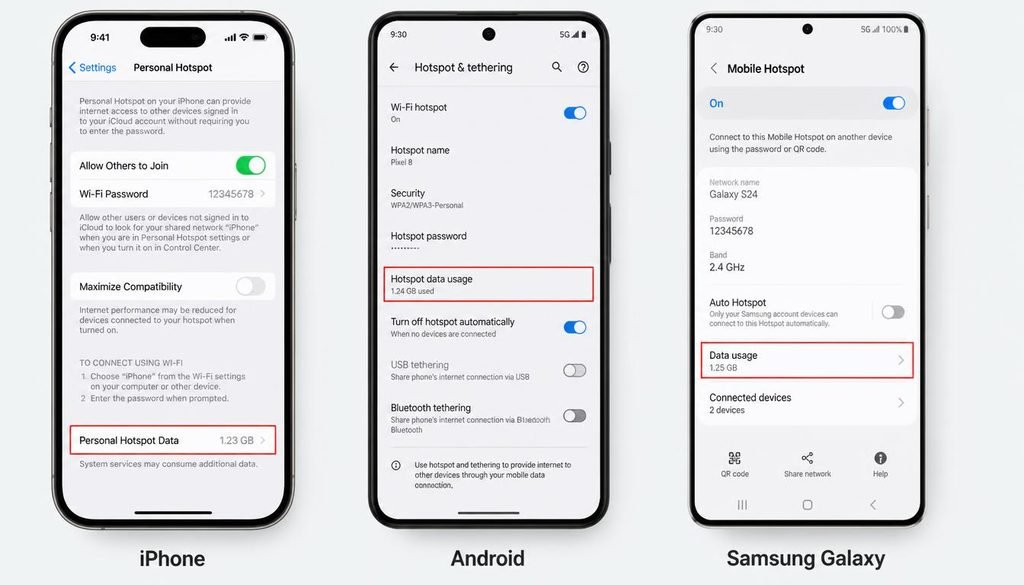
Some One UI versions show hotspot usage inside the data usage screens. Others do not break it out. If you cannot find a hotspot figure, your carrier account is the better source. If you plan to run heavy workloads on a computer, also consider how a Windows 11 debloater can reduce background activity, since background apps can quietly consume hotspot data.
How to check your hotspot allowance with your carrier
Carrier plans, app names, and hotspot rules change often, so this section tells you where to look. It does not state plan amounts, because those would go out of date.
| Carrier | Where to check | Notes |
|---|---|---|
| T-Mobile | T-Mobile app (T-Life) or your account on the T-Mobile website | Look under usage or plan details for the hotspot allowance, if your plan includes one |
| AT&T | myAT&T app or your account on att.com | AT&T has a support article on checking hotspot data |
| Verizon | My Verizon app or your account on verizon.com | Hotspot terms depend on the specific plan |
| Boost Mobile | My Boost app or your Boost account | Boost also publishes a mobile hotspot explainer on its blog |
| Other Carriers | Their own app or account portal | Prepaid and reseller brands often have different rules than the network they use |
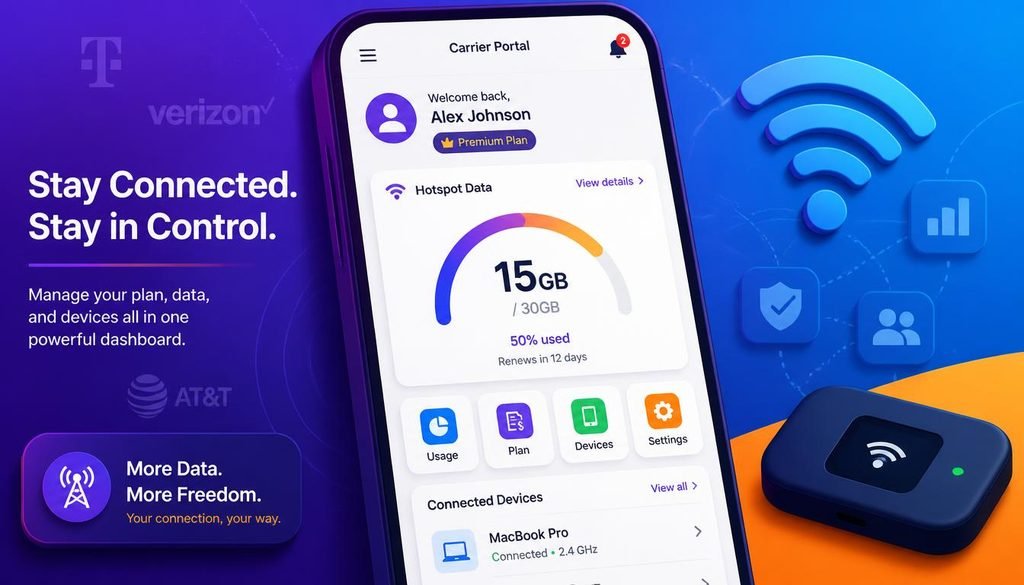
How Much Hotspot Do I Have Left?
Every carrier follows the same logic: plan rules decide the hotspot allowance, and the account shows usage against it. If the app does not show a hotspot line, look at the plan description, the plan comparison page, or ask carrier support directly. Current information for a specific plan could not be verified for this article, so confirm it in your own account.
How to check hotspot usage history
Your options are limited on the device and stronger in the carrier account:
- iPhone: The Cellular screen shows usage since the last reset. There is no long month by month hotspot history in Settings. Reset statistics at the start of each billing cycle to make it useful.
- Android and Samsung: Change the date range or billing cycle in the mobile data usage screen. Whether hotspot appears separately depends on the version.
- Carrier account: Most carriers show past and current billing cycle usage, and this is the more dependable history.
If you also share your connection at home and wonder who can see what, see whether a Wi-Fi bill shows search history. Data volume is one thing, and browsing content is another.
How to set a hotspot data limit
- Samsung Galaxy: Look inside Mobile Hotspot settings for a data limit option, which can stop the hotspot after a set amount.
- Stock Android: The Data warning & limit screen sets a warning or limit for total mobile data, not hotspot alone.
- iPhone: Apple does not document a hotspot specific data cap in Settings. You can turn Personal Hotspot off manually and use Low Data Mode under Settings > Cellular > Cellular Data Options to reduce background usage.
A phone limit is a convenience, not a billing control. It counts what the phone measures. Your carrier allowance still applies regardless.
What happens when hotspot data runs out
The outcome depends on your plan:
- Hotspot speed may be reduced while phone data continues normally.
- The hotspot may be blocked until the next billing cycle.
- You may be offered extra hotspot data for a fee, or charged overage on some plans.
Your carrier account and plan terms state which applies. Do not guess, because overage rules vary widely.
Is hotspot included with unlimited data?
Not automatically. Unlimited mobile data describes what your phone can use. Hotspot is often governed by a separate allowance, a speed reduction after a threshold, or a plan restriction. Some unlimited plans include a generous hotspot amount, others include very little, and some include none.
The wording to look for in your plan is “mobile hotspot,” “tethering,” or “premium data for hotspot.” If your plan page does not mention hotspot, ask the carrier before you rely on it.
How long does hotspot data last?
Duration depends on what you do, not on the calendar. These are rough illustrations built on approximate hourly rates. Real services vary, so treat them as ranges.
Approximate use per hour: light browsing and email use tens to low hundreds of MB, music uses roughly 50 to 150 MB, standard definition video roughly 0.7 GB, high definition video up to about 3 GB, and video calls roughly 0.5 to 1.5 GB.
| Allowance | Light Browsing & Email | Standard Definition Video | High Definition Video |
|---|---|---|---|
| 2 GB | Many hours | Around 3 hours | Well under 1 hour |
| 5 GB | Many hours, likely days of casual use | Around 7 hours | Under 2 hours |
| 10 GB | Very long for casual use | Around 14 hours | About 3 hours |
A 2 GB hotspot allowance can last a full workday of email and documents, or under an hour of high definition video. Several things shift the result:
- Video resolution and streaming quality
- Downloads and software updates
- Video calls and cloud synchronization
- Gaming, especially large game downloads
- The number of connected devices
- Background applications
If you stream to a television over your phone, remember that a TV usually picks the highest quality it can. Before you connect, read how to connect a TV to Wi-Fi and lower the streaming quality in the app. If you plan to cast a phone screen instead, screen mirroring without Wi-Fi explains the options.
A simple example
Imagine your plan includes 10 GB of hotspot data, and your carrier app shows 6.5 GB used.
10 GB total minus 6.5 GB used equals 3.5 GB remaining.
Now suppose your phone counter shows 6.9 GB of hotspot use. The two numbers may differ slightly because the phone counter started on a different date, measures traffic at the device rather than at the network, or includes usage from a period before your billing cycle. For plan decisions, use the carrier number.
Why your hotspot data may look different from your phone data
- Usage period mismatch: Your phone may count from the last reset, while the carrier counts from your billing cycle start.
- Device counter not reset: An iPhone Current Period counter keeps running until you reset it.
- Carrier tracking: The carrier may count hotspot separately, and may count traffic differently than the phone.
- Dual SIM: With two lines or an eSIM, usage may be split, so check the correct line.
- Background usage: Updates, backups, and sync on connected devices use hotspot data silently.
- Multiple connected devices: Every device on the hotspot adds to the total.
- Separate hotspot tracking: Some plans count hotspot data in its own bucket, apart from regular phone data.
- Unlimited phone data: This does not necessarily mean unlimited hotspot.
Troubleshooting
| Problem | Likely Cause | What to do |
|---|---|---|
| Hotspot data is not showing in the phone | The phone does not always break out hotspot usage | Check the carrier app or account instead |
| Hotspot option is missing | Plan does not include hotspot, carrier setting, or a device restriction | Check plan terms, restart the phone, then contact your carrier |
| Carrier says hotspot is unavailable | Plan restriction or an account issue | Ask the carrier to confirm hotspot on your plan |
| Usage counter looks incorrect | Counter not reset, or a different billing period | Reset statistics and compare against the billing cycle dates |
| Hotspot stopped working | Allowance exhausted, speed reduced, or a settings change | Check remaining data, restart the hotspot, and confirm in your account |
| Hotspot allowance appears exhausted | Heavy use by connected devices, or background traffic | Review connected devices and pause updates and backups |
| Phone shows data but carrier shows different usage | Different tracking methods and periods | Use the carrier figure for remaining data |
If the connected device is a laptop or another computer, you can check what is using data through the router style device list. For home networks, how to access router settings shows how to see what is connected, and a home broadband connection may be a cheaper place for heavy downloads than your hotspot.
FAQ
How can I check how much hotspot I have left?
Open your carrier app or online account and look for the usage or hotspot section. Your phone can show hotspot usage since its last reset, but the carrier tracks the plan allowance. Subtract the used amount from your plan hotspot allowance to find what remains, and trust the carrier figure if the two differ.
Is hotspot free if you have unlimited data?
Not automatically. Unlimited mobile data describes phone usage, while hotspot is often governed by a separate allowance, a slower speed after a threshold, or a plan restriction. Some plans include a generous hotspot amount, others include none. Check your plan details or carrier account for the exact hotspot terms.
How long will 2 GB of hotspot last?
It depends on what you do. Light browsing and email can last many hours, standard definition video may last roughly three hours, and high definition video can use the whole 2 GB in well under an hour. Video calls, downloads, and updates change the result quickly.
How many GB is a hotspot?
There is no fixed size. A hotspot is a way of sharing your phone connection, so the amount is the hotspot allowance set by your plan. It might be a few gigabytes, a larger amount, or unlimited on some plans. Your carrier account shows your exact figure.
How do I check hotspot data on iPhone?
Go to Settings, then Cellular, and scroll the app list to find Personal Hotspot. The figure shows usage since statistics were last reset, not necessarily this billing cycle. Your carrier account remains the source for the remaining allowance.
How do I check hotspot data on Samsung?
Open the mobile data usage screen and change the date range or billing cycle. Some Android versions list tethering or hotspot as its own item, and others do not. For a reliable month by month record, use the usage history in your carrier account.
Can I set a hotspot data limit?
Yes on some devices. Samsung Galaxy phones offer a data limit option inside Mobile Hotspot settings, while stock Android offers a warning and limit for total mobile data. iPhone does not document a hotspot specific cap. A phone limit is only a convenience, and your carrier allowance still applies.
Does hotspot use my regular mobile data?
Yes, in many cases. Hotspot data normally comes from the same mobile plan as your phone data, and many plans also apply a separate hotspot allowance on top. Using hotspot can therefore reduce your total data as well as your hotspot amount, depending on plan rules
Why does my hotspot data run out quickly?
Because computers and TVs use far more data than phones. Automatic updates, cloud backup, high resolution video, and background apps run without you noticing, and several connected devices multiply the effect. Check connected devices, lower video quality, and pause updates on the connected computer.
Conclusion
Your phone can show how much data it has used, and you can find that in Settings on iPhone, Android, or Samsung. That figure is a device counter, and it may cover a different period than your plan.
Your carrier account or app is the source for your real hotspot allowance and what remains. Unlimited phone data does not always mean unlimited hotspot, so read your plan terms. If the numbers look different, compare billing cycle dates, reset the phone counter, and use the carrier number for decisions.
For more practical tech fixes, browse the guides on Problevo.
One Comment