How to Learn Machine Learning From Scratch in 2026
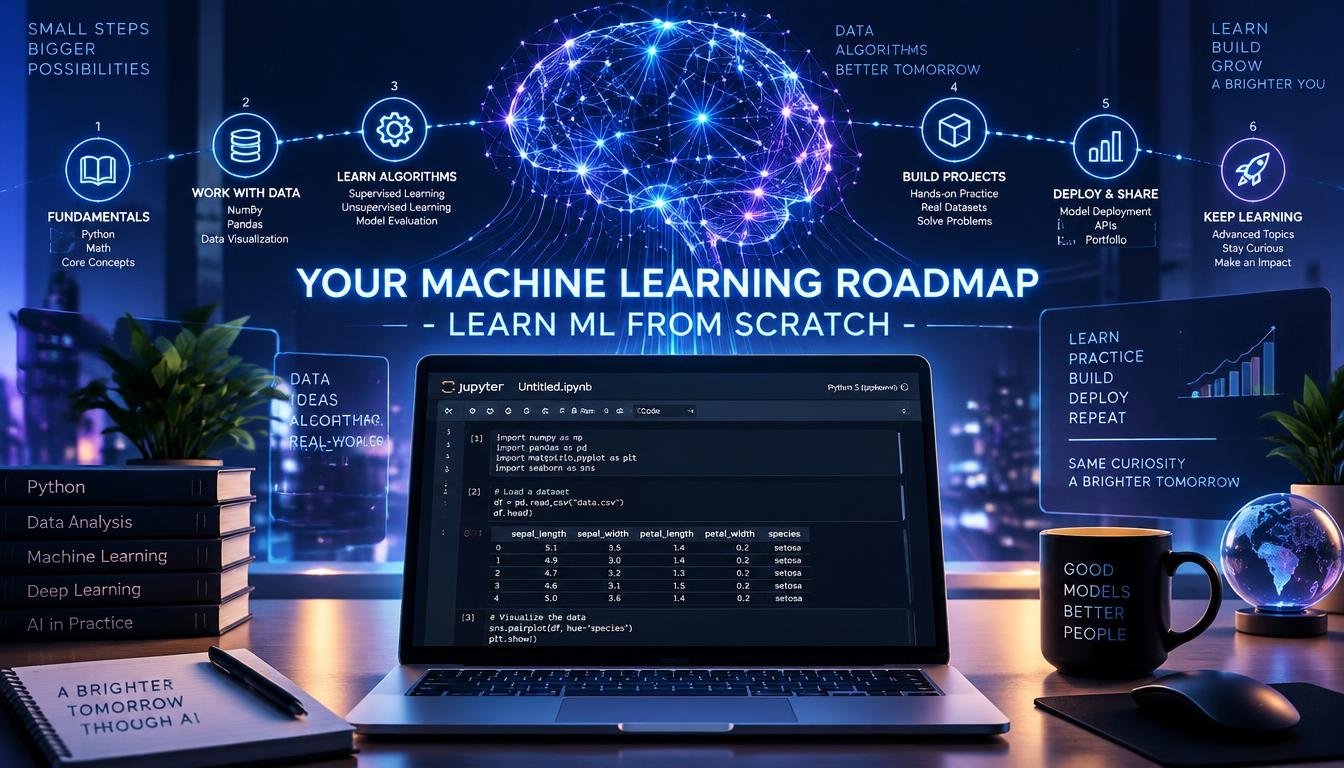
Most beginners waste months stuck in math textbooks or passive video loops, but knowing how to learn machine learning in the right order can turn any standard laptop into an AI engineering workstation within 16 weeks.
The secret is simple. Your laptop writes the code, free cloud servers handle the heavy training, and every week ends with something you built yourself. Plan for roughly 10 to 15 focused hours per week.
Quick Answer: How to Learn Machine Learning
- Master core Python syntax alongside NumPy and Pandas for data manipulation.
- Learn statistics, linear algebra, and probability as models require.
- Build classical algorithms in Scikit-Learn using free Kaggle datasets.
- Run deep learning models on free Google Colab cloud GPUs.
- Deploy three end to end portfolio projects on GitHub.
Table of Contents
Machine Learning Beginner Diagnostics: Roadblock & Action Matrix
| Beginner Roadblock or Symptom | Underlying Learning Cause | Actionable Corrective Fix |
|---|---|---|
| You quit during calculus chapters | Theory arrives before any visible result | Train a small model first, then study the math behind it |
| You finish videos but freeze at a blank notebook | Passive watching replaces recall and practice | Rebuild each lesson from memory on a new dataset |
| Your code fails on real CSV files | You only practiced on clean sample data | Practice missing values, data types, and duplicates in Pandas |
| Training scores look great but test scores collapse | Overfitting | Use cross validation, simpler models, and more representative data |
| Accuracy is high but predictions are useless | The classes are imbalanced or the metric is wrong | Compare with a baseline and check precision, recall, and F1 score |
| Your laptop freezes during training | The workload exceeds local memory or processing power | Move the notebook to Google Colab or Kaggle |
| You do not know what to study next | Too many resources and no milestone | Follow one roadmap and finish one deliverable per phase |
What Is the Best Way to Learn Machine Learning From Scratch? (Top-Down vs. Academic)
The best way for most self taught learners is top down: build a working model early, inspect how it behaves, and then study the math that explains it. Theory still matters. It simply arrives when you have a reason to care.
Why Beginners Quit When They Start With Pure Math
The academic route often asks for months of calculus and linear algebra before the first line of model code. That order suits a university degree with exams, tutors, and deadlines.
Alone at a desk, it feels different. You solve integrals for weeks, never see a prediction, and lose the thread. The math is not the enemy; studying it without context is.
The Reddit Rule: Bottom Up vs. Top Down
Community discussions among learners return to this debate constantly. The practical lesson is to avoid both extremes: endless prerequisites on one side, and copying code you cannot explain on the other.
| Question | Bottom Up (Academic) | Top Down (Practitioner) |
|---|---|---|
| First month | Calculus, algebra, and proofs | Load data and train a simple model |
| When math appears | Before any code | When a model raises a question |
| Main strength | Deep theoretical base | Fast feedback and motivation |
| Main risk | Quitting before building | Shallow understanding |
| Best fit | Research and graduate study | Career changers and self taught builders |
Take gradient descent as an example. First, train a linear regression model and watch its error. Next, learn that a loss function measures that error. Then use a basic derivative to see how the model adjusts its weights to reduce it.
Use one test to stay honest. After each model, explain in plain words what goes in, what comes out, how it learns, and when it fails.
How to Learn Machine Learning and AI: Where Each One Fits
Artificial Intelligence is the broad goal of making software perform tasks that need judgment. Machine Learning is a branch of AI that learns patterns from data. Deep Learning is a branch of machine learning that uses neural networks with many layers.
| Field | Typical Data | Example Task | Common Tools |
|---|---|---|---|
| Classical machine learning | Tables of rows and columns | Predict customer churn or house prices | Scikit-Learn |
| Deep learning | Images, audio, and text | Classify photos or transcribe speech | PyTorch, TensorFlow |
| Large language models | Very large text collections | Chat, summarize, and generate code | Transformer libraries |
Classical models still power many business predictions because tabular data is everywhere. Deep learning and large language models drive modern generative AI. Learn the first before the second, since both share the same habits of training, testing, and error analysis.
Prepare Your Computer Before You Start
Cloud notebooks do most of the work, yet local editors and browser tabs still use your hardware. A quick health check prevents frustrating study sessions.
When configuring local Python environments or checking hardware limits during model training, review how to check CPU temp on Windows 11 so heavy data processing does not overheat your laptop.
If your Windows PC slows down while running Jupyter Notebooks or local code editors, follow our Windows 11 debloater guide to free up background RAM.
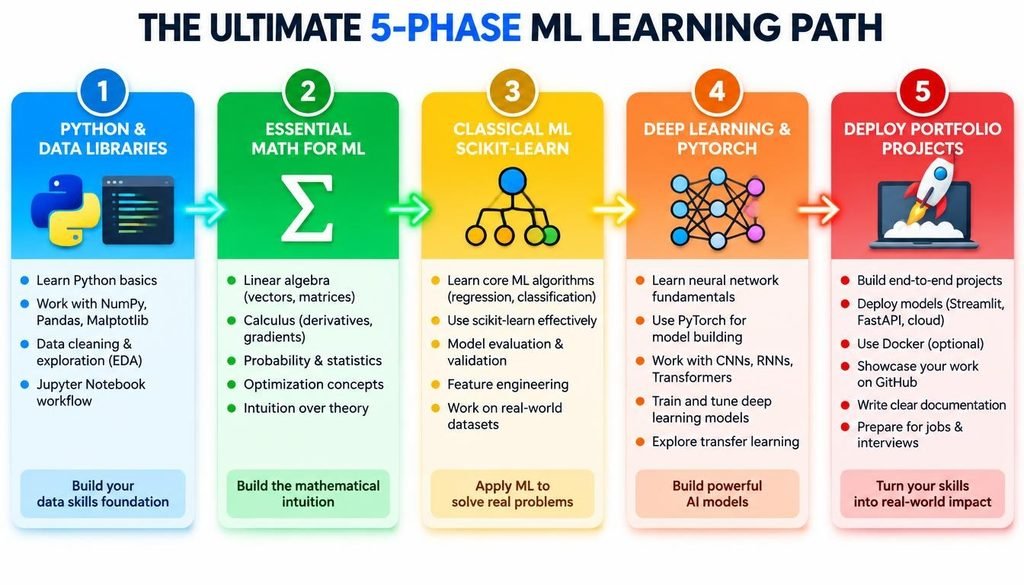
How to Learn Machine Learning Step by Step: The 5-Phase Roadmap
Each phase ends with a milestone. Move forward when you can complete it without copying a tutorial line by line. The week ranges assume 10 to 15 hours per week, so slow down if you need to.
Step 1: Master Python Programming and Data Libraries (Weeks 1 to 3)
Start with variables, lists, dictionaries, loops, conditions, functions, imports, and error messages. You do not need advanced software engineering yet.
Then learn the libraries in this exact order, because each one builds on the habits of the previous one.
- NumPy: arrays, shapes, indexing, slicing, broadcasting, and vectorized math.
- Pandas: DataFrames, filtering, grouping, merging, missing values, and CSV files.
- Matplotlib: line charts, scatter plots, histograms, and clear axis labels.
- Scikit-Learn: introduced in Step 3, once you can prepare data confidently.
- PyTorch: introduced in Step 4 for neural networks.
Milestone: Load a public CSV file, clean it, answer five questions with Pandas, and show three charts.
Step 2: Learn Essential Math for Machine Learning (Weeks 4 and 5)
Two weeks will not make you a mathematician. They give you enough vocabulary to read model behavior, and you will keep returning to these topics.
| Math Topic | What to Learn | Where It Appears |
|---|---|---|
| Descriptive statistics | Mean, median, variance, standard deviation, outliers | Data exploration and scaling |
| Probability | Distributions, conditional probability, basic Bayes rule | Classification and uncertainty |
| Vectors and matrices | Dot product, shapes, matrix multiplication | Features, weights, and neural layers |
| Basic derivatives | Slope, gradient, chain rule idea | Gradient descent and backpropagation |
Code every idea. Calculate a standard deviation by hand, repeat it in NumPy, and compare the answers. Skip long proofs until a project or a job target demands them.
Milestone: Write gradient descent for a one variable linear model using only NumPy.
Step 3: Build Classical Machine Learning Models With Scikit-Learn (Weeks 6 to 9)
This phase teaches the core of Supervised Learning, where a model learns from examples with known answers. Unsupervised learning finds structure in data without labels.
Study these models in sequence:
- Linear regression to predict numbers such as price.
- Logistic regression to predict categories such as spam or not spam.
- Decision trees to see how rules split data.
- Random forests to combine many trees for steadier results.
- KMeans clustering to group similar records without labels.
Split your data into training and test sets before any fitting step. Learn mean absolute error for regression, then confusion matrices, precision, and recall for classification.
Put scaling and encoding inside a Scikit-Learn Pipeline. This stops information from the test set leaking into training.
Milestone: Compare three models against a simple baseline with cross validation, and explain which one you would choose.
Step 4: Transition Into Deep Learning and Neural Networks (Weeks 10 to 13)
A neural network passes inputs through layers of weights. Activation functions such as ReLU and sigmoid let it learn curved patterns. Backpropagation calculates how each weight affected the error, and an optimizer updates those weights.
Choose one framework first. PyTorch is the pick for this roadmap because its training loop is explicit and reads like normal Python. TensorFlow with Keras is also a strong choice, especially if your course or employer uses it.
Learn tensors, datasets, data loaders, the training loop, and validation curves. Then train an image classifier, try transfer learning with a pretrained model, and study how transformers use attention to relate words in a sentence.
Milestone: Train one neural network on a free cloud GPU, save it, reload it, and test it on unseen examples.
Step 5: Build and Deploy Real Portfolio Projects (Weeks 14 to 16)
Three finished projects prove more than a long list of half completed courses. Start the first one during Step 3 and polish all three here.
| Project Milestone | Skill It Proves | Deliverable |
|---|---|---|
| House price or sales prediction | Cleaning, Feature Engineering, regression | Notebook with baseline and error analysis |
| Customer churn classifier | Pipelines, imbalanced data, evaluation | Small web demo built with Streamlit or Gradio |
| Image or text classifier | Transfer learning in PyTorch | Public demo on Hugging Face Spaces or similar hosting |
Every GitHub repository needs a README that states the problem, data source, method, results, limitations, and steps to run it. Include a requirements file, and never upload passwords, API keys, or private data.
Milestone: A stranger can open your repository, understand the result, and run the code.
How to Learn Machine Learning for Free: Learning Tracks and Platforms
Pick one main track and use the others for gaps. Prices and features change, so confirm them on each official page before you enroll.
| Platform | Cost | Best For | Math Level | Certificate |
|---|---|---|---|---|
| Google Machine Learning Crash Course | Free | Core concepts with visuals and exercises | Algebra, linear algebra, statistics; calculus optional | Check the course page |
| Kaggle Learn | Free | Short coding lessons on real data | Low | Yes, per completed course |
| Fast.ai | Free | Top down deep learning for people who can code | Low to start | None for the online course |
| Coursera Machine Learning Specialization | Subscription; preview, trial, or financial aid options | A guided path with graded work | Beginner friendly | Yes, with paid access or approved aid |
How to Learn Machine Learning for Beginners: Which Track to Choose
Complete beginners should start with the Python and Pandas lessons on Kaggle Learn, then take its introductory machine learning course. Add Google Crash Course for concepts.
If you already code comfortably, begin Fast.ai during Step 4. If you prefer deadlines and a fixed syllabus, the Coursera path offers that structure.
How to Learn Machine Learning Without a Powerful Computer (Free Cloud Setup)
You do not need a gaming laptop. A cloud notebook runs your code on a remote machine and shows the results in your browser, so an older Windows laptop or a Chromebook can train neural networks.
Hardware Myth Buster: RAM and GPU Requirements
These are practical planning figures, not official minimums.
| Setup | Your RAM | Your GPU | Suitable Work |
|---|---|---|---|
| Cloud only | 4 GB workable, 8 GB comfortable | None | Steps 1 to 5 within free limits |
| Local classical ML | 8 GB or more | None | Small and medium tabular datasets |
| Local deep learning | 16 GB or more | NVIDIA card with 8 GB video memory or more | Frequent training on modest models |
RAM holds your data during processing. Video memory holds the model and training batches on the GPU. The NVIDIA T4 often offered in cloud notebooks carries 16 GB of video memory, with slightly less available to your code.
Launch Google Colab With a Free T4 GPU
- Step 1: Open colab.research.google.com and sign in with a Google account.
- Step 2: Select File, then New notebook.
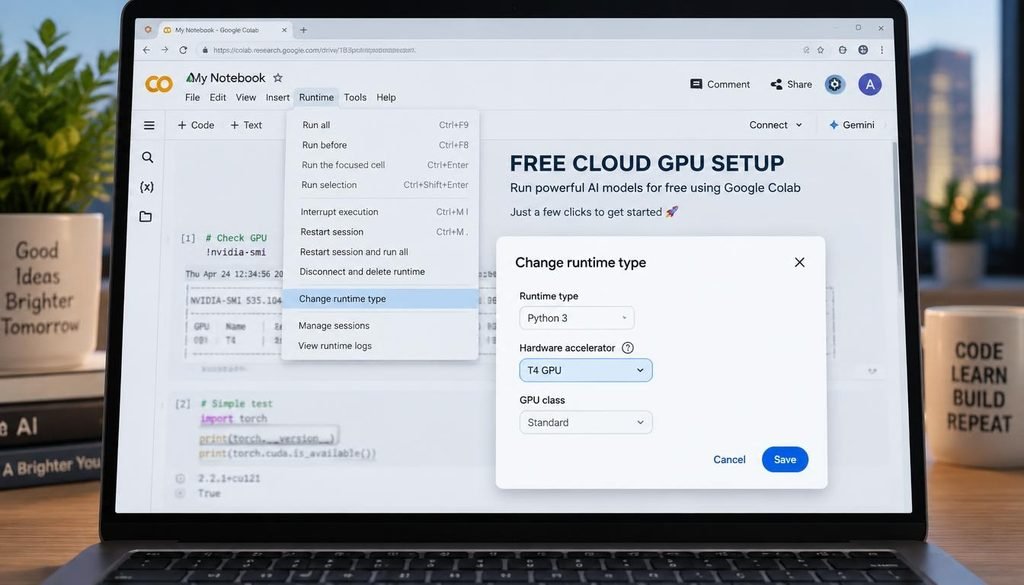
- Step 3: Select Runtime, then Change runtime type.
- Step 4: Choose T4 GPU as the hardware accelerator and save.
- Step 5: Run the cell below with Shift + Enter to confirm the GPU.
import torch

if torch.cuda.is_available():
    print(torch.cuda.get_device_name(0))
else:
    print("No GPU attached. Check the runtime type.")
Free GPU access is never guaranteed. Google states that limits and GPU types vary, idle runtimes time out, and free notebooks run for at most 12 hours, depending on availability and usage.
Save trained models to Google Drive or download them before you leave. Files stored only on the temporary machine disappear when the runtime is deleted.
Run Your First Scikit-Learn Model in the Browser
Scikit-Learn mainly runs on the CPU, so switch the runtime back to CPU for this exercise and save your GPU allowance.
from sklearn.datasets import load_iris
from sklearn.model_selection import train_test_split
from sklearn.ensemble import RandomForestClassifier
from sklearn.metrics import accuracy_score

X, y = load_iris(return_X_y=True)
X_train, X_test, y_train, y_test = train_test_split(
    X, y, test_size=0.2, random_state=42, stratify=y
)

model = RandomForestClassifier(random_state=42)
model.fit(X_train, y_train)

print(accuracy_score(y_test, model.predict(X_test)))
The printed number is the share of unseen flowers the model classified correctly. Change the test size or model, run it again, and write down what changed.
Kaggle Notebooks as Your Backup GPU
Kaggle Notebooks offer a second free option with datasets attached directly to your workspace. Verify your phone number, open a notebook, and choose a GPU under the accelerator settings.
Kaggle applies a weekly GPU quota, commonly reported at about 30 hours. Check the live figure in your account, and stop the session when you finish.
Keep Your Cloud Sessions Stable
Because cloud platforms like Google Colab and Kaggle require steady bandwidth to stream datasets, check how to increase download speed when large CSV files load slowly.
If you study machine learning while traveling or working outside a fixed office, learn how to use mobile data on a laptop to stay connected to cloud notebooks.
Before downloading large training datasets over a cellular connection, verify does hotspot use data so you can manage your monthly bandwidth budget.
If dataset downloads stall or cloud notebook kernels disconnect mid session, inspect how to fix weak WiFi signal to stabilize your connection.
How to Learn Machine Learning Online With a 16 Week Syllabus
Use a weekly rhythm: two sessions for lessons, two for coding, and one for review. Tick each phase only after its milestone works.
| Weeks | Focus | Proof of Progress |
|---|---|---|
| 1 | Python basics | Ten small functions |
| 2 and 3 | NumPy, Pandas, Matplotlib | Data cleaning report |
| 4 and 5 | Essential math | Gradient descent from scratch |
| 6 and 7 | Regression and classification | First complete pipeline |
| 8 and 9 | Trees, forests, clustering, validation | Model comparison and Project 1 draft |
| 10 and 11 | PyTorch and neural networks | Working training loop |
| 12 and 13 | Transfer learning and transformers | Image or text classifier |
| 14 | Finish Project 1 | Clear README and results |
| 15 | Finish Project 2 | Working web demo |
| 16 | Finish Project 3 | Public portfolio review |
How to Learn Machine Learning PDF Checklist Workflow
- Copy the syllabus into a text cell at the top of a study notebook.
- Add one checkbox line and one note for every week.
- Choose Runtime, then Run all, and fix any errors.
- Press Ctrl + P (Command + P on Mac) and select Save as PDF.
- Open the PDF and check that code, charts, and tables are not cut off.
- Use File, then Download, to keep the editable notebook file as well.
A PDF is best for revision on a phone or on paper. Keep the notebook file for running and changing code.
Common Beginner Mistakes That Delay Machine Learning Mastery
Most delays come from study habits rather than talent. Fix these early and your hours will count for far more.

Mistake 1: Staying in Tutorial Hell
Watching 50 hours of videos without writing code creates familiarity, not skill. You recognize every step but cannot produce it alone.
Apply a simple ratio: for each hour of watching, spend at least two hours coding. Close the video, rebuild the lesson, and then try it on a different dataset.
Make starting easy. To launch your daily study dashboards, Kaggle competitions, and Colab notebooks in one click, learn how to pin a website to taskbar on your desktop.
Mistake 2: Ignoring Data Cleaning and Feature Engineering
Garbage in, garbage out. Duplicate rows, wrong data types, hidden missing values, and leaked answers can ruin any algorithm.
Feature Engineering turns raw columns into useful signals. A purchase date can become the day of the week or the number of days since the last order.
Before modeling, check each column for meaning, range, missing values, and whether it would be known at prediction time.
Mistake 3: Overfitting Without Cross Validation
Overfitting happens when a model memorizes training examples and performs poorly on new ones. A large gap between training and validation scores is the warning sign.
Cross validation trains and checks the model on several different splits of the training data. Keep the final test set untouched until your choices are made.
For time based data, validate on later periods instead of random rows. Otherwise the model learns from the future.
Mistake 4: Letting AI Assistants Do the Thinking
An AI assistant can explain an error or suggest a function. If it writes the whole assignment, you lose the practice that builds judgment. Ask for hints, then test and explain every line.
For students using AI coding assistants while completing machine learning assignments, read does Google Classroom have an AI detector to understand academic integrity rules.
Frequently Asked Questions
How do I learn machine learning step by step?
Follow five phases: Python, essential math, classical models, deep learning, and portfolio projects. Finish a small milestone before moving ahead, such as cleaning a dataset or comparing three models. A schedule of 10 to 15 weekly hours fits this path into about 16 weeks.
How can I learn machine learning for free?
Combine Kaggle Learn, Google Machine Learning Crash Course, Fast.ai, and Google Colab. Use Kaggle for coding practice, Google for concepts, and Fast.ai for deep learning. Free cloud notebooks cover computing needs for beginner projects, although GPU access has limits and can vary.
How do beginners start learning machine learning and AI?
Start with basic Python, then practice data handling with NumPy and Pandas. Next, train simple models in Scikit-Learn to understand how machines learn from examples. Move to neural networks and large language models after you can test a model and explain its errors.
How do I learn machine learning with Python?
Learn libraries in this order: NumPy, Pandas, Matplotlib, Scikit-Learn, and then PyTorch. Practice each one on a real dataset instead of memorizing functions. Your first goal is a complete workflow that loads data, cleans it, trains a model, and measures results.
Can I learn machine learning without a powerful computer?
Yes, you can use Google Colab or Kaggle Notebooks through a web browser. The training runs on remote hardware, so an older laptop or Chromebook can handle beginner projects. You need a stable internet connection, and free GPU sessions come with usage and time limits.
How long does it take to learn machine learning from scratch?
Expect about 16 weeks for working foundations at 10 to 15 focused hours per week. That period can produce three beginner portfolio projects, but it does not guarantee a job. Deeper skill in a specialty usually takes many more months of practice and study.
How much math do I really need to learn machine learning?
Begin with practical statistics, probability, vectors, matrices, and basic derivatives. These topics explain data patterns, model weights, errors, and gradient descent. You can start coding before mastering them, then study deeper theory when your projects, research goals, or target roles require it.
What is the best machine learning roadmap recommended on Reddit?
Reddit has no single official roadmap, but a sensible approach drawn from common learner advice is Python, one structured course, hands on projects, and math alongside practice. Treat individual comments as opinions. Choose one plan, finish it, and ask for feedback on your own code.
Can I download a machine learning roadmap PDF to study offline?
You can create your own roadmap PDF from a study notebook. Add the 16 week syllabus and checkboxes, open the browser print window, and select Save as PDF. Review the pages for clipped code or charts, and keep the original notebook for editing and practice.
Is machine learning hard to learn without a computer science degree?
It is challenging but achievable through steady coding practice and documented projects. A degree can provide structure and deeper theory, and some employers require one. Self taught learners should build evidence of skill with clear repositories, honest evaluations, and the ability to explain every decision.
Final Thoughts on Starting Your Machine Learning Journey
The hardest part of learning how to learn machine learning is resisting the urge to collect more resources. One roadmap, one main course, and one notebook are enough to begin.
Build first, question the result, and learn the math that answers your question. Keep your milestones small and your projects honest.
Today, open Google Colab and run the iris model above. Then change one setting, record what happened, and you have started your first experiment.