How Much Does Windows 11 Cost? Prices and Free Options
How much does Windows 11 cost, and do you really have to pay for it? For many people the honest answer is nothing, but others do need a paid license.
Quick Answer: How Much Does Windows 11 Cost?
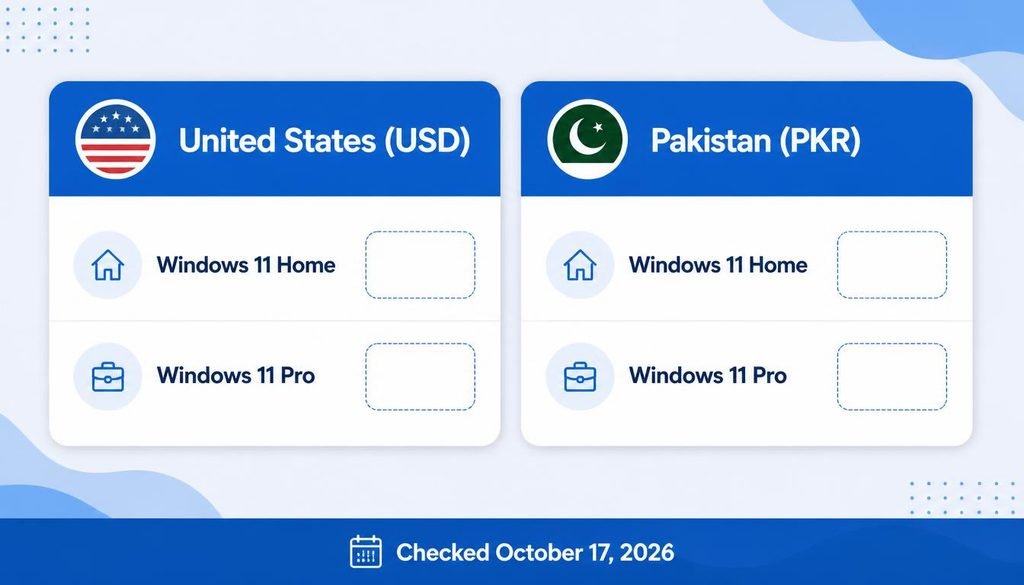
Quick Answer: A new Windows 11 license costs $139 for Home or $199.99 for Pro in the official US Microsoft Store, and Rs46,999 or Rs68,999 in Pakistan. An eligible Windows 10 PC can upgrade free through Windows Update, and a new PC with Windows 11 usually includes a license.
Table of Contents
| Windows Option | Verified Price | Region and Currency | What the Price Covers |
|---|---|---|---|
| Windows 11 Home, official US listing | $139.00 | United States, USD | One new Home license, sold as a download (a USB option is also listed) |
| Windows 11 Home, official Pakistan listing | Rs46,999.00 | Pakistan, PKR | One new Home license, sold as a download |
| Windows 11 Pro, official US listing | $199.99 | United States, USD | One new Pro license, sold as a download (a USB option is also listed) |
| Windows 11 Pro, official Pakistan listing | Rs68,999.00 | Pakistan, PKR | One new Pro license, sold as a download |
| Eligible Windows 10 to Windows 11 upgrade | No charge for eligible PCs | Any region | Same edition as your current Windows 10, only if the PC meets Microsoft’s requirements and Windows Update offers it |
| Third party or marketplace offers | Not verified | Varies | Seller advertisements are not official Microsoft prices. Check the seller, license type, and terms before paying. |
Prices were checked on October 17, 2026 on the Microsoft Store pages linked below. Prices can change, and taxes or delivery charges may change your final checkout amount.
How Much Does Windows 11 Cost in the United States?
On October 17, 2026, the official Microsoft Store listing for Windows 11 Home showed $139.00. The Windows 11 Pro listing showed $199.99. Both prices are in US dollars and are for a new license rather than an upgrade.
Both listings carry a warning worth reading. Microsoft says these products are designed for PCs that need a new license and meet the minimum system requirements. If your PC runs Windows 10 and cannot take the free upgrade through Windows Update, Microsoft says you will not be able to install the purchased version on it. Check eligibility before you buy.
Microsoft also explains how to get Windows 11 on a compatible PC, including the free upgrade path covered below. State sales tax may apply at checkout.
How Much Does Windows 11 Cost in Pakistan?
The Microsoft Pakistan listing for Windows 11 Home showed Rs46,999.00 on October 17, 2026. The Windows 11 Pro listing for Pakistan showed Rs68,999.00. Both are Windows 11 (Download) listings priced in Pakistan rupees. The pages do not say whether taxes are included, so confirm the total at checkout.
These figures are official Microsoft Store prices. They are not a conversion of the US price, and you should not estimate the Pakistan price by multiplying dollars. Local retailers and marketplaces may charge differently because of license type, import costs, or seller margins.
Marketplace numbers need extra care. One Pakistani retailer article advertises a very wide range of Rs 1,199 to Rs 78,899 across mixed license types. A range that wide shows why a single marketplace number tells you very little. Readers in the UK, Canada, and Australia should check their own regional Microsoft Store page, because prices and currencies differ by country.
Can You Still Get Windows 11 for Free?
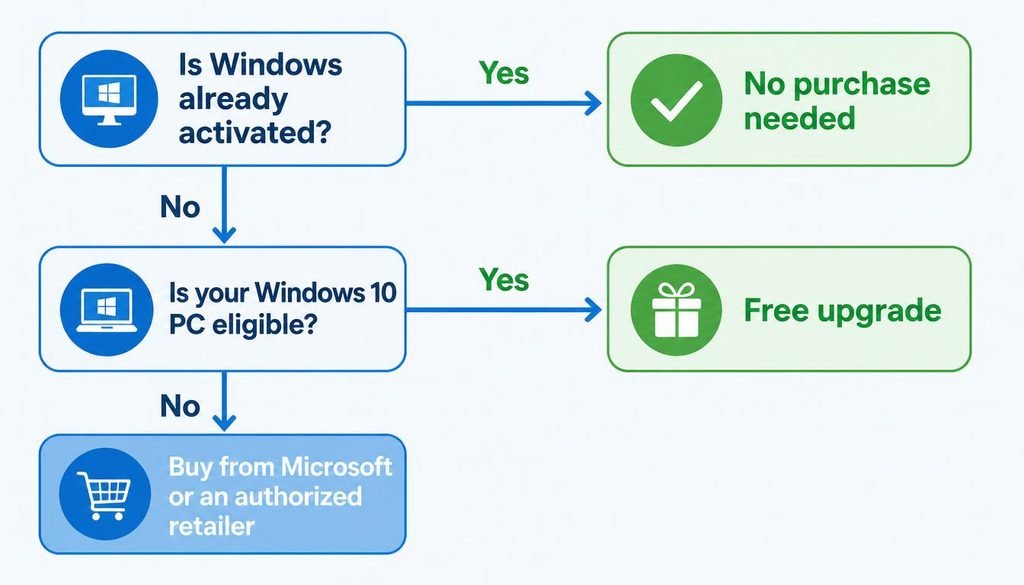
Yes, if your PC is eligible. Microsoft says the free upgrade is available for eligible Windows 10 PCs that meet the minimum device specifications. The upgrade keeps the same edition, so Windows 10 Home becomes Windows 11 Home.
Use this eligibility checklist:
- Your PC runs Windows 10, version 2004 or later.
- Your PC meets the minimum requirements: a compatible 64-bit processor (1 GHz or faster, 2 or more cores), 4 GB RAM, 64 GB storage, UEFI with Secure Boot capability, TPM version 2.0, DirectX 12 compatible graphics, and a 720p display larger than 9 inches.
- Windows Update offers the upgrade. Open Settings, go to Windows Update, and select Check for updates.
You can also run the PC Health Check app. It tells you whether your computer meets the requirements and, if not, explains why. The upgrade download is large, so make sure your internet connection is stable. If your connection is the problem, start with fixing common WiFi connection problems.
Unsupported hardware is where many people get stuck. Microsoft warns that installing Windows 11 on a PC that does not meet the requirements is not recommended. Such a PC is no longer supported, is not entitled to updates, and damage from incompatibility is not covered by the manufacturer warranty.
Windows 10 support ended on October 14, 2025. Microsoft offers Extended Security Updates for eligible Windows 10 PCs through October 12, 2027. Finally, remember that downloading Windows 11 does not automatically give you an activated, licensed copy.
Windows 11 Home vs Pro: Which Costs More?
Pro costs more. On the official US store it is $60.99 higher than Home ($199.99 versus $139.00). On the Pakistan store the gap is Rs22,000 (Rs68,999.00 versus Rs46,999.00). Each price is checked separately above and should never be inferred from the other edition.
| Feature or Cost Factor | Windows 11 Home | Windows 11 Pro |
|---|---|---|
| Official US price (October 17, 2026) | $139.00 | $199.99 |
| Official Pakistan price (October 17, 2026) | Rs46,999.00 | Rs68,999.00 |
| BitLocker drive encryption | Not included | Included |
| Remote Desktop hosting (letting other devices connect to this PC) | Not included (you can still connect out to other PCs) | Included |
| Hyper-V virtual machines | Not included | Included |
| Domain join (work or school network) | Not available | Available |
| Group Policy Editor | Not included | Included |
Most ordinary home users do well with Home. Pro makes sense if you need to host remote connections, run virtual machines, encrypt drives with BitLocker, or join a company or school domain. Do not pay extra for Pro unless one of those features solves a real need. Some devices offer a simpler device encryption feature on Home, so check your own PC settings before assuming you need Pro for encryption.
How Much Does Windows 11 Installation Cost?
The word “installation” hides several different costs, so separate them:
- Downloading official installation media: Microsoft offers the tools and the disc image (ISO) on its download page at no charge. Downloading is not the same as holding a license.
- An eligible free upgrade: $0, provided your Windows 10 PC qualifies.
- Installing with an existing valid license: no new software cost. If your PC already has a digital license, Microsoft says you can reinstall the same edition without entering a product key.
- Buying a new license: $139.00 (Home) or $199.99 (Pro) in the US, and Rs46,999.00 or Rs68,999.00 in Pakistan.
- Paying a local technician: a separate service fee. I could not verify a reliable standard fee for Pakistan, and I will not invent one. Charges depend on the technician, city, how complex the job is, and whether data backup is included.
- Reinstalling with backup and restore: labor for backing up and restoring files is often priced separately from the license.
Always ask a technician whether the license is included or whether you must supply your own. Once Windows is installed, some people tidy up preinstalled apps, and the Windows 11 debloater guide covers that step.
Is It Safe to Buy a Cheap Windows 11 Product Key?
Not automatically safe, and not automatically illegal. Price alone cannot tell you which one you are buying.
Product key versus license
A product key is a 25-character code used to activate Windows. The license is the legal right to use the software. A digital license (called a digital entitlement in Windows 11) is a form of activation tied to your hardware and Microsoft account that needs no key.
Microsoft states that activation pairs a key or entitlement with the hardware configuration. It does not evaluate whether the copy is genuine. Successful activation alone does not prove every aspect of a license, including whether it is genuine or transferable.
OEM, retail, and digital licenses in plain English
An OEM license is generally intended for a PC sold with Windows or for system builders, and it is usually tied to the first device it is installed on. A retail license is sold directly to buyers and may allow moving to another PC, subject to its terms. A digital license is the record stored for your device and account after activation. Terms vary, so read the exact license terms before paying.
Possible risks of unusually cheap keys
- The key may be invalid, already used, or later revoked.
- Transfer or reuse rights may be limited.
- Activation may fail, or work now and fail after a hardware change.
- The seller may have no clear authority to sell the license.
I am not accusing any specific seller. These are risk factors, not verdicts.
Practical purchasing checklist
- Check the seller’s identity and reputation.
- Read the license type and transfer terms.
- Confirm the edition matches the edition you intend to install.
- Request an invoice and written refund terms.
- Prefer Microsoft or an authorized retailer when possible.
Never use unofficial activation scripts, KMS tools, or key generators. They create security and licensing problems far larger than the cost of a license.
How to Check Whether Windows 11 Is Already Activated
Check this before buying a second license, because many PCs are already covered.
- Select Start, then open Settings.
- Go to System, then select Activation.
- Read the Activation status line.
- Note the edition shown, Home or Pro.
| Status message | What it means |
|---|---|
| Windows is activated | You are activated, but your Microsoft account is not linked. |
| Windows is activated with a digital license | You are activated. Link your Microsoft account for easier reactivation. |
| Windows is activated with a digital license linked to your Microsoft account | You are activated and linked. No new license is needed. |
| Windows is not activated | An error message explains why. You might need a license. |
If Windows is not activated, check that your installed edition matches your license, because Windows will not activate if they differ. Then follow Microsoft’s guide to Windows activation errors. Microsoft also recommends linking your Microsoft account to your digital license, which lets the activation troubleshooter reactivate Windows after a major hardware change.
How to Download Windows 11 Safely
Use only Microsoft’s official Windows 11 download page. It offers three options: the Installation Assistant for the device you are using, the media creation tool for a bootable USB or DVD, and a multi-edition ISO file for x64 devices.
An installation download is not a license. Microsoft notes that the ISO uses your product key to unlock the correct edition. Avoid modified ISO files and unknown download sites, because you cannot verify what was changed.
Before you start, confirm the PC meets the requirements and back up your important files. The Installation Assistant needs Windows 10 version 2004 or later and 9 GB of free disk space.
Problems can appear during or after setup. If the process stops, see troubleshooting a failed Windows installation. If a download fails with a name resolution error, fixing the DNS server not responding error may help. If the network icon is missing after a fresh install, read about fixing the missing WiFi option in Windows 11.
Should You Pay for Windows 11 or Upgrade for Free?
| Your Situation | Recommended Next Step |
|---|---|
| An eligible Windows 10 PC with a valid installation | Check Windows Update and run PC Health Check. The upgrade is free if offered. |
| A new PC that already includes Windows 11 | Check Settings > System > Activation. Do not buy another license. |
| A computer with an existing valid digital license | Reinstall the same edition and let it activate online. No purchase needed. |
| A PC that needs a new Windows license | Buy from Microsoft or an authorized retailer. Match the edition to your needs. |
| A user who needs Windows 11 Pro features | Pay for Pro only if you need BitLocker, Remote Desktop hosting, Hyper-V, or domain join. |
| A device that does not meet Windows 11 requirements | Do not buy a license for it. Consider a new PC or Windows 10 Extended Security Updates. |
If a PC cannot upgrade, Microsoft lists retailers such as Best Buy, Walmart, Dell, Amazon, Costco, and HP for buying a Windows 11 PC. Contact the device manufacturer if you are unsure what license came with your computer.
A new license will not fix a hardware problem. If an older PC feels slow or hot, start with checking CPU temperature in Windows 11 before spending money.
Common Windows 11 Pricing Mistakes
- Paying for a license that is already on the PC. Check Activation first.
- Confusing a download with activation. Installation media does not make Windows licensed.
- Mixing up Home and Pro prices. They are separate products with separate prices.
- Assuming all cheap keys carry the same rights. OEM, retail, and digital licenses differ.
- Ignoring regional pricing and checkout costs. Taxes and currency change the final amount.
- Paying a technician without asking whether the license is included. Labor and license are different costs.
- Buying for an unsupported device. Check requirements before paying.
Many of these problems show up after the purchase, so keep a guide to fixing common Windows 11 problems handy.
Final Verdict: What Should You Pay for Windows 11?
You may pay nothing, or you may pay $139 to $199.99 in the US or Rs46,999 to Rs68,999 in Pakistan. Work through this checklist in order:
- Check Settings > System > Activation for an existing license.
- If you run Windows 10, check Windows Update and PC Health Check for a free upgrade.
- Decide whether you truly need Pro features.
- If you must buy, prefer Microsoft or an authorized retailer, and get an invoice.
- Ask any technician to separate the license cost from labor.
After setup, you may want to explore more Windows guides on Problevo, such as configuring automatic login in Windows 11.
Frequently Asked Questions
1. How much does Windows 11 cost to buy?
On the official US Microsoft Store, Windows 11 Home costs $139.00 and Windows 11 Pro costs $199.99 (checked October 17, 2026). These are one time prices for a new license. Taxes and regional pricing can change the checkout total, so confirm the amount for your country before paying.
2. Can I still get Windows 11 for free?
Yes, if your PC is eligible. A Windows 10 PC that runs version 2004 or later and meets the minimum requirements can upgrade through Windows Update at no charge, keeping the same edition. Unsupported hardware may not qualify, and a Windows 11 download alone does not activate Windows.
3. How much does Windows 11 installation cost?
The software download from Microsoft is free, but Windows still needs a valid license, which is $0 for an eligible upgrade or a purchase otherwise. A technician may add a separate service fee. That fee depends on the person, city, and whether data backup is included, so no standard amount can be verified.
4. How much is Windows 11 in Pakistan?
On the Microsoft Pakistan store, Windows 11 Home is listed at Rs46,999.00 and Windows 11 Pro at Rs68,999.00 (checked October 17, 2026). These are official Microsoft Store listings in PKR. Local marketplace sellers may advertise different prices, which should not be treated as official Microsoft pricing.
5. How much does Windows 11 Pro cost?
Windows 11 Pro costs $199.99 on the US Microsoft Store and Rs68,999.00 on the Pakistan store (checked October 17, 2026). Pro is priced separately from Home, so do not assume one price from the other. For the UK, Canada, or Australia, check your own regional Microsoft Store page.
6. Is Windows 11 Home free?
Windows 11 Home is free only as an upgrade from an eligible Windows 10 Home PC. Microsoft states the free upgrade keeps the same edition you already have. If you need a new Home license, the official US price is $139.00 and the Pakistan listing is Rs46,999.00 (checked October 17, 2026).
7. Can I download Windows 11 without a product key?
Yes, Microsoft lets you download Windows 11 and setup includes an option to continue without a product key. However, Microsoft expects you to hold a license or an eligible Windows 10 device. The copy will not be activated until you add a valid license or digital entitlement.
8. Is a cheap Windows 11 product key legal and safe?
A cheap key is not automatically illegal or safe, and price alone cannot tell you which. Activation only confirms the key fits the hardware, not that the license is genuine or transferable. Check the seller, license type, transfer terms, invoice, and refund policy, and prefer Microsoft or an authorized retailer.
9. Does a new laptop already include a Windows 11 license?
Usually yes. A new PC that ships with Windows 11 normally carries its license, with a product key preinstalled, packaged, or printed on a Certificate of Authenticity. Check Settings > System > Activation before buying another license. For refurbished PCs, the refurbisher, not Microsoft, must provide the key.
10. How can I check if Windows 11 is activated?
Open Settings > System > Activation and read the Activation status line. A message such as Windows is activated with a digital license means Windows is activated. If it says Windows is not activated, check that your edition matches your license, then try the Microsoft activation troubleshooting before buying anything.


One Comment