
How to Measure Laptop Screen Size in Inches and CM ( 2026)
A laptop sleeve that is slightly too small, a screen protector that will not fit, or a replacement panel that arrives with the wrong connector all start the same way: someone guessed the screen size. The good news is that the correct answer takes about a minute once you know where to measure.
Quick Answer
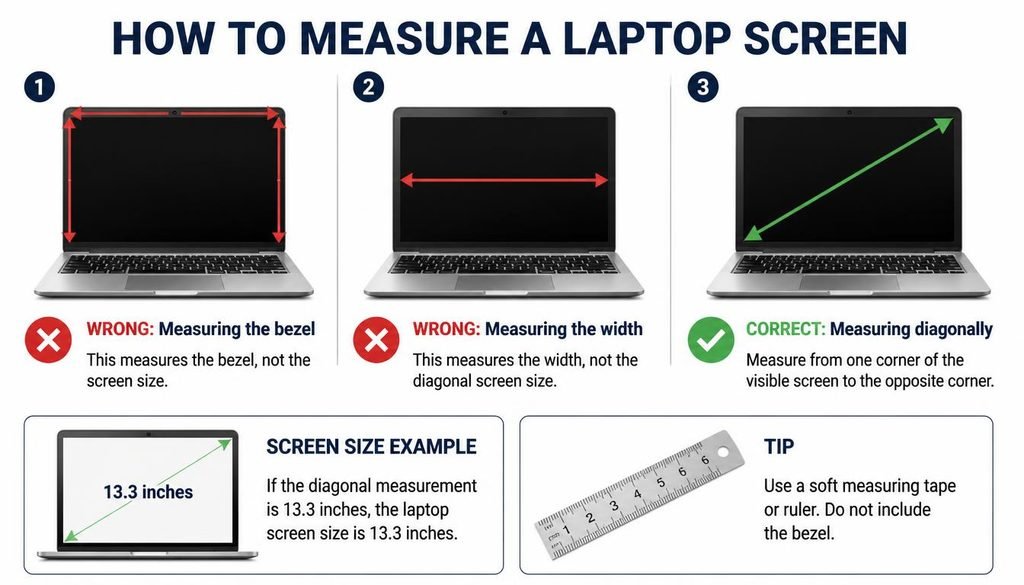
To measure laptop screen size, run a tape or ruler diagonally from one visible corner of the lit display to the opposite visible corner. Do not include the bezel, which is the frame around the screen. The result in inches is the advertised screen size, usually rounded to a common size.
Table of Contents
Which Situation Are You In?
| Situation | Likely explanation | Best next step |
|---|---|---|
| The laptop model is unknown | The model name is on a label or in Windows settings | Check the underside label, or open Settings > System > About in Windows 11, then look up the model on the maker support site |
| No measuring tape is available | The size is already published in the specifications | Find the exact model, then read its official spec sheet |
| The size is needed for a bag or sleeve | A bag fits the body of the laptop, not the screen | Measure the closed laptop width, depth, and thickness, then compare with the bag inner dimensions |
| The size is needed for a replacement display | Diagonal size alone does not identify a compatible panel | Use the exact model or part number, and confirm the panel details before ordering |
| The resolution is known but the physical size is not | Resolution counts pixels and says nothing about inches | Use a ruler measurement or the official specifications |
What Does Laptop Screen Size Actually Mean?
Laptop screen size is the diagonal length of the visible display area, measured from one corner to the opposite corner. It is not the width of the lid and it is not the size of the whole laptop. Both HP and Lenovo describe the measurement as a corner-to-corner diagonal that excludes the bezel.
The bezel is the plastic or metal border around the lit screen. Some modern laptops have very thin bezels, so the lit area can almost reach the edge of the lid. Even then, you measure only the part that lights up.

Advertised sizes are rounded labels. A panel marketed as 15.6 inches may measure a hair above or below that, so treat a ruler result as an approximation and the specification sheet as the reference.
How to Measure Laptop Screen Size With a Ruler or Tape
You need a flexible tape measure or a rigid ruler long enough to cover the screen. A soft tape is easier on a screen that has slightly rounded corners.
- Open the laptop and turn the screen on.
The lit area shows exactly where the visible display begins and ends. Switch the laptop off or lock it first if it has a touchscreen, so the tape does not trigger anything. - Place the end of the tape at one visible corner.
Start at the inside edge of the lit area, not at the outer edge of the frame. - Measure diagonally to the opposite visible corner.
Go from bottom left to top right, or top left to bottom right. Keep the tape straight and avoid pressing on the panel. - Leave out the bezel.
If the tape starts or ends on the frame, the number will be too large. - Record the result and match it to a common size.
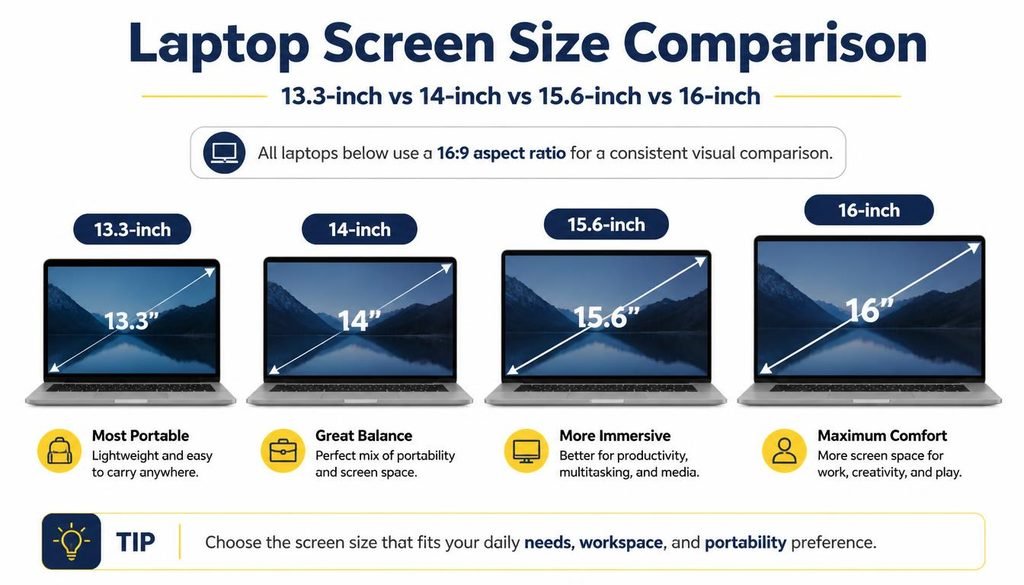
Typical advertised sizes include 11.6, 13.3, 14, 15.6, 16, and 17.3 inches.
Worked example (illustrative numbers)
Suppose you measure the lit area at 13.6 inches wide and 7.6 inches tall. The diagonal is the square root of (13.6 × 13.6 + 7.6 × 7.6), which is the square root of 242.72, or about 15.6 inches. That matches a 15.6-inch laptop, so measuring width and height is a handy cross-check when the diagonal is awkward to reach.
If the corners are rounded: estimate where the straight edges would meet, or use the width and height method above. A difference of a few millimeters is normal, so do not worry about it.
How to Check Laptop Screen Size Without Measuring It
If you cannot or prefer not to measure, use these methods in order of reliability:
- Find the exact model.
Look for the name and number on the underside label, around the base, or on the original box. - Open the official specification sheet.
The maker site lists the display size for that exact configuration. - Use the product number or serial number.
On the official support site when it offers a product lookup. - Check the invoice, packaging, or documentation.
Retail listings usually include the display size. - Verify with a physical measurement.
If anything looks inconsistent.
One product name can cover several configurations. Always confirm the exact model, machine type, or product number rather than relying on a broad family name.
How to Check Laptop Screen Size in Windows 11
Windows 11 can tell you the model, which you then look up. It does not give you a trustworthy physical diagonal.
- Open Settings, choose System, then select About.
- Read the device name, and the model shown just below it. Microsoft documents this path in its article on finding information about your Windows device.
- Search for that exact model on the manufacturer site and open its specification sheet.
You can also press Windows key + R, type msinfo32, and press Enter. System Information lists a system model that you can search for in the same way. It shows the model name, not the screen size.
If your laptop feels slow, removing unnecessary apps may help reduce clutter and background activity. Before making major changes, learn how a Windows 11 debloater works and which changes you should avoid to keep your system stable.
Resolution, Scaling, and Physical Size Are Different Things
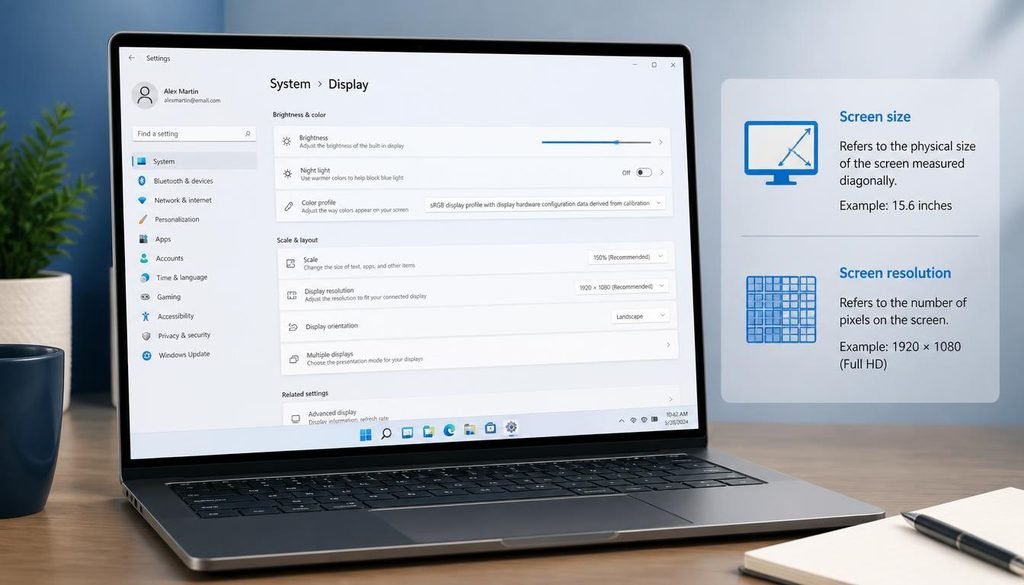
- Resolution is the pixel count, such as 1920 × 1080. Open Settings > System > Display and look under Display resolution to see it.
- Scaling makes text and icons larger or smaller on screen. It changes how things look, not how large the panel is.
- Physical size is the diagonal in inches or centimeters. Two laptops with different sizes can share the same resolution.
Some hardware identifiers, including EDID data stored in the display, can contain size information. Whether it can be read, and how to interpret it, depends on the device and the tool, so it is not a reliable beginner method. If Windows behaves strangely while you check settings, see our guide to fix common Windows 11 problems.
How to Measure Laptop Screen Size in Inches and Centimeters
Laptop screens are labeled in inches. To convert, multiply by 2.54, because 1 inch equals 2.54 centimeters.
| Diagonal (inches) | Diagonal (centimeters) |
|---|---|
| 11.6 | 29.5 |
| 13.3 | 33.8 |
| 14 | 35.6 |
| 15.6 | 39.6 |
| 16 | 40.6 |
| 17.3 | 43.9 |
For example, 15.6 × 2.54 = 39.62 cm, so a 15.6-inch screen is about 39.6 cm diagonally.
Laptop Screen Size in Width and Height
The diagonal alone does not tell you how wide or tall the screen is. That depends on the aspect ratio, which is the proportion of width to height. For a display with diagonal D and aspect ratio a:b:
- Width = D × a ÷ √(a² + b²)
- Height = D × b ÷ √(a² + b²)
For 16:9, the square root of (16² + 9²) is about 18.36. So a 15.6-inch screen is about 15.6 × 16 ÷ 18.36 = 13.6 inches wide.
Approximate visible display size for 16:9 screens (illustrative, not universal):
| Diagonal | Width (in) | Height (in) | Width (cm) | Height (cm) |
|---|---|---|---|---|
| 11.6 | 10.1 | 5.7 | 25.7 | 14.4 |
| 13.3 | 11.6 | 6.5 | 29.4 | 16.6 |
| 14 | 12.2 | 6.9 | 31.0 | 17.4 |
| 15.6 | 13.6 | 7.6 | 34.5 | 19.4 |
| 16 | 13.9 | 7.8 | 35.4 | 19.9 |
| 17.3 | 15.1 | 8.5 | 38.3 | 21.5 |
The same diagonal looks different on other shapes. A 14-inch panel is about 12.2 × 6.9 inches at 16:9, about 11.9 × 7.4 inches at 16:10, and about 11.7 × 7.8 inches at 3:2. These figures assume a perfectly rectangular visible area, and real panels vary slightly, so treat them as estimates. They describe the display only, never the outer body of the laptop.
How to Measure Laptop Screen Size?
If you want to view your laptop or phone content on a larger display, screen mirroring can be a useful option. Read our guide on how to screen mirror without WiFi to learn which wireless and wired methods work without a traditional internet connection.
How to Measure Laptop Size for a Bag or Sleeve
A bag has to fit the body of the laptop, so the screen diagonal is only a rough hint. A bag labeled for 15.6-inch laptops may still be too tight for one 15.6-inch model, because body dimensions differ between designs.
Close the laptop, place it on a flat surface, and measure:
- Exterior width: left edge to right edge of the closed lid.
- Exterior depth: front edge to back edge, including any hinge that sticks out.
- Exterior thickness: at the thickest point, including rubber feet if they add height.
Then compare those numbers with the inner compartment dimensions listed by the bag maker, not the outer size of the bag. Leave a little spare room so the laptop slides in without force. A margin of about 1 cm per side is a common rule of thumb, not a standard, and padded sleeves may need more. A laptop that stays warm in a bag is also worth checking, so see how to check CPU temperature in Windows 11.
How to Find Screen Size on Lenovo, HP, Dell, and Other Brands
The process is the same everywhere: identify the exact model, then open that model official specification page.
- Lenovo: Lenovo support describes finding the product name or serial number from the printed label, the Lenovo Vantage app, or the detect-product tool on its support site (Lenovo support: find product name).
- HP: HP explains that the model, product, and serial numbers are usually on the product label, and that an HP System Information window may also show them (HP model number guide). On some models, pressing Fn + Esc opens that window. Then search the product number on HP support.
- Dell, ASUS, Acer, and others: Look for the model name on the underside label, then search it on the maker support site. Menu names and tools differ by brand, so follow the labels you see there rather than assuming they match another maker.
Common Laptop Screen Measurement Mistakes
- Measuring the outside edges of the lid.
That gives body size. Measure only the lit display. - Including the bezel.
Start and stop at the visible edges of the picture. - Measuring horizontally and calling it the screen size.
Screen size is diagonal. Width is a separate number. - Confusing resolution with physical size.
Pixels are not inches. Use a ruler or the specifications. - Assuming every 15.6-inch laptop has the same outer size.
Check the real exterior dimensions before buying a bag. - Buying a replacement display from diagonal size alone.
Panels with the same diagonal can differ in connector, resolution, and mounting. Use the exact model or panel part number and confirm compatibility with the seller. - Rounding an odd measurement without checking.
If you get something like 14.6 inches, look up the model instead of guessing.
Windows 11 includes several settings that let you customize how your computer starts and how you sign in. If you also want to reduce the steps needed to access your desktop, see our guide on Windows 11 automatic login, including the security risks you should consider before enabling it.
Which Screen Size Should You Choose?
This is not a buying guide, but knowing what each size tends to offer helps you read the number you just measured.
| Size range | General trade-off |
|---|---|
| 11 to 12 inches | Most portable, smallest workspace |
| 13 to 14 inches | Balance of portability and room to work |
| 15 to 16 inches | More workspace and comfortable media viewing, heavier to carry |
| 17 inches and above | Largest workspace, least portable |
HP and Lenovo both describe this as a trade-off between portability and screen space, so the right size depends on how and where you use the laptop.
Frequently Asked Questions
How big is a 15.6 inch laptop?
A 15.6 inch laptop has a display that measures 15.6 inches diagonally, about 39.6 cm. On a 16:9 screen the visible area is roughly 13.6 inches wide and 7.6 inches tall. The laptop body is larger than the display and varies by model, so check its exterior dimensions separately.
What size is a 14 inch laptop?
A 14 inch laptop has a 14 inch diagonal display, about 35.6 cm. On a 16:9 screen that is roughly 12.2 inches wide and 6.9 inches tall. Other aspect ratios, such as 16:10, change the width and height, and the outer body is always larger than the screen.
How is a 16 inch laptop measured?
A 16 inch laptop is measured diagonally across the visible display, from one corner of the lit screen to the opposite corner, excluding the bezel. That equals about 40.6 cm. On a 16:9 panel the display is roughly 13.9 by 7.8 inches. The laptop body measures larger.
How can I check my display size?
The most reliable way is to find the exact model and read its official specifications. In Windows 11, open Settings > System > About to see the model. You can also measure the lit area diagonally with a tape. The Display settings page shows resolution, not physical size.
How do I check my laptop screen size without a measuring tape?
Find the exact model name or number on the underside label, in Settings > System > About, or on the box. Then open the manufacturer specification page and read the display line. A purchase invoice or retail listing often states the size too. Confirm the exact configuration.
Can Windows 11 show the physical size of my laptop screen?
Not reliably. Windows 11 shows the model, resolution, and scaling, but display settings do not provide a trustworthy physical diagonal. Use Settings > System > About to get the model, then check the manufacturer specifications, or measure the visible screen diagonally with a ruler or tape.
How do I find my Lenovo laptop screen size?
Identify the exact model from the label, Lenovo Vantage, or Lenovo support product detection. Then search that product name, machine type, or model number in Lenovo PSREF and read the display entry on its specification sheet. Because one name can cover several configurations, match the full model or machine type.
How many centimeters is a 15.6 inch laptop screen?
A 15.6 inch laptop screen is about 39.6 centimeters diagonally, because 15.6 × 2.54 equals 39.62. This is the diagonal of the visible display, not the width of the laptop. A 16:9 display of that size is roughly 34.5 cm wide and 19.4 cm tall.
Is laptop screen size measured horizontally or diagonally?
Laptop screen size is measured diagonally, from one visible corner of the display to the opposite visible corner, without the bezel. Width and height are separate measurements. They depend on the aspect ratio, so a horizontal measurement alone cannot give the advertised screen size.
How do I measure my laptop for a bag?
Close the laptop and measure its exterior width, depth, and thickness at the thickest point. Compare these numbers with the inner compartment dimensions listed by the bag maker, and allow a little spare room. Do not rely on the screen diagonal, because body sizes differ between models.
Final Verdict
The most reliable path is simple. Identify the exact model, read the official specification sheet, and use a diagonal measurement of the lit display to confirm it. Windows 11 helps with the model name but not the physical size, and resolution never tells you inches.
Keep the two measurements apart. Use the diagonal for screen protectors and panels, and the closed-laptop width, depth, and thickness for bags and sleeves. With those numbers and the exact model, you can shop with confidence.