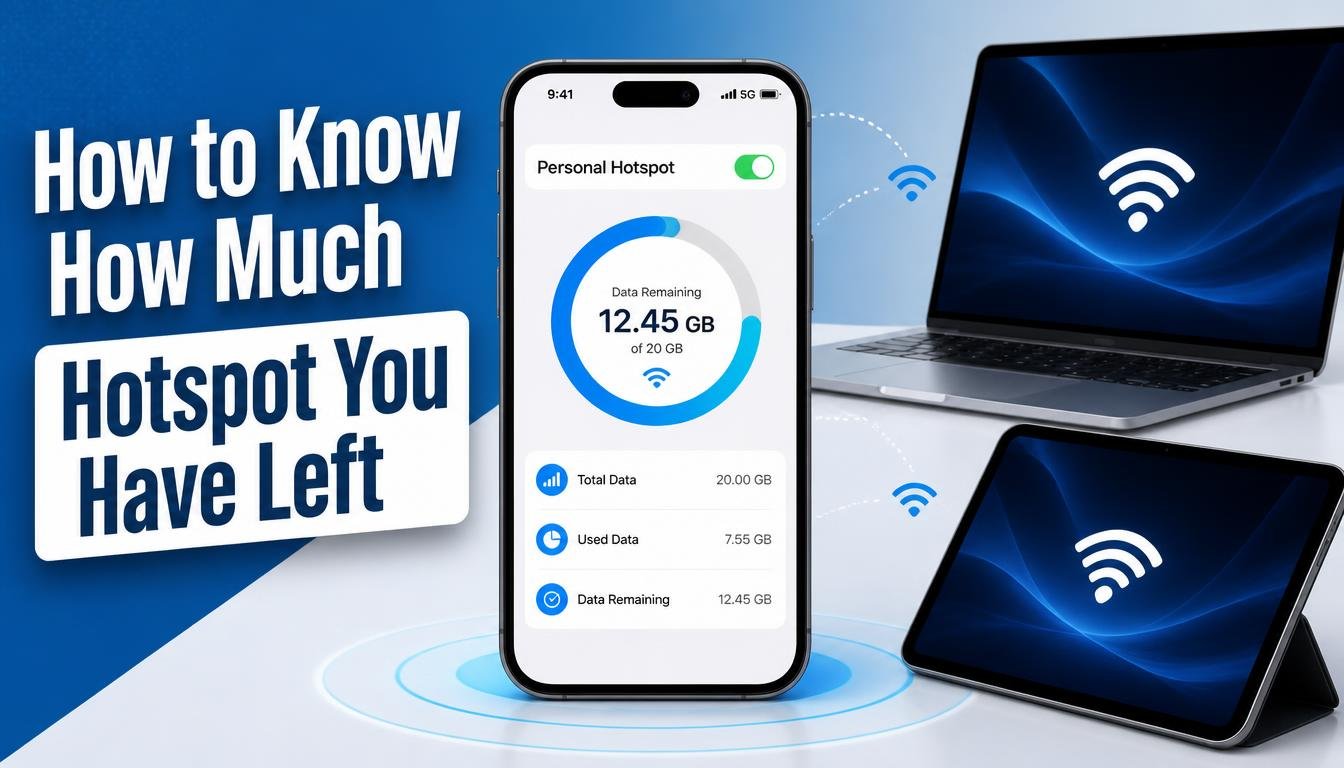
How to Know How Much Hotspot You Have Left: Easy Guide
If you want how to know how much hotspot you have left, your phone can show how much mobile data it has measured, but your carrier account is usually the best source for your remaining hotspot allowance. This guide explains how to check hotspot usage on Android, Samsung Galaxy, and iPhone, and how to confirm the amount of hotspot data remaining on your plan.
Phone and carrier numbers can differ because they may use different tracking periods or measure data differently. The steps below help you understand which number matters.
Quick Answer
To check your remaining hotspot data, open your mobile carrier’s app or account portal to view your plan’s official allowance. You can also check your phone’s built-in data settings for a quick estimate of device-measured usage.
1. Check Official Carrier Account (Most Accurate)
Your carrier determines your official hotspot limit and remaining balance.
- Open Carrier App: Launch your mobile carrier app (e.g., Verizon, AT&T, T-Mobile, or your local carrier).
- View Usage: Navigate to the Data Usage or Plan Details section.
- Check Balance: Look for Hotspot Data to see your exact remaining allowance for the current billing cycle.
2. Check Built-in Device Settings (Usage Estimate)
Android and iPhone track how much data your device has shared, though carrier records are the final authority.
- iPhone (iOS): Go to Settings > Cellular (or Mobile Data) > Personal Hotspot.
- Android: Go to Settings > Network & Internet > SIMs / Data Usage > Mobile Data Usage and filter by Wi-Fi Hotspot.
Note: Built-in phone counters show device-side usage, while your carrier app reflects your actual billing status and plan caps.
In This Guide
What the Numbers Mean
Before checking your hotspot balance, it helps to understand the difference between these terms:
| Term | What it means |
|---|---|
| Hotspot data used | Data transferred through your phone’s hotspot connection |
| Total mobile data used | Cellular data used by your phone, including apps and other services |
| Remaining hotspot allowance | The hotspot data your carrier says is still available |
| Plan allowance | The amount of data included in your mobile plan |
| Device usage | Data usage measured by your phone |
| Billing cycle | The period your carrier uses to calculate your plan usage |
A phone may show total cellular data usage without separating hotspot data from everything else. Some plans also provide a separate hotspot allowance.
That is why the number shown in your phone settings may not match the remaining hotspot balance shown by your carrier.
How to Check Hotspot Usage on Android
Android menus can vary depending on the phone manufacturer, Android version, and carrier.
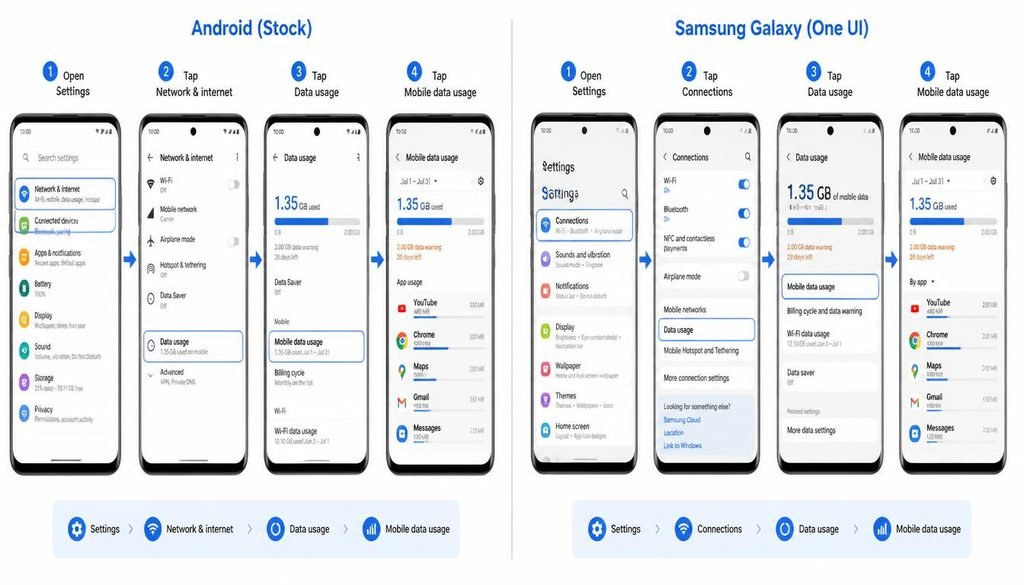
On many Android phones:
- Open Settings.
- Look for Network & internet, Connections, or a similar option.
- Open Data usage or Mobile data usage.
- Review the amount of cellular data used during the current period.
- Check your data warning or billing cycle settings if available.
You can also use the Settings search bar and search for Data usage if you cannot find the option.
The important point is that the Android data counter may show overall mobile data usage rather than your remaining hotspot allowance. Android hotspot and tethering use mobile data, and carriers can apply their own limits or additional requirements.
For the actual amount of hotspot data remaining on your plan, check your carrier account.
How to know how much hotspot you have left?
How to See How Much Hotspot You Have Left on Samsung
Samsung Galaxy phones provide built in data usage tools that can help you monitor cellular data.
Try these steps:
- Open Settings.
- Tap Connections.
- Tap Data usage.
- Select Mobile data usage.
- Review your usage and available data controls.
Samsung also provides options for setting a billing cycle and data warning. The exact screens can vary by Galaxy model, software version, region, and carrier. Samsung describes the figures shown in these settings as estimates.
Samsung also notes that tethering data can be treated separately from regular mobile data depending on the carrier and plan. If your tethering allowance has been exhausted, other devices may still connect to the phone but may not be able to access the internet.
For that reason, check your carrier account when you need to know your actual remaining hotspot balance.
How to Know How Much Hotspot You Have Left on iPhone
On an iPhone, you can review cellular data usage from the Cellular settings.
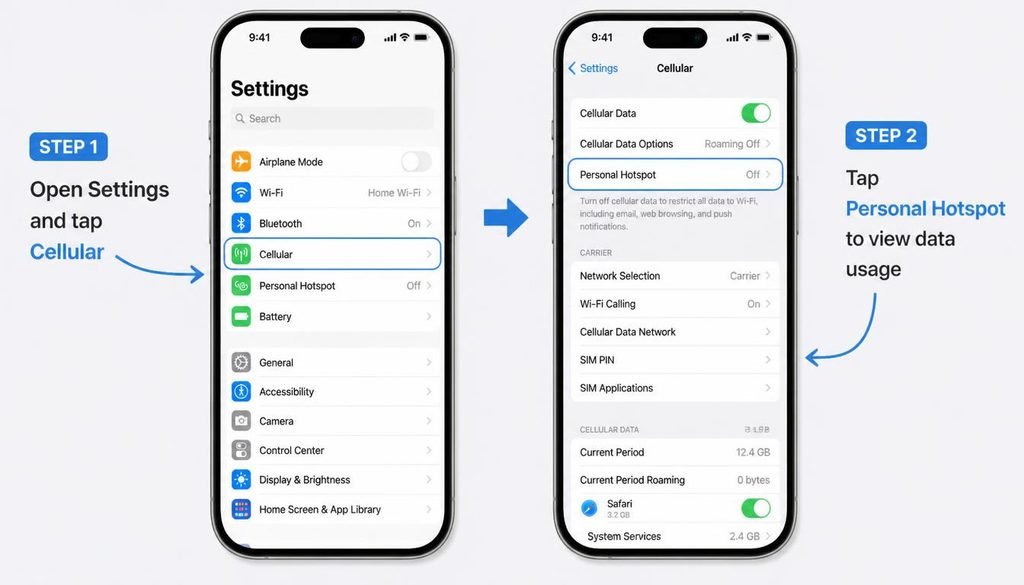
- Open Settings.
- Tap Cellular. On some versions or regions, this may be called Mobile Data or Mobile Service.
- Review the cellular data usage shown for apps and services.
- Scroll down to review available cellular usage information.
- If necessary, reset the statistics at the beginning of your billing period.
The iPhone’s usage statistics represent data measured since the statistics were last reset. Apple recommends contacting your carrier for the most accurate information about current cellular data usage.
When you need to know how much hotspot allowance remains on your plan, your carrier account is more useful than relying only on the iPhone’s usage counter.
How to Check Your Actual Remaining Hotspot Allowance
Your phone can tell you how much data it has measured. Your carrier account is normally the better place to check what remains on your plan.

Depending on your carrier, you may be able to see:
- Total mobile data used
- Hotspot data used
- Remaining hotspot allowance
- Current billing period
- Data remaining
- Data warnings or limits
- Usage by line on a family plan
Open your carrier’s mobile app or website and look for sections such as Usage, Data, Plan, Account, or Mobile Hotspot.
If the hotspot allowance is not displayed separately, check your plan details or contact the carrier.
How to Check Hotspot Usage on T-Mobile
T-Mobile provides usage information through T-Life and its website.
In T-Life, you can generally open Account, select the relevant line, and choose Data used to review usage information. T-Mobile’s website also provides a Usage area where mobile hotspot usage may be listed when available for the account.
The exact information shown can depend on your plan and account.
How to Check Hotspot Usage on Verizon
Verizon customers should check their My Verizon account or app for current plan and usage information.
The exact hotspot information available can depend on the plan. If your account does not show a separate hotspot balance, check your plan details or contact Verizon support.
For a broader explanation of hotspot balances and plan limits, see our guide on how much hotspot data you have left.
Why Your Phone and Carrier May Show Different Numbers
It is normal for the numbers to differ.
The most common reasons are:
Different usage periods
Your phone may be tracking data from the date you last reset its statistics, while your carrier uses your billing cycle.
Different measurement methods
Your phone measures data locally. Your carrier measures usage on its network and applies the rules of your plan.
Hotspot data may be separate
Your phone may show total cellular data while your plan has a separate hotspot allowance.
Usage updates may not be immediate
Carrier dashboards can take time to update. A phone and carrier account may therefore show different figures temporarily.
When the two numbers disagree, check that you are comparing the same date range. For your remaining plan allowance, use the carrier’s current account information.
How to Check Hotspot History on Android
Most phones do not provide a complete historical log of every hotspot connection.
Instead, Android and Samsung generally provide data usage information for a selected or current period.
You may be able to:
- Open Settings.
- Search for Data usage.
- Select the relevant mobile data screen.
- Review usage for the available period.
- Check individual app usage where supported.
If you need detailed historical records, your carrier may provide better information through its website or app.
How to Check Which Devices Are Connected to Your Hotspot
Checking connected devices can help explain unexpected hotspot usage.
On Android, open:
Settings > Connections or Network & internet > Mobile Hotspot and Tethering
The exact menu depends on your phone.
Samsung Galaxy devices provide hotspot management options under Settings > Connections > Mobile Hotspot and Tethering. Some models also provide settings such as a timeout that can turn the hotspot off when no device is connected.
On iPhone, open:
Settings > Personal Hotspot
You can also manage Personal Hotspot from the Control Center and review the hotspot settings available on your iPhone.
If you see a device you do not recognize:
- Turn off the hotspot.
- Change the hotspot password.
- Reconnect only your trusted devices.
- Turn the hotspot off when you no longer need it.
If you need help locating the password, see our guide on how to find your hotspot password.
Does Turning On Hotspot Use Data?
Simply turning the hotspot feature on does not mean that a large amount of data is automatically being consumed.
Data is used when connected devices actually transfer information through the hotspot.
For example, a connected laptop may use data for:
- Windows updates
- Cloud synchronization
- Video streaming
- Software downloads
- File transfers
- Web browsing
- Background applications
A device that is connected but doing very little may use very little data. A device downloading a large file can consume a significant amount of hotspot data.
How to Reset and Manage Data Usage Tracking
Resetting your phone’s data statistics can make it easier to monitor usage during your billing cycle.
Android
Look for Data usage in Settings and review the available billing cycle, warning, or limit controls.
Samsung Galaxy
Go to:
Settings > Connections > Data usage
You can review the billing cycle and data warning options available on your device. Samsung notes that these settings and screens can vary by device and carrier.
iPhone
Go to:
Settings > Cellular
Scroll to the bottom and select Reset Statistics when you begin a new tracking period.
Resetting the statistics only changes the usage counter on your iPhone. It does not reset your carrier’s hotspot allowance. Apple identifies the current statistics as usage measured since the last reset.
How to Make Your Hotspot Data Last Longer
If your hotspot allowance is limited, a few changes can reduce unnecessary usage.
Pause automatic updates
Large operating system and application updates can consume significant amounts of data.
Limit cloud backups and synchronization
Cloud storage services can upload or download files in the background.
Reduce video quality
High resolution streaming can use much more data than lower quality playback.
Avoid large downloads
Games, software installers, operating system files, and large media files can quickly consume hotspot data.
Disconnect devices you are not using
A laptop, tablet, smart TV, or another device may continue transferring data in the background.
Check connected devices
Review your hotspot settings regularly so that only devices you recognize are connected.
Use data saving features
Android, Samsung, iPhone, and many connected devices offer settings that can reduce background data usage.
If your Wi-Fi connection is also causing problems, see our guide on how to fix Wi-Fi problems.
Is 30 GB of Hotspot Data a Lot?
30 GB can be a substantial hotspot allowance for normal browsing, email, documents, and occasional video calls. However, how long it lasts depends heavily on what the connected device does.
| Activity | Effect on hotspot data |
|---|---|
| Email and basic browsing | Usually relatively low |
| Documents and web apps | Usually moderate |
| Video calls | Can be moderate to high |
| HD video streaming | Can become high |
| Large software downloads | High |
| Game downloads and updates | Potentially very high |
| Cloud backups | Can become high |
| 4K video streaming | Very high |
There is no single number of hours that 30 GB will last because applications and video services use data differently.
If you are using hotspot primarily for browsing and work, 30 GB may last considerably longer than if you are using it for frequent HD video streaming or large downloads.
What to Do If Your Hotspot Data Looks Too High
If your hotspot allowance is disappearing faster than expected, check the devices connected to your phone first.
Then check for:
- Automatic updates
- Cloud backups
- Video streaming
- Large downloads
- Game updates
- Background applications
- Multiple connected devices
- Devices you no longer recognize
Also compare the phone’s usage period with your carrier’s billing period.
If the carrier reports much more usage than your phone, contact the carrier because its network usage record determines the plan balance.
Common Hotspot Mistakes
These are some of the most common reasons people misread their hotspot balance:
- Treating total mobile data as hotspot data
Your phone may combine different types of cellular usage. - Assuming the phone shows the remaining plan allowance
Device settings generally show measured usage, not necessarily the carrier’s remaining allowance. - Forgetting the usage period
A phone counter and carrier billing cycle may start on different dates. - Resetting phone statistics and expecting the carrier balance to reset
Resetting the iPhone or Android counter does not change your mobile plan. - Leaving connected devices active
A laptop or tablet can continue using data in the background. - Assuming all Android phones use the same menu
Android settings vary by manufacturer, software version, and carrier. - Assuming hotspot being enabled means data is constantly being consumed
Actual data consumption depends on what connected devices are doing.
FAQ
How can I check how much hotspot I have left?
Check your carrier’s app or website for the remaining hotspot allowance. Your phone’s data usage settings can show how much cellular data it has measured, but they may not show your remaining hotspot balance.
How do I check my hotspot balance?
Open your carrier’s app or online account and look for Usage, Data, Plan, or Mobile Hotspot. If your carrier does not show a separate hotspot balance, check your plan details or contact support.
Is 30 GB of hotspot data a lot?
30 GB can be enough for regular browsing, email, documents, and occasional video calls, but it can be used much faster by HD or 4K streaming, large downloads, game updates, and cloud backups
How do I check my hotspot on my iPhone?
Go to Settings > Cellular to review cellular data usage and Settings > Personal Hotspot to manage hotspot settings. For the most accurate remaining plan allowance, check your carrier account.
How do I see how much hotspot I have left on Android?
Open Settings and look for Data usage under Network & internet, Connections, or a similar section. For the remaining hotspot allowance, check your carrier account because Android’s local counter may not show the plan balance.
How do I see how much hotspot I have left on Samsung?
Go to Settings > Connections > Data usage to review mobile data usage. For the actual remaining hotspot allowance, check your carrier account because hotspot limits can vary by carrier and plan.
How do I check hotspot history on Android?
Android can show data usage for an available tracking period, but it generally does not provide a complete historical record of every hotspot connection. For detailed historical usage, check your carrier account if that information is available.
How do I check hotspot connected devices?
Open your phone’s Mobile Hotspot, Personal Hotspot, or Hotspot and Tethering settings. The available device management options vary by phone and software version.
Why is hotspot usage different from carrier usage?
Your phone and carrier may use different measurement periods and tracking methods. Your phone measures local device usage, while the carrier calculates usage against your plan and billing system.
How do I know how much hotspot I have left on T-Mobile?
Use T-Life or your T-Mobile account to review data usage for the relevant line. T-Mobile provides usage information through its account tools, including mobile hotspot usage where available.
How do I know how much hotspot I have left on Verizon?
Check your My Verizon account or app for current usage and plan information. The exact hotspot details shown can depend on your Verizon plan.
Conclusion
Your phone and your carrier answer two different questions.
Your phone tells you how much data it has measured. Your carrier tells you how much data your plan has remaining.
Use your phone’s data usage settings for a quick estimate and to identify devices or apps consuming data. When you need to know your actual remaining hotspot allowance, check your carrier account and make sure you are comparing the same usage period.
That approach gives you the clearest picture of how much hotspot you have left and helps prevent unexpected data usage.
For more practical troubleshooting guides, explore the other Problevo how-to guides.



One Comment