
What Is eero Plus? Features, Price and Who Needs It
You open the eero app to change a setting, and the feature you wanted is grayed out with a small icon beside it. That icon marks a feature that needs eero Plus.
Quick Answer
⚡ Quick Answer: What is eero plus ?
- Core Security Features: eero Plus provides advanced network security filtering, ad blocking, historical data usage insights, and automated threat prevention across all connected home devices.
- Parental & Access Controls: Includes custom content filters, safe search defaults, and scheduled internet downtime controls for specific family profiles.
- Included Security Apps: Subscriptions bundles premium access to partner applications, including 1Password (password management), Guardian VPN (mobile privacy), and Malwarebytes (antivirus protection).
- Network Backup Features: Offers Internet Backup to automatically switch your home network to a mobile hotspot or secondary Wi-Fi connection during ISP outages.
- The Verdict: eero Plus is worth the monthly or annual fee if you actively use the bundled apps (1Password and Guardian VPN) and require network-wide parental controls; otherwise, standard eero hardware features are sufficient for basic Wi-Fi routing.
Table of Contents
Which eero Plus feature matches your need?
| Reader Need | Relevant eero Plus Capability | Important Consideration |
|---|---|---|
| Block dangerous websites | Active threat protection | Does not cover devices on the guest network |
| Parental controls | Content filters, app blocking, advanced scheduling | Set per profile, and it needs a network that is not in bridge mode |
| Fewer ads | DNS level ad blocking | Reduces ads, but does not remove every ad |
| Access your home network remotely | Remote access and dynamic DNS (DDNS) | Most useful if you run devices at home that you check while away |
| Stay online during an outage | Hotspot Backup, plus cellular backup data with eero Signal | Cellular backup needs eero Signal hardware and an annual plan |
| See which device uses data | Historical data and network insights | Works poorly in bridge mode |
| Protect a phone on public WiFi | VPN powered by Guardian | Covers up to five devices, and is mainly for use away from home |
| Store passwords | 1Password family access | Up to five users |
How does eero Plus work?
eero Plus is software and services layered on an eero network. It does not replace the hardware or your internet service.
You still need an internet connection from a provider, and you still need compatible eero devices. The subscription is managed in the eero app, and Plus features are marked there and stay grayed out until you subscribe.
According to eero’s own explanation, the subscription also gives access to partner services, including password storage and VPN support.
Think of it this way. Your eero units spread WiFi through the house. eero Plus decides what that network blocks, what it reports to you, and what extra tools come with it.
What features does eero Plus include?
Eero’s pages describe the lists slightly differently, so this section follows the support article and the product page together. Examples below are illustrations, not test results.
Active threat protection
This blocks access to malicious sites that can lead to phishing, viruses, and other attacks. The official support article says it protects every device on your network, including ones that cannot run security software, such as a smart TV.
For example, a family member clicks a fake delivery link and the network can stop the page loading. The limits: guest network devices are not covered, and no filter catches every threat.
Content filters and parental controls
You assign filters to a profile, and they apply to every device in that profile. The content filters article lists categories such as shopping, social media, chat and messaging, streaming, and restricted YouTube. It also offers preset levels for different age groups.
A parent might set a stricter level for a child profile and a lighter one for a teenager. If a site is blocked by mistake, you can allow it manually or report it. Eero’s pages also describe app blocking by name or category, and advanced WiFi scheduling, both tied to profiles.
Ad blocking
Eero says its ad blocker works at the DNS level, which means it stops requests to known ad servers before they load. That covers every device on the network without installing anything.
A realistic expectation: fewer banner and tracking requests on phones and laptops. Some ads are served from the same place as the content, so they can still appear. Astound’s guide says ads in services such as YouTube and Hulu may not be blocked. I could not confirm that on eero’s own pages, so treat it as likely rather than certain.
VPN powered by Guardian
A VPN encrypts traffic between your device and a VPN server. In eero’s setup guide, the VPN is described as protection for a phone or tablet when it is away from your eero network. It is covered in its own section below.
Malwarebytes antivirus and identity protection
The product page says Malwarebytes protects up to 20 devices against malware, viruses, and ransomware. The page also lists identity protection with dark web monitoring, credit protection, identity recovery, and identity theft insurance, with fine print about the credit score model and the insurance policy.
Astound’s guide says three devices, which conflicts with eero. For product facts, eero’s own page takes priority. Check whether identity protection is offered in your country before counting on it.
1Password
Eero’s support page says the subscription includes 1Password for a family of up to five users. It helps generate and store passwords and share them with family members. It is useful if nobody in your household uses a password manager yet. If you already pay for one, it overlaps.
Remote access and DDNS
DDNS gives your home network a stable name even when your provider changes your IP address. Eero’s explanation says it supports secure remote access to devices at home from anywhere. The product page also mentions reaching smart devices, security cameras, and stored media from your phone.
This suits someone who checks a home camera while traveling. If you never access home devices remotely, you will not miss it.
Network insights and historical data
You can look at past data usage to find a device that uploads or downloads an unusual amount. Support describes this as updating in real time.
For example, you notice a spike overnight and trace it to a game console downloading updates. Eero says this feature does not work properly in bridge mode.
If you want a related privacy angle, here is what a WiFi bill can and cannot show about search history.
Backup connectivity
There are two different things here, and many articles blur them.
Hotspot Backup lets the network connect to a phone hotspot or nearby WiFi when your wired internet fails. You can add up to eight backup networks, and the network switches back when the outage ends. Your data charges on that hotspot are your responsibility. If you rely on a phone for this, it helps to know how much hotspot data you have left.
eero Signal is separate hardware with its own cellular connection. Eero says it needs an annual eero Plus plan, and a monthly plan does not include its connectivity. The annual plan includes up to 10 GB of backup data per year. A higher tier called eero Plus 100 includes up to 100 GB per month.
Priority support and multiple networks
Eero lists priority or VIP support. One Plus account can manage up to five networks, though settings do not carry between networks. That suits a family home plus a rental or vacation home.
What is the difference between eero and eero Plus?
| Capability | Standard eero Experience | eero Plus |
|---|---|---|
| Mesh WiFi coverage | Included with the hardware | Same hardware, no change to coverage |
| Speed tests and network health check | Included | Included |
| WPA3 encryption and automatic updates | Included | Included |
| Guest WiFi | Included | Included |
| Profiles, pausing devices, limiting access | Included | Included, with advanced scheduling added |
| Blocking specific devices | Included | Included |
| Hotspot Backup | Listed as included on the product page. Support says free for a limited time for retail buyers | Listed as a Plus feature on the support page |
| Content filters and app blocking | Not available | Included |
| Ad blocking and active threat protection | Not available | Included |
| Activity history, insights, remote access, DDNS | Not available | Included |
| VPN, antivirus, identity protection, 1Password | Not available | Included through partners |
| Cellular backup data for eero Signal | Not available | Annual plan only |
Not every eero device has identical capabilities. The product page includes a note that mentions WiFi 6 or later devices, and it is not clear which feature that note applies to, so check your model.

How much does eero Plus cost?
On the official eero Plus page, US pricing is $9.99 per month with a one month free trial, or $99.99 per year with a two month free trial. Both renew automatically until you cancel. The yearly plan is labeled as saving 17 percent.
Eero’s support article uses a different trial description. It says both plans include a one month trial. If the trial length matters to you, trust what the app or checkout screen shows.
An eero support page on its older help site lists prices outside the US: Canada at $12.99 monthly or $129.99 yearly, the UK at £9.99 or £99.99, the EU at €10.99 or €109.99, and Australia at A$15.99 or A$159.99. I could not confirm a date for that page, so treat those as approximate and check your own account.
Upgrade options for backup data: eero Plus 100 is listed at $199.99 per year for the cellular backup tier.
To see your exact price, open the subscription screen in the eero app or sign in at account.eero.com before you pay.
Is eero Plus worth it?
It depends on what you would use. Here is a practical split.
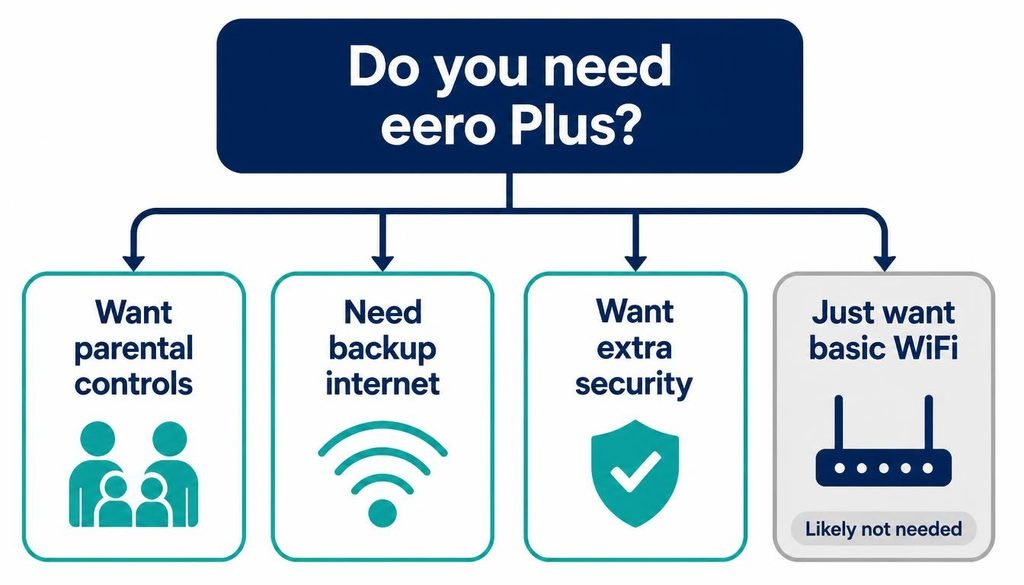
- Families who want parental controls: Likely worth considering. Content filters and profile scheduling are the clearest reason to subscribe. Compare with any controls your device or router already provides.
- Security conscious users: Moderate value. Network level blocking helps devices that cannot run antivirus, but it is a layer, not a complete defense.
- People who dislike ads: Optional. It reduces ads across the home, but it will not clean every app.
- Users needing backup internet: Strong fit if outages hurt your work. Check that you will use the right hardware and plan.
- People already paying for similar tools: If you already pay for a VPN, a password manager, and antivirus, compare the real overlap before subscribing.
- Users who only want ordinary WiFi: Probably not needed. Eero says eero Plus is not required to keep receiving security updates, and the network is designed to be safe without it.
Recommendation: Subscribe if you will use at least two or three features that you would otherwise pay for or go without. Skip it if your goal is simply reliable WiFi.
Why would you need eero Plus?
Most people do not need it for the WiFi itself. You need it when you want control and extra protection beyond the basics.
Useful extras: filtering for children, remote access, outage backup, and bundled security apps. Features you may already have: a password manager, a VPN, or antivirus from another provider. Count those as overlap, not new value.
Is eero WiFi or just a router?
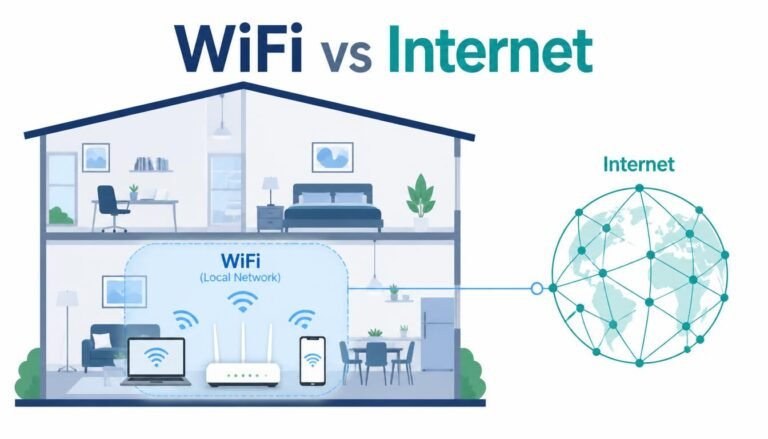
Eero is a mesh WiFi system. It uses several units placed around your home to spread coverage. One unit connects to your modem or provider equipment and acts as the gateway. It manages the network, and the other units extend it.
Here is how the pieces differ:
- Internet service provider: the company that delivers internet to your home.
- Modem: connects to the provider line.
- Router: directs traffic between your devices and the internet.
- Mesh WiFi system: several units working as one network.
- eero Plus: a subscription layered on top. It is not the physical equipment.
If another router sits in front of eero and eero runs in bridge mode, many Plus features stop working properly. Here is a guide to accessing your router settings if you need to check your setup.
eero Plus vs eero Secure
Eero Secure was the earlier name. Eero’s transition notice says US customers billed directly by eero moved to eero Plus on November 15, 2022.
The current product page says eero Secure is no longer sold by eero or offered for new free trials, though it may still be available from select authorized resellers.
Some internet providers still bundle an eero Secure version. Astound says its bundled Secure plan lacks DDNS, the VPN, Malwarebytes, and 1Password. Nova in Iceland says Secure comes with its eero devices and that Plus includes everything in Secure. These are provider specific, so read your own plan.
Does eero Plus include a VPN?
Yes, a VPN powered by Guardian is included. The details matter.
- Eero’s setup guide describes it as protection for your phone or tablet when you are off your eero network.
- It covers up to five devices, and each device counts against the limit once enabled.
- It runs through the eero app or the Guardian app, and only the network owner sees it in the eero app.
- It supports the WireGuard protocol, with other options planned.
- Streaming services may block VPN traffic, so you may need to disconnect.
What it does not do: it does not automatically protect every device on your home WiFi, and it is not complete anonymity or antivirus. At home, the network level protections do that work instead.
What are the limitations of eero Plus?
- Region: Eero Plus is not available in every country, and eero says it is not supported where it is not sold.
- ISP bundles: If your provider bundles its own version of eero security software, Plus may not be supported.
- Bridge mode: Some features, including DNS filtering, historical data, and Hotspot Backup, do not work properly. Many other advanced features are also unavailable.
- eero Business: Plus is not compatible with networks that use eero Business.
- Guest network: Devices on it are not covered.
- Overlap: You may already own a VPN, password manager, or antivirus.
- Not a speed boost: It does not increase your internet speed. If your WiFi is slow, start with fixing common WiFi problems.
- Backup limits: Cellular backup needs eero Signal and an annual plan, and data allowances apply.
How do you subscribe to eero Plus?
Eero’s subscription guide says you need an eero system, the eero app on iOS or Android, and a network that is not in bridge mode.
From the eero app:
- Open the app and tap Home.
- Tap the eero Plus button.
- Choose Yearly or Monthly.
- Pick a payment method, such as Apple Pay or Google Pay.
- Confirm the recurring charges and tap Subscribe to eero Plus.
- Check your status under Security & privacy on the Home tab.

From the website (US and Canada): Go to account.eero.com, log in, choose a plan, and complete payment.
To manage or cancel: Check status in Security & privacy, or use Settings, then Account settings, then Manage at account.eero.com. If you subscribed through Apple or Google, you manage it with them. Amazon bundles are managed on Amazon’s subscription page. Cancel at least 24 hours before renewal.
Menu names can vary by app version and region.
What should you check before buying eero Plus?
- Your eero network is not in bridge mode.
- Your country supports Plus, and your provider does not bundle its own version.
- You know the exact price shown on your account.
- You listed overlapping subscriptions you could cancel.
- You will use at least two or three features.
- Your devices are on the main network, not the guest network. This includes things like a printer, so see how to connect a printer to a wireless network and how to connect a smart TV to WiFi if you need to move devices.
- If you want cellular backup, you understand the annual plan requirement.
Conclusion
Eero Plus is a bundle of security, family controls, remote access, and partner apps built on top of eero WiFi. It is most useful for families, smart home owners, and people who would pay for several of these tools anyway. It is least useful if you only want dependable WiFi.
Compare your real needs against the checklist above, then check the live price in the app. For more help with home networks, browse the other networking guides on Problevo.
FAQs
Why do I need eero Plus?
You may not. Eero works without it. Plus makes sense if you want content filters, network level threat blocking, remote access, backup options, or bundled apps like a VPN and password manager. It is a convenience and control upgrade, not a requirement for WiFi.
What is the difference between eero and eero Plus?
Eero is the hardware and basic network tools, such as guest WiFi, profiles, and updates. Eero Plus is the paid subscription that adds filtering, ad blocking, history, remote access, partner apps, and extra support. The hardware does not change when you subscribe.
Why would I need eero?
Eero is useful when one router cannot cover your home well. Several units work together as a mesh, and you manage everything in an app. You need an internet connection from a provider either way. Eero improves how WiFi is spread, not the speed you buy.
Is eero WiFi or just a router?
Eero is a mesh WiFi system. One unit connects to your modem and works as the router, while the others extend coverage. It does not supply internet. Your provider does that, and eero Plus is only an optional subscription.
Is eero Plus worth the money?
It is worth it if you will use several features, such as parental controls, backup, and the bundled apps. It is not worth it for basic WiFi only. Count any services you would cancel, then compare that total with the price shown in your app.
How much does eero Plus cost?
In the US, eero lists $9.99 per month or $99.99 per year. Other regions have different prices and currencies. Check the price in your eero app or account before buying, because trials and prices can change.
Is eero Plus the same as eero Secure?
Eero Plus is the newer name for eero Secure, renamed in 2022. Some internet providers still bundle a Secure version with fewer extras. Your provider’s plan decides what you get, so read its feature list.
Does eero Plus include a VPN?
Yes, through Guardian, for up to five devices. It is meant mainly to protect a phone or tablet away from your eero network. It does not automatically cover every home device, and it is not antivirus or full anonymity.
Can you use eero without eero Plus?
Yes. Eero works as a WiFi system without a subscription, and eero says it is designed to stay secure and receive updates. You lose the Plus extras, such as content filters, ad blocking, and remote access.
Is eero Plus available in every country?
No. Availability varies by country, and Plus is not supported where eero does not sell it. It may also be unavailable if your provider bundles its own security software. Check eero’s regional availability page and your account before subscribing.