
How to Get Internet Without Cable or Phone Line (2026)
You can cancel cable TV, drop the landline, and still have fast home internet, but only if you pick a connection that reaches your address. This guide explains how to get internet without cable or phone line, what each option needs, and what it can really cost.
Four things are often confused: cable TV, cable internet, a phone line, and WiFi. They are separate. This article separates them first, compares eight options, and ends with a setup checklist.
Quick Answer
⚡ Quick Answer: How to Get Internet Without Cable or Landline
- Fiber Internet: The fastest standalone option that delivers high-speed internet over fiber-optic lines without needing traditional coaxial cable TV or landline phone plans.
- 5G / 4G LTE Home Internet: Wireless home internet from cellular carriers that connects directly to local cell towers via a plug-and-play wireless gateway router.
- Fixed Wireless Internet: High-speed broadband delivered via a radio receiver installed on your roof that connects to a local service provider tower.
- Satellite Internet: Nationwide coverage option (such as Starlink or HughesNet) that delivers wireless internet directly to a satellite dish installed at your property.
- Mobile Hotspot: Emergency or low-data option that shares your smartphone cellular data connection with laptops or TVs via Wi-Fi or USB tethering.
- First Step: Test your home address availability with local fiber and 5G cellular carriers to confirm standalone internet coverage before selecting a provider.
Table of Contents
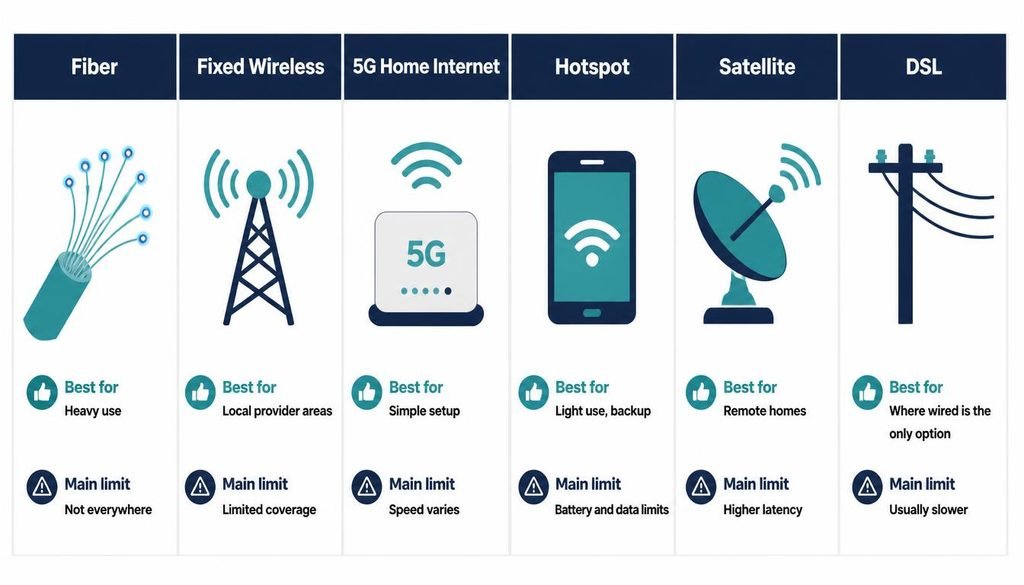
Internet Options at a Glance
| Internet option | Cable or landline required? | Installation needs | Best for | Main limitation |
|---|---|---|---|---|
| Fiber | No, but fiber must reach your address | Provider equipment, often a technician | Heavy use and many devices | Not available everywhere |
| Fixed wireless | No | Receiver or antenna, sometimes mounted | Areas served by a local provider | Coverage often limited to certain providers |
| 4G LTE or 5G home internet | No | Plug in a provider gateway, often self setup | Covered homes wanting a simple setup | Speed varies with signal and traffic |
| Smartphone hotspot | No | None, if your plan allows tethering | Light use, travel, backup | Battery drain and hotspot data limits |
| Dedicated mobile hotspot | No | Device plus a data plan | Portable use for several devices | Device cost and data limits |
| Satellite | No | Dish with a clear view of the sky, router | Remote and rural homes | Higher latency, equipment and data terms |
| DSL | Uses telephone line wiring, voice plan may not be needed | Existing line and provider modem | Where it is the only wired option | Usually slower than newer options |
| Public or community WiFi | No | None | Short, light use | Security and availability |
These are general distinctions, and individual setups vary. Fiber may not need a landline subscription, but it does need fiber infrastructure. Cable broadband can often be bought without cable TV, depending on the provider.
How to Get Internet Without Cable or Phone Line?
Can You Get Internet Without Cable or a Phone Line?
Yes. Here is what each term means:
- Cable TV is a television package. Cable internet uses the same coaxial network, but many providers sell it as a standalone plan. AT&T notes that standalone internet service is offered in many areas, and HighSpeedInternet.com says discounted bundles are also sold as standalone plans.
- A landline is voice telephone service. DSL sends internet over copper telephone wiring, so the line is still used, even when no voice plan is bought.
- Fiber uses its own optical lines and does not depend on a landline.
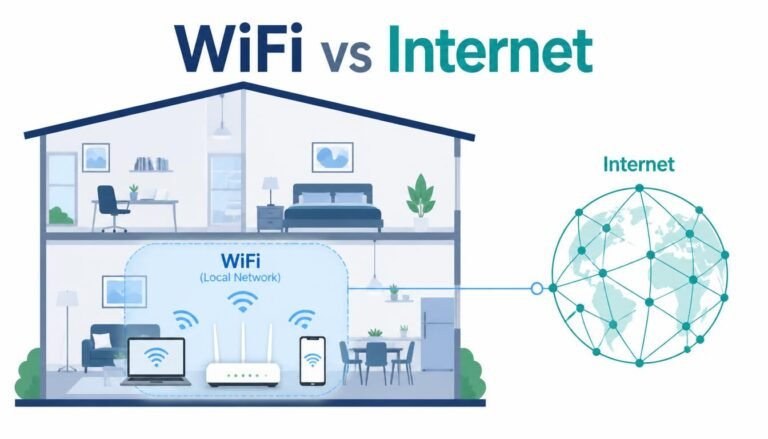
- WiFi is only the local wireless link between your devices and a router. It is not an internet service. For a deeper explanation, see our guide on whether WiFi and internet are the same thing.
So cancelling cable TV or a landline does not automatically mean losing internet.
Best Ways to Get Internet Without Cable or a Phone Line
1. Fiber Internet Without a Traditional Landline
Fiber carries data as light through glass lines. Your provider installs or activates equipment at your home, and you connect a router or use the one supplied. Fiber is commonly linked with fast, consistent performance, but its footprint is still growing, so it varies by neighborhood.
2. Fixed Wireless Home Internet
Traditional fixed wireless sends a signal from a provider’s tower to a receiver at your home. According to HighSpeedInternet.com, many of these providers are local companies, so look beyond national brands. It suits places where wired options are limited. Performance depends on distance, obstacles, and the provider.
3. 4G LTE and 5G Home Internet
This uses a cellular network instead of a cable line. A provider gateway receives the signal and creates your WiFi network. AT&T describes it as appealing for simple, plug and play setups, and HighSpeedInternet.com notes the gateway falls back to 4G LTE where 5G is unavailable.
Check these before you buy:
- Service area at your exact address.
- Data policies. Some providers may slow speeds during congestion.
- Where the gateway sits. Signal strength changes with location and building materials.
4. A Smartphone Hotspot
A hotspot shares your phone’s cellular data with other devices. It works for travel, backup, and light use.
- Android: swipe down for Quick Settings and tap Hotspot, then touch and hold it to see the name and password, according to Android Help. Menu names vary by version and manufacturer.
- iPhone: go to Settings, then Personal Hotspot, and turn on Allow Others to Join, as described by Apple Support.
Every connected device uses your mobile data and drains your battery. Carriers may limit hotspot data or speed even on unlimited plans. You can learn how to check how much hotspot data you have left and how a mobile hotspot works.
5. A Dedicated Mobile Hotspot
A dedicated hotspot is a separate device with its own SIM or plan. It keeps your phone free and often supports more devices, but you pay for the device and a data plan. It suits portable use, such as travel or a temporary home.
6. Satellite Internet
Satellite connects a dish at your home to satellites in orbit. AT&T notes that latency is often higher than wired services, and plans may include data limits or equipment costs. HighSpeedInternet.com says satellite is widely available but has downsides such as limits and latency.
7. DSL Internet Without a Telephone Subscription
DSL generally uses telephone line infrastructure. Some providers sell it without a voice plan, but availability depends on the line and provider. AT&T describes DSL as generally older technology that may be slower than newer services, so confirm speeds before ordering.
8. Public WiFi and Community Internet
Libraries, cafes, and community networks can give short term access. Public WiFi is better for light use. Use only networks you are allowed to join, avoid sensitive transactions, and consider a VPN. Do not try to access a network without permission.
How to Choose the Best Internet Option for Your Home
| Your situation | Options to look at first |
|---|---|
| Urban home, many devices, gaming | Fiber where available, then 5G home internet |
| Suburban home, light to moderate use | 5G or 4G home internet, fixed wireless |
| Rural home, no wired service | Fixed wireless, 4G or 5G home internet, satellite |
| Renting short term or traveling | Phone hotspot or dedicated hotspot |
| Backup during outages | Phone hotspot |
| Very low budget, light use | Phone hotspot on an existing plan, public WiFi |
Also compare how many devices are online, how much you stream or take video calls, your data use, and whether you can install equipment. No option is best for every household.

How to Get Home Internet Without Installation
Some options allow self setup:
- 5G or 4G home internet: you usually plug in a gateway and follow the provider’s app or instructions.
- Starlink and similar satellite kits: designed for self install, but the dish still needs a good location.
- Phone hotspot: no equipment beyond a plan that allows tethering.
“No installation” does not mean no equipment, no provider, or no cost. Fiber and fixed wireless may still need a technician, an antenna, or a mounted receiver.
How to Get WiFi at Home Without Cable
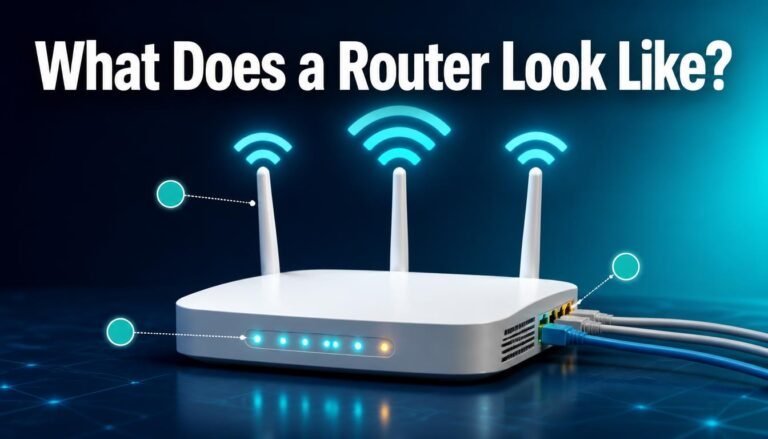
Separate two ideas: the internet source and the WiFi router. The source can be fiber, cellular, satellite, or DSL. The router then shares it as WiFi.
Many gateways from 4G and 5G home internet providers already include WiFi. HighSpeedInternet.com notes that many modems come with a built in router. If yours does not, connect a separate router to the modem or receiver with an Ethernet cable. You can access your router settings to rename the network or set a password.

Can You Get WiFi at Home Without a Router?
Yes, in limited ways:
- A smartphone hotspot acts as the router, but it uses mobile data and battery.
- Public WiFi works away from home and has security limits.
- A device with built in cellular connects directly, but only that device benefits.
A router by itself does not create internet. It needs a source.
Can You Get Internet Without a Provider?
Not for normal public internet. Internet access comes through an internet service provider or an organization that provides connectivity. Buying a router alone does not create a connection.
What you can have is no separate home subscription: for example, using a phone plan, a library, or a network you are authorized to join. Those still depend on a provider somewhere.
How to Get Internet Without a Provider for Free
Legal options include public WiFi, libraries, community programs, assistance programs you qualify for, and a network shared with permission. Mobile data, hotspot service, and satellite are not automatically free. For a longer list, read our guide on legitimate ways to get free internet.
How to Set Up Internet Without Cable or a Phone Line
Step 1: Check which services reach your address.
Step 2: Compare monthly cost, equipment, data limits, and contract terms.
Step 3: Choose a connection type.
Step 4: Get the gateway, modem, receiver, hotspot, or dish.
Step 5: Activate service using the provider’s official instructions.
Step 6: Connect devices by WiFi or Ethernet. Examples include your TV and a printer.
Step 7: Test coverage, speed, and reliability at different times of day.
Exact steps depend on the technology and provider, so follow your provider’s setup guide.
Common Problems and How to Fix Them
| Problem | Likely Cause | Practical Fix |
|---|---|---|
| Cellular home internet has a weak signal | Distance from tower, walls, device position | Move the gateway near a window or higher spot and retest |
| Hotspot connects but has no internet | Phone has no data or plan blocks tethering | Test mobile data on the phone first |
| Mobile data works on the phone but not on connected devices | Tethering restriction or hotspot data used up | Check the plan’s hotspot allowance |
| Home internet gateway will not activate | Account or address not verified, outage | Follow the provider’s activation steps or contact support |
| Internet speed is inconsistent | Network congestion, signal changes, obstructions | Test at different times and positions |
| Data allowance runs out quickly | Video, updates, backups | Check usage and adjust settings |
| WiFi is available but there is no internet | Source is down, not the router | Restart the gateway, then check provider status |
| A device cannot connect to WiFi | Wrong password, range, or device setting | Recheck the password and move closer |
- Check the source first. Test with one device and, if possible, a cable.
- Restart the gateway or modem once, wait a few minutes, then test again.
- Move the equipment to reduce obstructions.
- Check usage and plan terms for caps or slowdowns.
For general WiFi issues, see our guide to fixing WiFi problems. Do not disable security features or try to bypass carrier limits as a fix.
Which Internet Option Is Best for Rural Areas?
- Fixed wireless: can be good where a local provider serves your area, but obstacles affect it.
- 4G or 5G home internet: depends on cellular coverage at your house.
- Satellite: reaches many remote places, but latency and terms need checking. It needs a clear view of the sky.
- DSL: only where lines exist, and often slower.
Check coverage, equipment, and weather or congestion limits before choosing.
Is Internet Without Cable Cheaper?
Sometimes. Compare the total cost, not the advertised price. Include:
- Equipment purchase or rental.
- Activation or installation fees.
- Data overage or throttling terms.
- Taxes and fees.
- Promotional price changes after the first period.
- Contract length.
Compare current local offers, because prices differ by country and provider.
FAQs
How to get internet without a phone line or cable?
Choose a service that reaches your address: fiber, 5G or 4G home internet, fixed wireless, satellite, or a phone hotspot. Check coverage first, because availability depends on location. Many providers sell internet only plans, so you usually do not need a cable TV package or a landline voice plan.
How to get Wi-Fi without cable or phone line?
Get an internet source that does not need cable or a landline, then use a router or gateway to share it as WiFi. Many 5G and 4G home internet gateways already include WiFi. A phone hotspot can also create WiFi, but it uses mobile data and battery.
How can I have internet but no phone line?
Fiber, cable, fixed wireless, cellular home internet, and satellite do not need a phone line. DSL still uses telephone wiring, though some providers sell it without a voice plan. Confirm line requirements and availability with the provider before ordering.
Can I get internet without a provider?
Not for normal home internet. Access comes through an ISP or an organization that provides it. You can avoid a separate home subscription by using public WiFi, a library, or a network shared with permission, but those still rely on a provider. A router alone does not create internet.
Can I get WiFi at home without a router?
Yes, in limited ways. A smartphone hotspot can act as the router, but it uses mobile data and drains battery. Public WiFi works away from home. A router by itself cannot provide internet, because it needs a source such as a modem or cellular connection.
Can I get home internet without installation?
Sometimes. Eligible 5G or 4G home internet and satellite kits are designed for self setup, and a phone hotspot needs no installation. No installation does not mean no equipment or cost. Fiber, fixed wireless, and some satellite setups may still need a technician or mounting.
Can I use my phone as home internet?
Yes, for light use or backup. Check your plan’s hotspot data limits, because heavy use can drain data and battery quickly. Android and iPhone both include a hotspot feature, but carriers may restrict or slow tethered data. A home internet plan suits busy households better.
What is the cheapest way to get home internet without cable?
It depends on location and use. A phone hotspot on an existing plan may add the least cost, but data caps and speed limits can make it a poor fit for heavy use. Compare total monthly cost, equipment, and data terms for two or three services at your address.
Is satellite internet available in rural areas?
Often, yes. Satellite can reach many remote locations, but it needs a clear view of the sky, and latency, equipment costs, and data policies vary by provider. Compare it with fixed wireless and cellular home internet if those cover your address.
Final Verdict: Which Option Should You Choose?
- Fiber available: usually the first option to check for heavy use.
- No fiber, good cellular signal: compare 5G or 4G home internet.
- Rural and uncovered: compare fixed wireless and satellite.
- Temporary or backup: use a phone hotspot or a dedicated hotspot.
Your next step: check coverage at your address, then compare the full monthly cost of two or three services. For more help with home networks, read our guide on fixing WiFi problems or accessing your router settings.