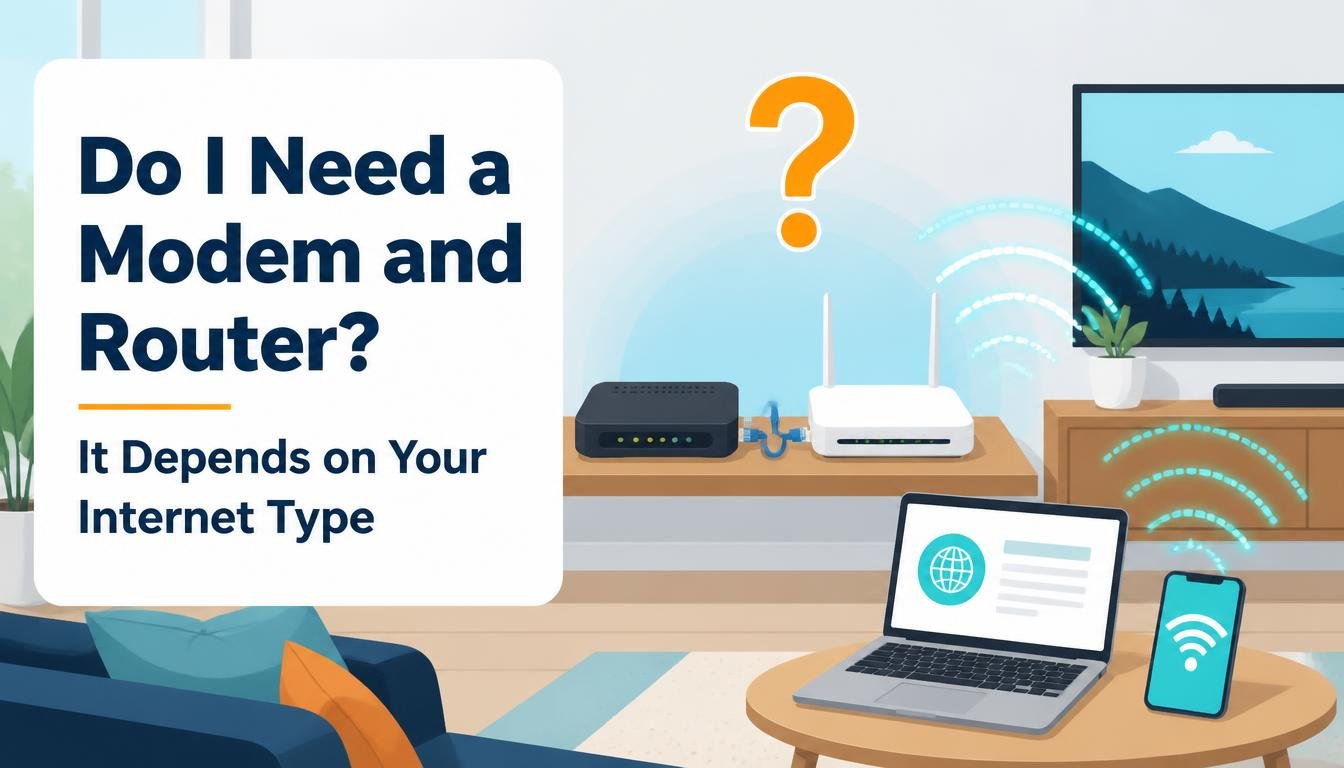
Do I Need a Modem and Router? A Clear Guide (2026)
You sign up for internet, find one box already sitting in the corner, and wonder whether you also need to buy a second one. That confusion is common, and the honest answer is that it depends on your connection type and the equipment your provider installed.
Quick Answer (Do I Need a Modem and Router)
⚡ Quick Answer: Do You Need Both a Modem and a Router?
- Two Distinct Roles: A modem translates the signal from your Internet Service Provider (ISP), while a router broadcasts that internet connection wirelessly (Wi-Fi) to your devices.
- 2-in-1 Gateway Devices: Many modern setups use a single combination gateway device that contains both a modem and a router in one physical box.
- Fiber & Satellite Setup: Fiber connections use an Optical Network Terminal (ONT) instead of a traditional modem, which then connects directly to a Wi-Fi router.
- Fixed Wireless & 5G: Cellular and fixed wireless systems typically use a standalone 5G/4G wireless gateway provided directly by your carrier.
- Quick Check: Look at your hardware. If you have a single box supplied by your ISP with built-in Wi-Fi antennae or ports, you are using an integrated gateway device.
Table of Contents
What equipment does your setup need?
| Your Internet Setup | Equipment You May Need | What to Check |
|---|---|---|
| Cable internet | A cable modem and a router, or one gateway | Whether the modem is on your provider’s approved list |
| DSL internet | A DSL modem and a router, or a DSL modem router | The modem must be built for DSL, not cable |
| Fiber internet | An ONT and a router, or a combined ONT and router unit | Who owns the ONT and whether your router has a suitable WAN port |
| Fixed wireless internet | An outdoor antenna unit and an indoor router | Whether the provider supplies both and allows your own router |
| Satellite internet | Provider supplied satellite equipment, often with its own router | Whether your own router can be connected and how |
| Combined modem router gateway | Usually nothing more for basic use | Add a router only if you need better coverage or features |
| ISP supplied all in one device | Usually nothing more | Check the label and your provider’s documentation |
Providers do not all use the same hardware. Treat this table as a starting point, then confirm with your provider.
What does a modem do?
A modem connects your home to your internet service provider (ISP). It translates the signal that travels over your provider’s line into a connection your network can use, and it does the reverse for outgoing data.
The line depends on your technology. Cable uses coaxial cable, and DSL uses a phone line. Frontier notes that cable, DSL, and fiber each need a different kind of modem, which is why a modem built for one technology generally does not work on another.
A modem on its own usually gives you a single wired connection. It does not manage a home network, and most modems do not provide WiFi.
What does a router do?
A router creates your home network and directs traffic between your devices and the internet. It gives each device a local address, and it lets phones, laptops, TVs, and printers share one connection by Ethernet cable or WiFi.
A router does not create an internet connection by itself. It needs an upstream source, such as a modem, a fiber ONT, or a provider gateway. Without one, it can still connect your devices to each other, but nothing reaches the internet.
If you want to understand how the two ideas differ, read the difference between WiFi and internet.
What is the difference between a modem and a router?
| Feature | Modem | Router |
|---|---|---|
| Purpose | Connects to your ISP | Builds and manages your home network |
| Connection | Talks to the provider line | Connects to the modem, ONT, or provider gateway |
| Device sharing | Often one wired device | Many devices at once |
| WiFi capability | Usually none, unless it is a gateway | Common on home routers |
| Typical placement | Where the provider line enters your home | Often in a central spot for coverage |
Some devices combine both roles, so a single box can break these rules. That is covered below.
Do you need both for home WiFi?
For most homes, yes, you need both functions. They may be two boxes or one.
A common flow looks like this:
Internet service → compatible modem or ONT → router or gateway → phones, laptops, TVs, and other devices
With a gateway, the middle steps happen in one box. With fiber, the ONT usually replaces the modem.
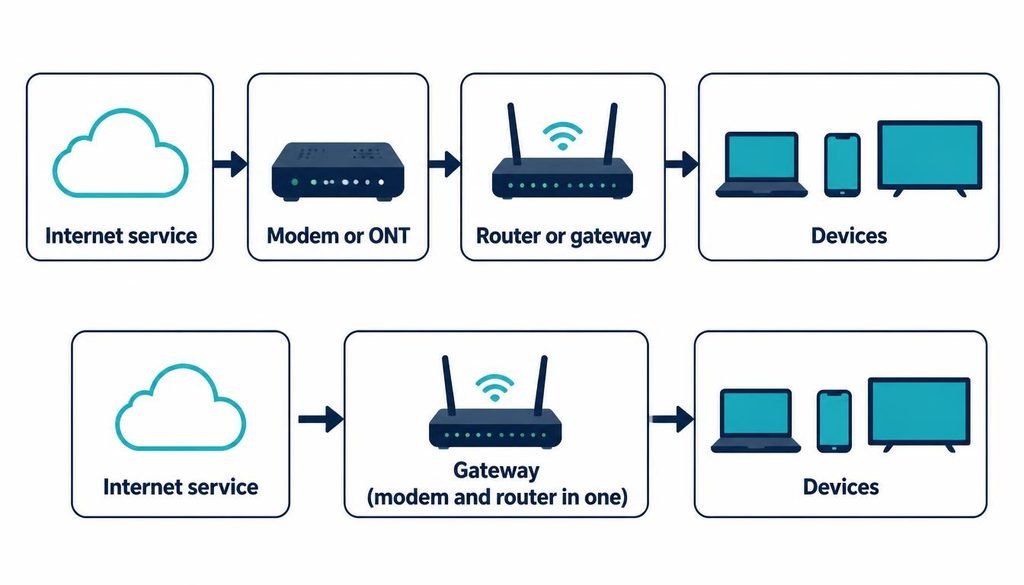
Some guides say you always need a modem. That is true only if you count an ONT as the modem. Others say a router cannot exist without a modem, which ignores setups where the router connects to an ONT or a provider antenna. The more accurate rule is this: you need something that connects to your provider, and something that shares the connection.
Do you need a modem and router for different internet types?
Cable internet

Cable uses a coaxial line and a cable modem. You can often rent a modem or gateway from your provider, or buy a compatible modem and add a router.
Buying your own modem can avoid rental charges, but only if your provider supports it. Many providers publish approved device lists, so check the list before you buy. Also check what your provider includes. Spectrum, for example, states that its internet plans include a modem at no additional cost, so buying your own would be unnecessary in that case.
DSL internet
DSL travels over a phone line and needs a DSL modem. Combined DSL modem routers exist, and TP-Link sells models of that type. If you buy your own, make sure it supports DSL, because a cable modem will not work on a phone line.
Fiber internet
Fiber usually uses an ONT, short for optical network terminal. It converts light signals from the fiber line into Ethernet that your router can use. It is not a traditional cable modem, and a cable modem cannot connect to a fiber line.
Providers handle this differently. Mercury Fiber says its installs include a professionally placed ONT and a matched router. UTOPIA Fiber says it installs the ONT and expects you to supply your own router. Some providers also use combined ONT and router units.
If you want to keep your own router, Mercury advises that it needs a Gigabit Ethernet WAN port to connect to the ONT. For background on getting service, see how fiber internet works and how to get it.
Fixed wireless internet
Fixed wireless uses an outdoor antenna or customer premises equipment (CPE) that talks to a nearby tower. A cable runs inside to a router. Upward Broadband describes this as an antenna feeding a router, which can sometimes be a modem router combination, and says your own router must be compatible with the provider’s equipment.
Because designs vary, ask your provider what is supplied and whether you can add your own router.
Satellite internet
Satellite equipment is provider specific. Starlink kits include a WiFi router, and some setups let you add your own router, often through an Ethernet adapter and a setting called bypass mode, depending on the hardware version. Traditional satellite services use their own provider supplied modem. Check your provider’s documentation before connecting extra equipment.
What is a modem router combo?
A modem router combo, often called a gateway, puts modem and router functions in one device. Your provider may supply one, or you can buy one.
Advantages: Fewer boxes, simpler setup, and one device to manage. Optimum describes this as simpler, with the provider often supplying it.
Limitations: You cannot upgrade the modem and router separately, and if the device fails, you lose both functions. Frontier and Optimum also note that separate devices can be easier to troubleshoot and upgrade.
A separate router is worth considering when you want stronger coverage, a mesh system, or more control than the gateway offers. If coverage is the problem, see how to fix a weak WiFi signal.
What happens if you use a router without a modem?
A router connected to nothing cannot give you internet. It can still create a local network, so devices on it can share files or print.
A router does not always need a separate modem. If it connects to an ONT, a fixed wireless unit, or another network source that already provides the internet, it can share that connection. The point is that an upstream connection must exist.
Do routers have built in modems?
A standalone router does not. A gateway does, and some ISP supplied devices combine several functions.
To find out, check these in order:
- The label on the device and the exact model number.
- The manufacturer’s specifications for that model.
- Your provider’s documentation or support page.
Do not rely on the name alone. Some DSL modem routers are sold under the router name.
How can you tell if you need a modem or router?
- Check your internet technology and ISP. Cable, DSL, fiber, fixed wireless, and satellite have different needs.
- Inspect your existing equipment. Note every box between the wall and your devices.
- Identify incoming connections. Look at what plugs into each box, such as coaxial cable, a phone line, or a fiber cable.
- Look up the exact model. Search the manufacturer’s page for the model number.
- Confirm whether it already routes and broadcasts WiFi. If it does, you may not need a separate router.
- Verify compatibility before buying anything. Ask your provider or check its approved device list.
Port appearance alone is not conclusive. A device with Ethernet ports might be a router, a gateway, or an ONT.
What does a modem look like compared with a router?
Designs vary a lot, so use these only as clues:
- Coaxial connector: may indicate a cable modem or gateway.
- Phone line connection: may indicate DSL equipment.
- Fiber cable connection: may indicate an ONT or a fiber gateway.
- WAN or Internet port: usually found on a router. Mercury and TP-Link both describe the router’s WAN port as where the modem connects.
- Antennas: often on routers and gateways, though some routers hide them inside.
- Indicator lights: can show power and connection status, but labels differ by brand.
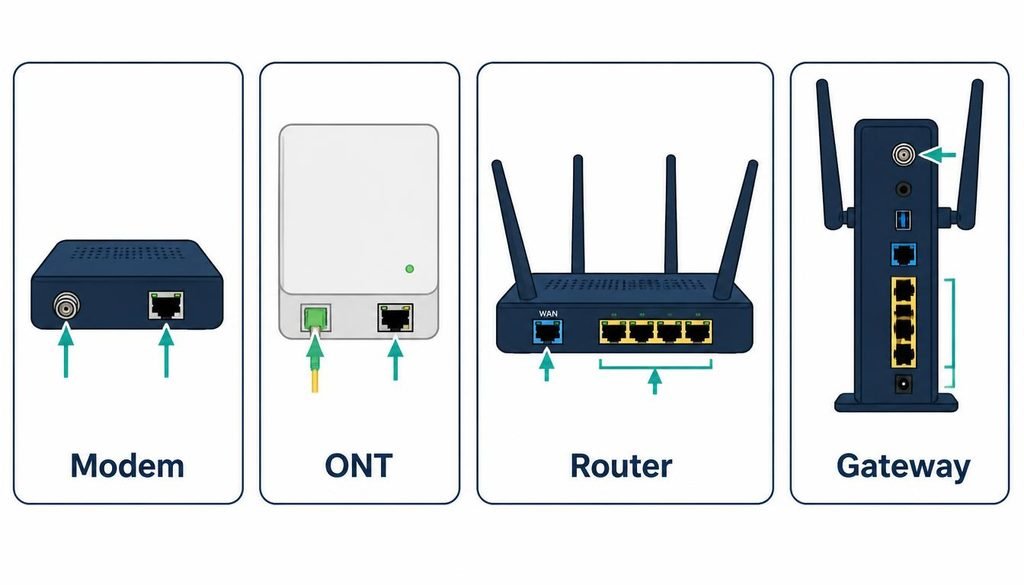
These clues help but do not identify a device for certain. An original illustration showing a modem, an ONT, a router, and a gateway side by side would help readers.
Should you rent or buy your own equipment?
There are real trade offs.
- Renting: Your provider supports and replaces the device, and some providers include equipment at no extra charge. You may pay a recurring fee elsewhere.
- Buying: You may avoid rental charges and gain control, but you must confirm compatibility and handle replacement yourself.
- Replacement: Equipment wears out, so see how long modems typically last and how to identify a failing router.
Fees and policies vary by provider, so compare your own bill before deciding.
How do you connect a router to a modem?
Mercury Fiber describes this order, which works for many setups. Check your provider’s guide first.
- Turn off both devices.
- Plug the modem into your provider line.
- Use an Ethernet cable from the modem output port to the router’s WAN or Internet port.
- Turn on the modem first, wait for it to connect, then turn on the router.
- Open the router settings to set your WiFi name and password. This guide explains how to access your router settings, and this one covers how to change the WiFi password on your router.
Bridge mode, router mode, and access point mode
If your gateway and your own router both route traffic, you can get double NAT, where traffic is translated twice. Double NAT can cause problems with gaming, remote access, and port forwarding.
There are two common fixes. Bridge mode turns off routing on one device so the other handles it. Access point mode keeps the first device as the router and lets the second extend WiFi without routing. Brand terms differ, so check your device’s documentation.
Common modem and router setup mistakes
- Buying an incompatible modem. Check your provider’s approved device list first.
- Assuming fiber needs a cable modem. Fiber uses an ONT instead.
- Connecting to the wrong port. Use the router’s WAN or Internet port for the upstream cable.
- Confusing WiFi with internet. A device can connect to WiFi and still have no internet. Start with fixing common WiFi problems.
- Running two routing devices blindly. Learn whether you need bridge mode or access point mode.
- Buying a router you do not need. Check whether your gateway already routes and broadcasts WiFi.
Conclusion
You need a way to connect to your provider and a way to share that connection. The goal is compatible internet access and reliable home networking, not necessarily two separate boxes.
- Cable or DSL: a modem and a router, or one gateway.
- Fiber: an ONT and a router, or a combined unit.
- Fixed wireless or satellite: follow the provider’s equipment, then add a router only if allowed.
- Gateway already installed: you probably do not need more for basic use.
Browse the other networking guides on Problevo for help with setup, coverage, and troubleshooting.
FAQs
What happens if you use a router without a modem?
The router can still build a local network, so devices can talk to each other and share printers. It cannot create internet access on its own. It needs an upstream source such as a modem, an ONT, or a provider unit that already supplies the connection.
Do I need a modem and router for home WiFi?
Usually yes, because WiFi comes from a router and the connection comes from a modem or ONT. Both functions can sit in one gateway, so you may only need one box. Check what your provider installed before buying anything.
Do routers have built in modems?
Standalone routers do not. Gateways and some ISP supplied devices do. Some DSL modem routers combine both too. Check the model number and the manufacturer specifications rather than assuming from the name.
How do you tell if you need a modem or router?
Identify your connection type, then check each device on your line. Note the model numbers, whether the device routes and broadcasts WiFi, and the connections it uses. Confirm compatibility with your provider before buying.
Can a modem provide WiFi by itself?
A basic modem does not. Only a gateway or modem router combination provides WiFi. If your device has antennas or a WiFi network name, it likely includes a router, but confirm with the model details rather than guessing.
Do I need a modem for fiber internet?
Not a traditional cable modem. Fiber usually uses an ONT, which converts fiber signals into Ethernet. You still need a router or a combined unit to share the connection. Your provider may supply both.
Can I use a modem router combo instead of two devices?
Yes. A combo is simpler and often suits basic needs. The trade off is that you cannot upgrade each part separately, and if it fails, you lose both. Choose separate devices if you want more control.
Can I use my own modem and router?
Often, but not always. Providers differ. Check the approved device list or ask support, especially for modems. Fiber and fixed wireless setups may also require provider equipment.
Is a gateway the same as a modem and router?
A gateway is a single device that performs modem and router functions together. It does not always include WiFi at the level of a dedicated router, so confirm features. Some providers call their combined device a gateway.
Does my internet provider supply a modem and router?
Many do, though terms vary. Some include equipment, some rent it, and some expect you to provide a router. Check your plan and bill for what is included before buying anything.