
Is WiFi and Internet the Same? The Clear Answer Guide (2026)
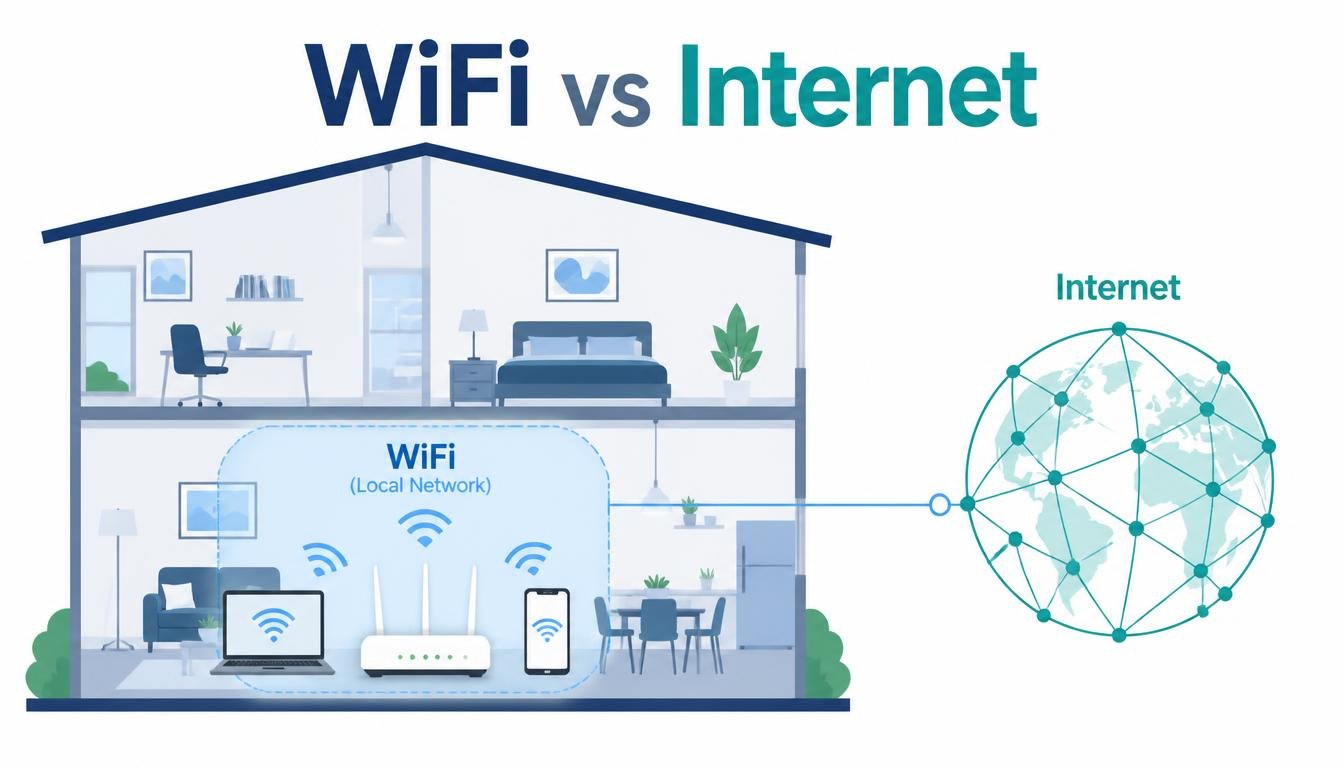
Your phone shows a full WiFi symbol, yet the page will not load. That moment is why so many people ask: is WiFi and internet the same? No. WiFi is a wireless way to connect devices to a local network, while the internet is the global network of networks that your provider connects you to.
The two usually work together at home, which is why the words get mixed up. This guide explains the difference in plain English, shows when one works without the other, and gives a step by step method for the “connected, no internet” problem.
⚡ Quick Answer: Wi-Fi vs. Internet Difference
- Wi-Fi (Local Network): Connects your devices wirelessly to a central router within a short physical range.
- Internet (Global Connection): The wide area network supplied by your Internet Service Provider (ISP) to deliver websites, streaming, and online data.
- Key Distinction: You can have a working Wi-Fi signal without internet access (e.g., printing locally), and you can access the internet without Wi-Fi using Ethernet cables or cellular mobile data.
Table of Contents
WiFi vs Internet Comparison Table
| Feature | WiFi | Internet |
|---|---|---|
| What it is | A wireless networking technology | A global network of interconnected networks |
| Main purpose | Connects compatible devices to a local network without a cable | Gives access to websites, apps, and cloud services |
| Router or access point involved | Commonly provided by a wireless router or access point | Reached through a modem, gateway, or cellular connection, often with a router in the home |
| ISP connection required | Not for local network traffic | Yes, some provider or access network is needed |
| Can it work without the other | Yes, a local WiFi network can run without internet | Yes, through Ethernet or mobile data |
| Common problems | Weak signal, wrong password, interference, WiFi switched off on the router | Provider outage, modem or gateway fault, plan limits, DNS errors |
| How to spot the problem | The device cannot see or join the network, or the signal is poor | The device joins the network but websites and online apps fail |
Local capabilities without internet depend on the network setup and the devices involved.
What Is WiFi?
WiFi is a wireless networking technology that lets compatible devices join a local network without a physical network cable. It uses radio signals between a device and a wireless router or access point. The Wi-Fi Alliance, the industry group behind the WiFi name, works on interoperability so that devices from different makers can connect to each other.
In most homes, the router provides WiFi. A wireless access point can do the same job in a larger space. Neither one is the internet itself.
Picture a simple home. A phone, a laptop, and a wireless router sit in the living room. The phone and laptop join the router’s WiFi network, so they can talk to the router and to each other. Whether they can reach websites depends on whether the router has a working connection to an internet provider.
A WiFi signal shows that a device can reach the router. It does not prove the internet is working.
What Is the Internet?
The internet is a global network of interconnected networks. The Internet Society describes it as independent networks that connect to one another, with no single center controlling it. It is not one machine, one company, or one cable.
The internet lets devices reach websites, email, cloud applications, video platforms, and other online services. An internet service provider, or ISP, supplies your home or phone with a connection into that wider network.
That connection can arrive through fiber, cable, DSL, fixed wireless, or a cellular network. AT&T lists both wired and wireless ways for the internet to reach a device, including Ethernet and cellular. A device does not need WiFi specifically. It only needs some way to reach the equipment or network that provides access.
What Is the Difference Between WiFi and Internet?
Think of WiFi as the private road network inside a gated property, and the internet as the public road network outside the gate. You can drive around inside the property without ever leaving it. To reach a distant city, the gate must connect to public roads.
The analogy has limits. WiFi is a radio link, not a physical road, and the internet is not one road but many independent networks. A phone can also leave the property through a different gate, such as a cellular network, without using the WiFi road at all.
So, is WiFi and internet the same? No, because WiFi connects your device to a local network, and the internet is what that network may or may not be connected to.

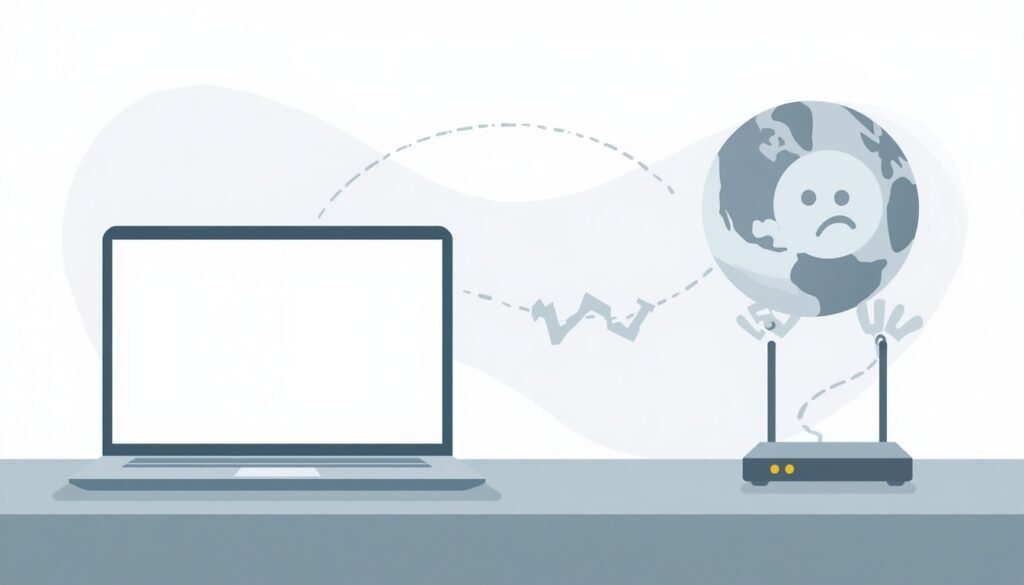
Here is a practical example. A phone is connected to home WiFi, but websites do not load because the internet service is down. The router still has power and still broadcasts its WiFi network, so the phone shows a connection. However, the router’s link to the provider has failed, so requests for websites have nowhere to go.
WiFi Signal Strength Is Not Internet Speed
Signal strength describes how well a device hears the router. Internet speed describes how quickly data moves between your home and the wider internet. That depends on your plan, the connection type, congestion, and the remote service.
A device can show full bars and still load pages slowly if the provider connection is congested or the plan is modest. The opposite also happens: a fast plan can feel slow in a far corner of the house. The FCC notes that neighboring WiFi networks can affect performance. If distance or walls are the problem, read how to fix a weak WiFi signal.
Can WiFi Work Without Internet?
Yes, a WiFi network can work without internet. A router or access point can keep broadcasting a local wireless network even when its connection to the provider has failed. What you can do on that network depends on the devices, applications, and security settings involved.
Possible examples include:
- Devices on the same network communicating with each other.
- Accessing a locally hosted file or service.
- Using some local smart home controls.
- Printing to a local printer. Here is how to connect a printer to WiFi.
- Opening the router’s local administration page. Here is how to access router settings.
Event printing guides, such as the Simple Booth Help Center, describe this kind of local network communication, where a tablet and a printer talk to each other without a venue internet connection. If you are curious about a related use case, see whether screen mirroring works without WiFi. None of these functions is guaranteed on every device or application.
Anything that depends on a remote server will stop working. That includes most websites, streaming services, cloud storage, and online games. A smart TV can join your wireless network yet fail to load streaming apps, which is covered in how to connect a smart TV to WiFi.
Can You Have Internet Without WiFi?
Yes. WiFi is one way to connect a device to a network, not the only way to reach the internet. Common alternatives include:
- Ethernet cable. A computer or TV connects by cable to a router or gateway.
- Mobile data. A phone uses the cellular network directly, with WiFi turned off.
- USB tethering. A computer borrows a phone’s connection through a cable.
- Another supported wired or cellular connection, such as a cellular home internet device.
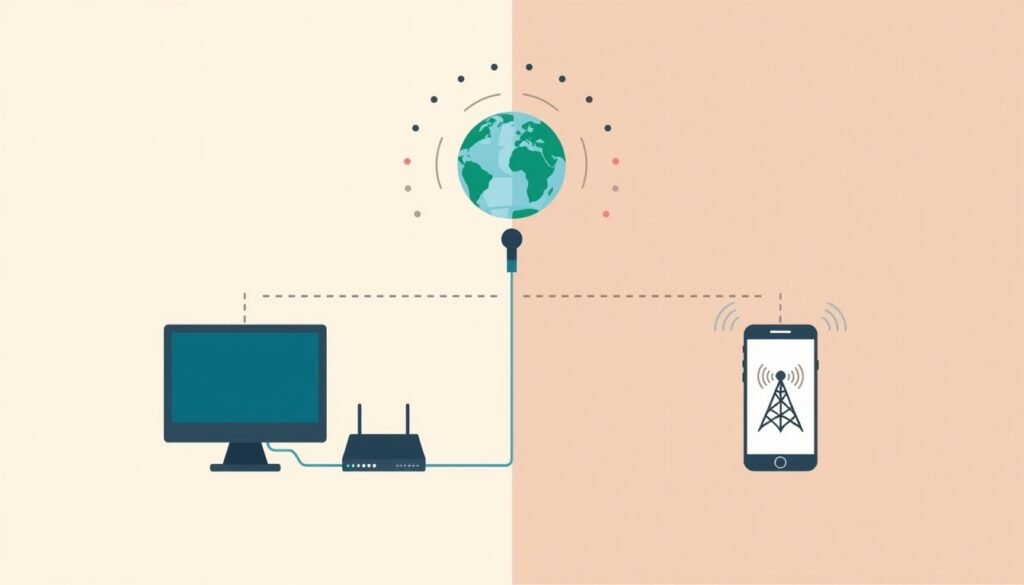
Mobile data and hotspots count against your mobile plan, so it helps to know how to check your remaining mobile hotspot data before you rely on them. For a stationary computer, the FCC says a direct Ethernet cable can give the highest speeds and avoid WiFi congestion.
Do You Need Both WiFi and Internet at Home?
It depends on what you want to do. For browsing, video streaming, cloud services, and online communication, you need internet access and a way to connect your devices to it.
WiFi is the convenient way to connect phones, tablets, and laptops. Ethernet can serve the same basic purpose for a desktop or a TV near the router. A local network can also be useful without an internet subscription for certain local tasks, such as printing or file sharing.
Is Home Internet the Same as WiFi?
No. Home internet is the service, and WiFi is one way to share it inside your home. Several separate roles are involved:
- Internet subscription: the plan you pay your provider for.
- Physical connection: the fiber, cable, DSL, fixed wireless, or cellular link from the provider.
- Modem or gateway: equipment that receives the provider’s connection.
- Router or wireless access point: equipment that directs traffic and creates the WiFi network.
- WiFi network: the wireless network that phones and computers join.
A combined modem router gateway can perform several of these functions in one device. Kinetic describes this kind of all in one gateway. Not every household needs a separate modem and router, so check what your provider supplied.
What Is the Difference Between WiFi and Internet on Mobile?
A phone can be in several different situations:
- WiFi with working internet: pages and apps load normally through your router.
- WiFi without working internet: the phone joins the router, but the router has no working connection to the provider. Pages fail even though the WiFi symbol appears.
- Mobile data with WiFi off: the phone reaches the internet through the cellular network and does not use your router at all.
- Connected to a hotspot: another phone is sharing its cellular connection over WiFi. You are using WiFi to reach that phone, and its mobile data to reach the internet.
- WiFi symbol but some apps fail: the network may work, but an app’s own servers may be unreachable or restricted.
Phones can also switch between WiFi and mobile data depending on settings, the operating system, and network conditions. Behavior is not identical across all phones, so check your device settings if the switching surprises you.
If I Have Internet, Do I Have WiFi?
Not automatically. Internet service means a connection reaches your home or device. WiFi needs equipment that creates a wireless network.
A household might have an Ethernet connection but no wireless access point, or the router’s WiFi feature might be switched off. If you want wireless connectivity, you need a router, gateway, or access point with WiFi enabled, plus a device that supports WiFi. Your provider’s equipment documentation will show how to turn it on.
Which Is Better, WiFi or Internet?
This is a false comparison. WiFi and internet are not competing alternatives, because they perform different functions. You cannot replace one with the other.
The more useful question is how to connect your devices to the internet:
- WiFi: the most convenient choice for phones, tablets, and laptops that move around. Reliability can vary with distance, walls, and interference.
- Ethernet: often the steadier choice for stationary devices such as desktops, TVs, and consoles. It needs a cable.
- Mobile data: useful away from home or as a backup. It depends on coverage and your plan limits.
Whichever you pick, internet access remains a separate requirement for online services.
WiFi and Internet Plans: What Are You Paying For?
Internet plans usually provide internet service through an ISP. WiFi is commonly provided by a compatible router or gateway. Some providers include a gateway, equipment rental, WiFi management, mesh equipment, or installation in their packages, while others charge for these separately.
Providers do not all price WiFi the same way, so do not assume it is always a separate charge. Check the actual plan details and your bill. Look for lines that name equipment rental, WiFi services, or installation before deciding whether you pay extra.
Why Does My WiFi Say Connected but No Internet?
This message means your device has joined the router but cannot reach the internet. For a wider overview, see how to fix common WiFi connection problems. Work through these steps in order.
Step 1: Check another device.
Try a second phone or laptop on the same network. If only one device fails, focus on that device. If every device fails, the problem is more likely with the router, modem, or provider.
Step 2: Check the router and modem or gateway.
Look at the status lights and compare them with the manufacturer’s instructions, because colors and meanings differ between brands. Many gateways have a separate light for the internet connection.
Step 3: Test a wired connection if available.
Connect a computer to the router with an Ethernet cable. If the wired computer also has no internet, the WiFi radio is probably not the cause. If wired works while WiFi fails, look at WiFi settings or signal.
Step 4: Restart network equipment when appropriate.
Power off the router, and the modem if it is separate, then unplug them. Wait briefly, often around thirty seconds unless the manufacturer says otherwise. Power the modem on first, let the lights settle, then power the router. Give devices a few minutes to reconnect. The FCC lists a router reboot among basic checks.
Step 5: Check for an ISP outage.
Use the provider’s official status page, app, or support channel. Mobile data on your phone can help you reach them if the home connection is down.
Is WiFi and Internet the Same?
Step 6: Investigate device specific settings.
If the router and provider look healthy and only one device fails, check airplane mode, forget and rejoin the network, and look for a VPN or proxy setting. Only look at DNS when the evidence points there, for example when other devices work but one cannot resolve websites. In that case, read how to troubleshoot a DNS server error in Windows 11. If a computer cannot find WiFi at all, see how to fix the missing WiFi option in Windows 11.
Quick Decision Table
| What you see | Likely area | Sensible next step |
|---|---|---|
| One device fails, others work | That device’s settings or adapter | Rejoin the network, check device settings |
| All WiFi devices fail, wired works | WiFi setting, router radio, or signal | Confirm WiFi is enabled on the router, move closer |
| All WiFi and wired devices fail | Modem, gateway, upstream connection, or ISP | Check lights, restart equipment, contact the provider |
| All home devices fail, phone on mobile data works | Home internet service | Check the provider status page |
Common Myths About WiFi and Internet
Myth: WiFi and internet mean the same thing.
They do not. WiFi connects devices to a network, and the internet is the global network that a connection can reach.
Myth: A WiFi symbol proves the internet is working.
It only shows the device is connected to a wireless network. Websites may still fail if the upstream connection is down.
Myth: Turning off WiFi always disconnects a phone from the internet.
A phone with mobile data enabled and coverage can still go online through the cellular network.
Myth: Every home internet connection requires WiFi.
Ethernet, cellular, and other connections can carry internet access without WiFi.
Myth: A strong WiFi signal always means fast internet.
Signal strength and internet speed are different things, and the plan and provider connection set the ceiling.
Myth: A more expensive router automatically improves the internet connection.
A better router can improve WiFi coverage and capacity, but it cannot create speed that your plan or provider connection does not supply.
Final Checklist
- Decide whether the problem concerns WiFi or internet access.
- Check whether other devices can connect and load websites.
- Identify whether the connection uses WiFi, Ethernet, or mobile data.
- Check router lights and the provider status page where appropriate.
- Use the relevant troubleshooting steps before changing advanced settings.
Frequently Asked Questions
Do I need both internet and WiFi?
For most homes you want both, because they do different jobs. You need internet access to reach websites and cloud services, but you do not need WiFi specifically, since Ethernet or mobile data can carry that connection. WiFi is only required when you want wireless access to a local network, which many homes use for convenience.
Can you use WiFi without internet?
Yes, a WiFi network can run without internet access. The router still creates a local network, so devices may print, share files, or open the router settings page. Apps that depend on online servers, such as streaming and web browsing, will not work, and local features vary by device and setup.
Do I have WiFi if I have internet?
No, internet service does not automatically include WiFi. Internet service only means a connection reaches your home or device. You need a wireless router, gateway, or access point with WiFi switched on to get wireless access. If your service arrives through an Ethernet port or a modem alone, devices may need a cable until you add WiFi equipment.
Do I want WiFi or internet?
You want both for most homes, because they do different jobs. Internet gives access to online services, while WiFi is one convenient way to connect devices to a network. If you only need online access for one desktop computer, Ethernet can replace WiFi. For phones and laptops, WiFi is usually the practical choice.
What is the difference between WiFi and internet on a phone?
WiFi is the local wireless link, and internet is the online access behind it. A phone can join WiFi and still have no internet if the router has lost its connection. It can also use mobile data with WiFi turned off. The WiFi symbol shows the first connection, not whether websites will load.
Can I use the internet without WiFi?
Yes, you can use the internet without WiFi. An Ethernet cable connected to a router or gateway works, and so does mobile data from a cellular network. A phone can also share its connection to a computer through USB tethering. WiFi is only one of several ways to connect a device to a network.
Why does my WiFi say connected but no internet?
Your device has joined the router, but traffic is not reaching the internet. Causes include an ISP outage, a modem or gateway fault, a stalled router, or a device specific setting. Test another device and a wired connection first. If every device fails, check the provider status page before changing advanced settings.
Is home internet the same as WiFi?
No, home internet is the service, and WiFi is one way to share it inside your home. The ISP supplies the connection, a modem or gateway receives it, and a router or access point creates the WiFi network. Many providers combine these parts into one gateway device, but the roles stay separate.
Can devices communicate over WiFi without internet?
Yes, devices on the same WiFi network can often communicate without internet. Examples include printing to a local printer or reaching a router page. Whether it works depends on the devices, the apps, and router settings such as client isolation, which can block devices from seeing each other. Some apps also need an online server to start.
Does turning off WiFi turn off the internet on my phone?
No, turning off WiFi does not turn off the internet on a phone. If mobile data is enabled and you have coverage and an active plan, the phone can still go online through the cellular network. Your data usage may count against your mobile plan, so check your plan limits.
Conclusion
WiFi is the wireless link between your devices and a local network. The internet is the global network of networks that your provider connects that local network to. They often work together, but each can work without the other, which is why a connected WiFi symbol is never proof of working internet.
When something breaks, ask first whether the problem is the wireless link or the internet behind it. If you are fixing a real connection problem right now, explore more networking guides on Problevo for step by step help with routers, WiFi settings, and Windows network errors.


9 Comments