Does Hotspot Cost Money? Plans, Limits and Fees
A hotspot feels free until a bill arrives with a surprise on it. The good news is that the switch on your phone is rarely the problem. The real cost question sits in your carrier plan.
So, does hotspot cost money? Turning on the built-in hotspot on an iPhone or Android phone usually has no separate activation fee, but the data your connected devices use comes from your mobile plan. Whether that data is covered, limited, slowed, or billed extra depends on your carrier and plan.
⚡ Quick Answer
Turning on a built-in phone hotspot usually has no separate activation fee, but the data you share comes from your carrier plan. Unlimited phone data does not always mean unlimited hotspot data, because many plans cap high-speed hotspot use. Check your plan’s hotspot allowance and usage to avoid surprises.
Six Things People Mix Up
Most confusion comes from treating several different things as one. Keeping them apart makes every later section easier.
- The built-in hotspot feature: the switch in your phone settings that shares your connection.
- A mobile data plan: the service that supplies the data in the first place.
- Included hotspot data: the amount of sharing your plan allows each billing cycle.
- A separate hotspot device or data plan: a dedicated gadget with its own monthly plan.
- Going over an allowance: the point where speeds slow down or an add-on is offered.
- Roaming or a travel eSIM: the rules that apply when you use data outside your home network.
Table of Contents
Quick Diagnostic Table
Use this table to match your situation to a likely cause. Rules differ by carrier, so each row ends with what to check.
| Situation | Possible Cost or Cause | What to Check |
| Turning on the built-in hotspot | Usually no separate activation fee, but the plan must allow hotspot use | Whether the hotspot option appears and whether your plan lists hotspot |
| Using included hotspot data | No extra charge while you stay within the allowance | Your allowance and usage in the carrier app or account |
| Unlimited phone data but a limited hotspot allowance | A separate hotspot limit may apply even though phone data is unlimited | The hotspot gigabytes listed for your exact plan |
| Exceeding a hotspot allowance | Often slower speeds, and some carriers sell extra hotspot data | Whether your plan slows speeds, blocks hotspot, or offers a paid add-on |
| Using a prepaid plan | Allowances and rules can differ from postpaid plans | The terms of your specific prepaid plan |
| Traveling internationally | Roaming rates or a travel plan may apply, and some hotspot add-ons are domestic only | Your carrier’s international options before you leave |
| Buying a dedicated hotspot device | A device cost plus a separate monthly data plan | The plan price, data cap, and contract terms |
| Slow hotspot speeds after reaching a limit | A speed reduction, which is not the same as a billed charge | Your plan’s speed after the allowance and your billing cycle dates |
Does Hotspot Cost Money or Is It Free?
The hotspot switch on your phone is a software feature, and the major phone makers do not sell it as a paid upgrade. Apple’s Personal Hotspot instructions say the setting depends on your carrier, and they tell you to contact the carrier if the option is missing. In other words, the phone provides the feature, and the carrier plan decides whether you may use it.
That is why the honest answer is conditional. If your plan includes hotspot data, using it within the allowance adds nothing to your bill. If your plan has no hotspot, a small allowance, or paid add-ons, the cost comes from the plan rather than the phone.
Activating a hotspot does not automatically create a new subscription. Charges appear only if you accept an add-on, move to a different plan, or use data under terms that bill for it, such as roaming.
How Does Mobile Hotspot Pricing Work?
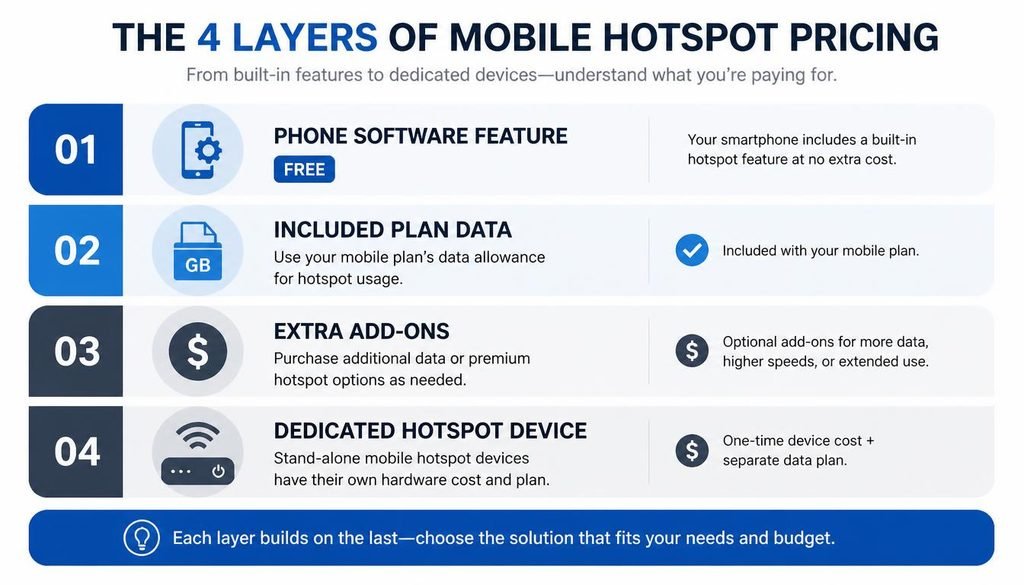
Think of hotspot pricing in four layers. Each layer can add cost, or none at all.
- The phone feature. This is the setting on the device. It has no price of its own.
- Included hotspot data. Many plans include a set amount of high-speed hotspot data each billing cycle. You pay for it as part of the plan.
- Add-ons and upgrades. Some carriers sell extra hotspot data or a higher plan with a larger allowance.
- A dedicated device and plan. A separate hotspot gadget or tablet-style data line has its own monthly price.
Do I need a separate hotspot plan? Usually not, if your phone plan already includes hotspot data. A separate plan makes sense when you need more data than your phone plan allows, or when you want a device that stays connected without draining your phone battery.
Phone Software Versus Carrier Plan
The operating system, whether iOS or Android, provides the hotspot function. The carrier and your subscription decide eligibility, the allowance, and any charges. This is why two people with the same phone can have very different hotspot experiences.
Does Hotspot Cost Money With Unlimited Data?
Unlimited phone data and unlimited hotspot data are not the same promise. “Unlimited” usually describes what your phone itself can use. Hotspot sharing is commonly governed by its own allowance.
When you reach that allowance, one of several things can happen. These outcomes are different, and mixing them up causes most of the fear around hotspot bills:
- A separate hotspot fee: a charge just for using the feature. Many plans have none.
- An included monthly allowance: hotspot data covered by your plan up to a limit.
- A speed reduction after the limit: hotspot keeps working, but slowly. This is throttling, not a charge.
- A paid add-on or plan upgrade: optional extra data or a higher tier that you choose to buy.
- Roaming charges: costs that apply outside your home network or country.
Do not treat a slowdown as a bill. Throttling reduces speed and costs nothing by itself. A paid add-on only costs money when you accept it.
Exceptions exist between carriers and between plans on the same carrier. The two sections below use each carrier’s own published pages.
Does Hotspot Cost Money on T-Mobile?
It depends on the plan. T-Mobile’s Mobile Hotspot support page says Mobile Hotspot is included with many plans, such as Experience More, Experience Beyond, and Go5G plans, and that the price and high-speed hotspot allotment vary by plan. Do not assume two T-Mobile plans have the same allowance.
The same page explains what happens at the limit. If you use up your high-speed hotspot allotment, your hotspot speed is reduced until the end of your billing cycle. On eligible Go5G and Experience plans, T-Mobile also offers Hotspot Data Passes that add 10 GB of high-speed hotspot data. The page says that after the high-speed data is used, you continue to have unlimited hotspot data based on your voice plan.
A few other points from the same page are worth knowing:
- Hotspot works only in T-Mobile 5G and 4G LTE coverage.
- You can share with up to 10 other devices.
- Hotspot passes are intended for use in the United States, not abroad.
- You can check hotspot use by logging in to T-Mobile.com and selecting Usage > Data.
T-Mobile changes its plan lineup often, so confirm your own allowance in your account before relying on any figure.
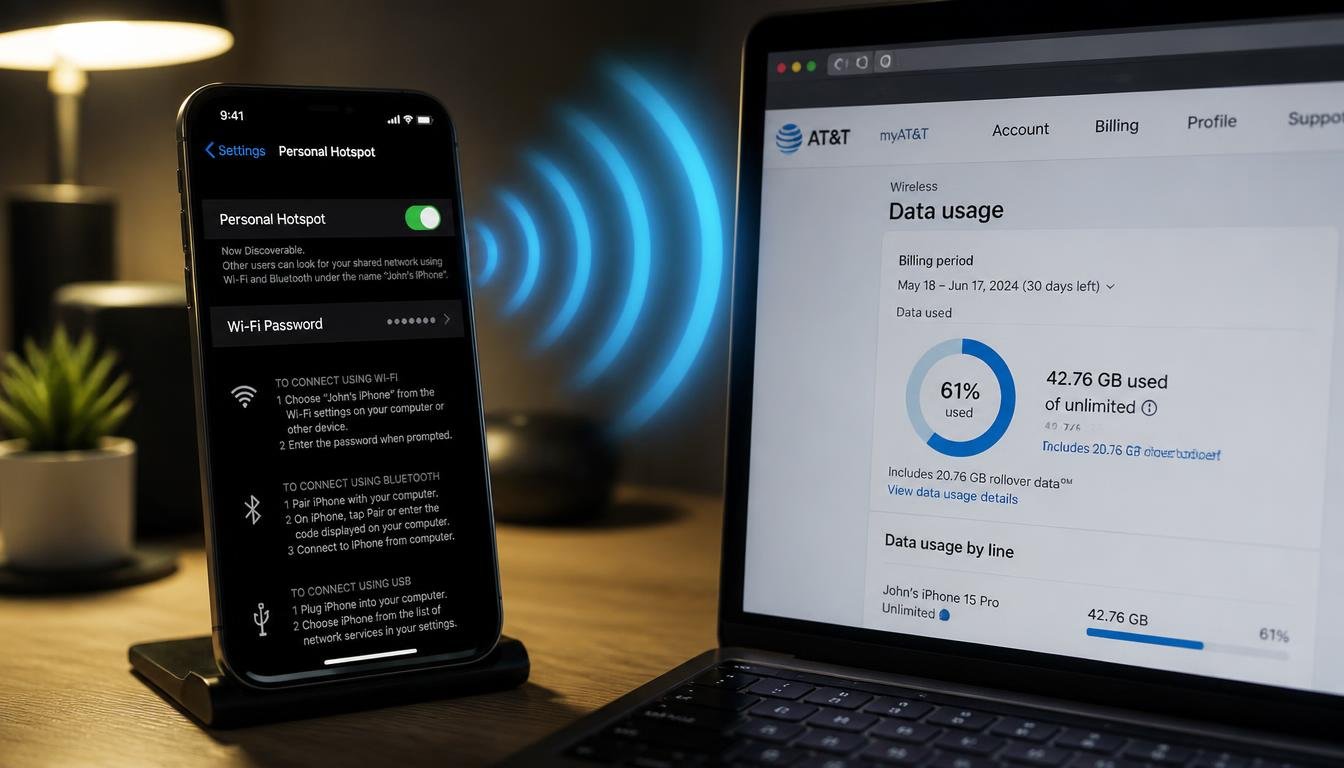
Does Personal Hotspot Cost Money With AT&T Unlimited Data?
AT&T says every one of its current unlimited plans includes hotspot data. AT&T’s unlimited plans page lists a different monthly allowance per line for each plan, and states that after the allowance, hotspot speed is slowed to a maximum of 128 Kbps for the rest of the bill cycle.
| AT&T plan | Hotspot data per line per month | After the allowance |
| Value 2.0 | 3 GB | Slowed to a maximum of 128 Kbps for the rest of the bill cycle |
| Extra 2.0 | 50 GB | Slowed to a maximum of 128 Kbps for the rest of the bill cycle |
| Premium 2.0 | 100 GB | Slowed to a maximum of 128 Kbps for the rest of the bill cycle |
| Elite 2.0 | 250 GB | Slowed to a maximum of 128 Kbps for the rest of the bill cycle |
Source: AT&T’s published plan page, checked in October 2026. Plans, names, and allowances can change. Older AT&T plans may follow different rules, so confirm your own plan in your account.
The table shows allowances rather than prices because the per-line price changes with the number of lines and with discounts. The practical point is simple: a small plan may give you very little hotspot data, even though your phone data is unlimited.
Does Hotspot Cost Money on Samsung Phones?
Samsung Galaxy phones include a built-in Mobile Hotspot feature, and turning it on is not a separate purchase on the phone. Your carrier and active plan determine whether hotspot use is included and how much data you receive.
According to Samsung’s tethering guide, the path is:
- Open Settings.
- Tap Connections.
- Tap Mobile Hotspot and Tethering.
- Tap Mobile Hotspot, then switch it on.

Menu labels can differ by device model and software version. If the option is missing or will not turn on, your plan may not include hotspot, so check your plan terms or contact your carrier.
How Much Does a Mobile Hotspot Cost?
The cost depends on which of these five routes you take:
- Using an existing smartphone: no extra cost if your plan already includes hotspot data.
- Adding hotspot data to an existing plan: a monthly add-on or a one-time pass, where the carrier offers one.
- Buying a dedicated mobile hotspot device: a device price plus a data plan.
- Paying for a separate prepaid or postpaid data plan: a standalone monthly plan for the hotspot device.
- Using international roaming or a travel eSIM: a separate cost that depends on the country and provider.
For a sense of the dedicated route, AT&T’s unlimited plans page advertises mobile hotspot plans starting at $25.99 per month. Treat that as a price seen in October 2026 for one carrier in the United States, since it can change and does not apply elsewhere.
How Much Does Hotspot Cost Per Hour?
There is no universal hourly hotspot charge. If your plan includes the data, an hour of hotspot use may add nothing to your bill. The hourly cost only becomes meaningful when you pay for extra data by the gigabyte.
Here is an illustrative calculation. These numbers are hypothetical and are not real carrier prices.
- Suppose an add-on costs $10 and includes 5 GB.
- The effective cost is $10 divided by 5 GB, which is $2 per GB.
- If a video stream uses up to 1 GB in an hour, that hour is worth up to about $2 of that add-on data.
- If the stream uses up to 3 GB in an hour, that hour is worth up to about $6.
The calculation only helps when you buy add-on data. If the data is already included in your plan, the extra cost of an hour of use is zero until you hit the allowance.
How Much Does 100 GB of Hotspot Cost?
The price depends on the provider, the plan, the country, and whether the 100 GB is included or bought separately. There is no honest average to quote.
One verified example: AT&T lists 100 GB of hotspot data per line each month with its Premium 2.0 plan, so that hotspot data is part of the plan price rather than a separate charge. I could not verify a current price for a standalone 100 GB hotspot plan, so I am not stating one.
You can compare options yourself with this formula:
$$\text{Effective cost per GB} = \frac{\text{Add-on price}}{\text{Included GB}}$$
This number is useful for comparing add-ons. It does not represent the total cost of your phone plan, and it may overstate the real cost if the data is already included in what you pay.
Does Hotspot Use More Data Than WiFi?
A phone hotspot shares your phone’s cellular data. Everything connected to it counts against your plan. WiFi from a home router normally does not touch your mobile data at all, so a hotspot is not “more data” by nature. It simply spends the mobile data you pay for.
Connected devices can make usage climb quickly. A laptop or television may run background updates, cloud synchronization, and high-quality video without asking you. The hotspot technology does not multiply the data. The devices simply use more than a phone screen would.
Does hotspot cost money on WiFi? If your phone is only connected to WiFi, sharing that connection is different from sharing cellular data. Some devices can share an existing WiFi connection, but support varies by phone, so do not assume yours can.
What Different Activities Use
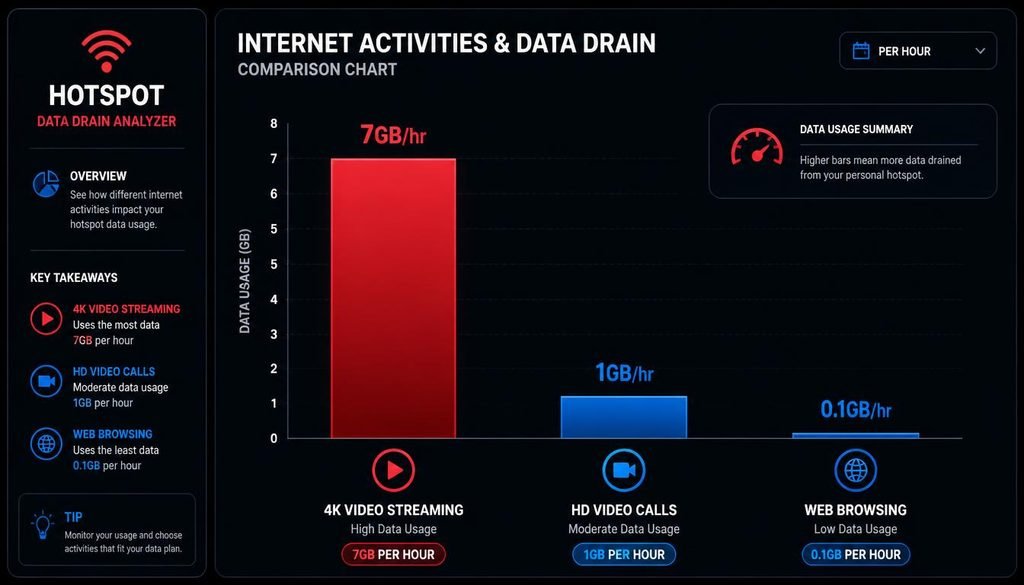
Only a few figures come from a source I could verify. Netflix’s help center says each stream uses, per hour:
| Netflix quality | Data per hour, per device |
| Low | Up to 0.3 GB |
| Medium (standard video) | Up to 0.7 GB |
| High, standard definition | Up to 1 GB |
| High, high definition | Up to 3 GB |
| High, ultra high definition (4K) | Up to 7 GB |
For other activities, I describe relative use rather than invent numbers:
- Email and basic browsing: low use.
- Video meetings: moderate to high, depending on video quality.
- Large downloads and operating system updates: can be very large in one session.
- Cloud backups and file synchronization: can run in the background for a long time.
Mark Your Windows Connection as Metered
If you connect a Windows laptop to your hotspot, tell Windows the connection has a data limit. Microsoft’s metered connections page gives this path:
Settings > Network & internet > Wi-Fi > select the connected network > Metered connection
Menu wording can differ slightly between Windows versions. This setting reduces some background data use, such as automatic update downloads. It does not block everything, so a manual download or a streaming video still uses your data.
If your laptop does not even show your hotspot, this guide to the Windows 11 no WiFi option can help you fix that first.
Does Hotspot Run Out?
Yes, if your plan has a hotspot allowance. The allowance resets at the start of each billing cycle, and what happens at the limit depends on your carrier and plan.
- Speed reduction: hotspot continues at a much lower speed. AT&T states a maximum of 128 Kbps for the rest of the cycle, and T-Mobile says speed is reduced until the cycle ends.
- Paid extra data: some plans offer an add-on, such as T-Mobile’s 10 GB Hotspot Data Passes on eligible plans.
- Disconnection or blocking: some plans may stop hotspot use entirely.
If your hotspot feels slow but you are nowhere near your limit, the cause may be weak cellular signal rather than a data cap. In that case, these tips for fixing a weak WiFi signal can help with the connected device’s side of the problem.
How to Check Your Remaining Hotspot Data
Your phone can show how much data it has measured, but your carrier holds the allowance and the real remaining figure. Use this order:
- Open your carrier app or online account. On T-Mobile, log in to T-Mobile.com and select Usage > Data. AT&T offers a usage page through its account menu.
- Check your phone’s usage screen. On an iPhone, look in Settings > Cellular and scroll to Personal Hotspot.
- Compare billing cycle dates. A phone counter may cover several months, while your carrier counts from your billing cycle start.
Phone counters and carrier counters often differ because of different start dates and measurement methods. For the full walkthrough, read how to check how much hotspot data you have left.
How to Avoid Unexpected Hotspot Charges
Follow these steps in order. Each one has a practical reason behind it.
- Confirm the included hotspot allowance. Your phone data may be unlimited while hotspot is not, so the exact number matters.
- Check the carrier’s billing and overage policy. Some plans slow speeds, and others sell extra data. Knowing which one applies tells you whether a bill can change.
- Monitor data usage during the billing cycle. Catching a fast drain early is easier than recovering after the allowance is gone.
- Reduce video streaming quality when necessary. Video is usually the biggest data user, and lowering quality can cut an hour of use sharply. If you are sharing a connection with a television, this smart TV WiFi guide covers setup, and the TV app is where you can lower the quality.
- Disable automatic updates and large downloads on connected devices when appropriate. Background updates are a common cause of quiet data loss. The metered connection setting above helps on Windows.
- Disconnect devices that are not needed. Every connected device can use data in the background.
- Check roaming charges before traveling. AT&T’s plan page says monthly plan prices do not apply to data used while roaming outside the United States, Canada, and Mexico, and that pay-per-use rates apply unless an international package is added. T-Mobile says its hotspot passes are for domestic use.
- Contact the carrier when plan terms are unclear. A short call or chat can settle what a plan page leaves vague.
If you only need to show something from your phone to a screen, screen mirroring without WiFi may avoid using hotspot data altogether. For heavy downloads, a home connection is often the cheaper place, and accessing your router settings lets you see what is connected at home.
If a laptop is connected to your hotspot but pages will not load, the issue may not be data at all. This DNS server not responding guide for Windows 11 explains a common cause, and this general guide to fixing WiFi covers the wider set of connection problems.
Frequently Asked Questions
Is hotspot free if you have unlimited data?
Not automatically. Unlimited phone data describes what your phone can use, while hotspot sharing is often governed by a separate high-speed allowance. On AT&T, for example, each unlimited plan lists its own hotspot amount, and speeds slow after it is used. Check your plan terms before sharing data with other devices.
Does hotspot run your bill up?
Usually not, but it can on some plans. Turning on the hotspot does not add a fee by itself. Extra cost appears mainly when a plan sells hotspot add-ons, charges for roaming, or requires a higher plan. Many plans slow speeds after the allowance instead of billing more, so read the overage terms.
Do I need to pay monthly for a hotspot?
Not for the built-in phone feature, if your plan includes it. You pay monthly for your phone plan, and hotspot data is part of it on many plans. A separate monthly payment applies if you buy a dedicated hotspot device with its own data plan, or add extra hotspot data to a plan that offers it.
How much does 100 GB of hotspot cost?
There is no single price. The cost depends on the carrier, plan, country, and whether the 100 GB is included or purchased separately. AT&T lists 100 GB of hotspot data per line each month with its Premium 2.0 plan, so the price is part of that plan. Compare current carrier pages before deciding.
Does hotspot cost money on Samsung phones?
The Samsung feature itself does not require a separate purchase on the phone. Galaxy phones include a Mobile Hotspot feature, but your carrier and plan decide whether sharing is included and how much data you get. Open Settings > Connections > Mobile Hotspot and Tethering, and check your plan terms if the option is missing or limited.
Does personal hotspot cost money with unlimited data on AT&T?
Hotspot is included on current AT&T unlimited plans, up to a monthly limit. AT&T lists 3 GB, 50 GB, 100 GB, or 250 GB per line depending on the plan, then slows hotspot speed to a maximum of 128 Kbps for the rest of the bill cycle. Older plans may differ, so check your account.
Does hotspot cost money on T-Mobile?
It depends on the plan. T-Mobile says Mobile Hotspot is included with many plans, including Experience More, Experience Beyond, and Go5G plans, and the high-speed allotment varies by plan. After the allotment, speed is reduced until the billing cycle ends, and Hotspot Data Passes can add 10 GB on eligible plans.
How much does hotspot cost per hour?
There is no universal hourly charge. Cost depends on your plan, the data allowance, and whether extra data is sold separately. If a plan includes the data, an hour of use may add nothing to your bill. If you buy add-on data, divide its price by its gigabytes and multiply by the gigabytes you used that hour.
Does hotspot use more data than WiFi?
Not by itself. A hotspot shares your phone’s cellular data, so everything connected to it counts against your plan. A laptop or television may use more because of automatic updates, backups, and high-quality video. WiFi on a home router usually does not use mobile data at all.
What happens when hotspot data runs out?
It depends on the carrier and plan. On AT&T, hotspot speed slows to a maximum of 128 Kbps for the rest of the bill cycle. T-Mobile reduces hotspot speed until the cycle ends and offers 10 GB passes on eligible plans. Other plans may block hotspot use or sell more data, so check your terms.
Final Verdict
Does hotspot cost money? The switch on your phone is usually free to turn on, but the data you share is governed by your carrier plan. The real risks are a small hotspot allowance on an “unlimited” plan, add-ons you choose to buy, and roaming outside your home network.
Your next step takes about two minutes. Open your carrier app, find your hotspot allowance and usage, and note how your plan behaves when the allowance runs out. If you want to go further, start with the guide on how much hotspot data you have left or browse the other Problevo troubleshooting guides.


3 Comments